


Heat is the silent killer of gaming performance, throttling your CPU and GPU the moment your case turns into a sauna. Whether you’re running a modest mid-tower or a heavily overclocked build, picking the right airflow and liquid setup keeps frame rates stable and fans from screaming. This roundup walks through nine solid options spanning ultra-quiet case fans, ARGB-packed AIOs, and budget-friendly radiators sized for compact builds.
A Side-By-Side Look
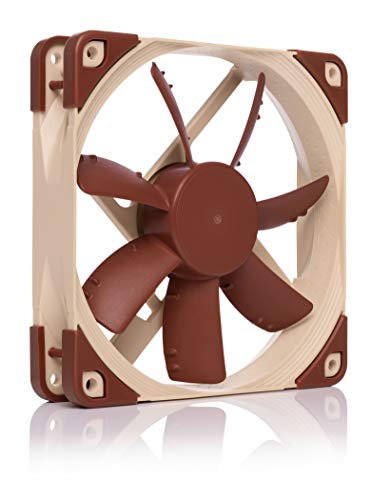
Noctua NF-S12A PWM Quiet Fan 120mm
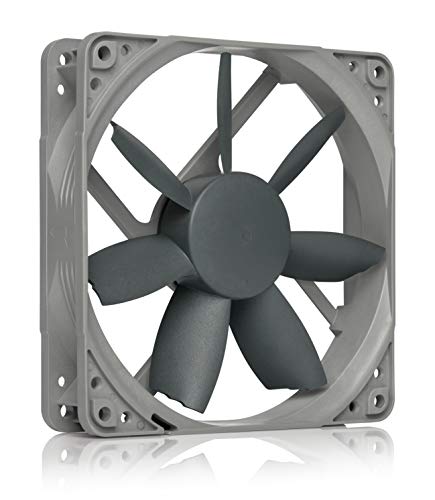
Noctua NF-S12B redux-1200 Quiet Fan 120mm
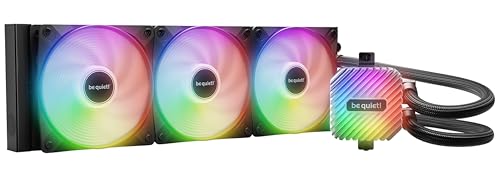
be quiet! Light Loop 360mm Black CPU Liquid Cooler
Thermalright Aqua Elite 360 V3 AIO CPU Cooler

Thermalright TL-C12CW-S X5 CPU Air Fan 5-Pack

Dracaena.io 120mm AIO CPU Cooler

Dracaena 240mm AIO CPU Cooler
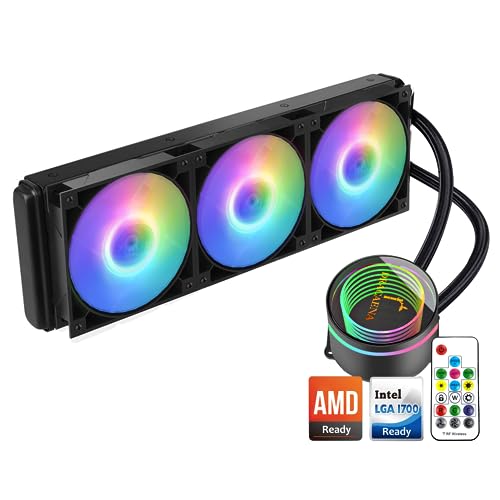
Dracaena.io 360mm AIO CPU Cooler

GAMDIAS Aeolus M2-1204R RGB Case Fan
A Closer Look At Each Pick
Noctua’s NF-S12A PWM sits in a class of its own for builders who want whisper-quiet case airflow without surrendering static pressure. The 120x120x25 mm frame, 12V operation, and 4-pin PWM header (PWM stands for Pulse Width Modulation, a signal that lets your motherboard vary fan speed based on temperature) let it idle down to near-silence under light desktop loads and ramp up only when thermals demand it.
For most home theater PC projects and recording setups, this fan simply disappears acoustically, and the Anti-Stall Knobs on the blade surface help maintain steady airflow even at low RPM. The brown-and-beige color scheme is divisive, so you may find it clashes with themed builds, and the premium cost per fan adds up across multi-fan installations.
Noteworthy Benefits
- Max 17.8 dB(A) noise rating keeps even full-speed operation inaudible across a typical room
- Anti-Stall Knobs help maintain airflow when resistance climbs inside dense radiators or filters
- PWM support lets your motherboard tune speed automatically instead of running flat-out
- >150,000-hour MTTF rating (Mean Time To Failure, a lab-derived lifespan estimate) points to long service life
Things To Consider
- Color scheme is famously polarizing and may clash with darker themed cases
- Cost per unit is high if you’re populating a full multi-fan configuration
Key Specs
Who It Suits Best
Builders prioritizing low noise over raw RGB flash, especially for content creation or streaming rigs where microphone pickup is critical.
Consider Something Else When
You want a colorful ARGB showcase build, in which case the Thermalright TL-C12CW-S X5 5-Pack is a louder but more vibrant option.
The redux-1200 strips the Noctua experience down to essentials, keeping the same 120x120x25 mm form factor and proven blade design while dropping the PWM functionality. The result is a 3-pin fan that still benefits from the brand’s reputation for longevity and acoustic tuning, making it a strong candidate for cost-conscious case cooling.
At 1200 RPM and 18.1 dB(A), it runs slightly louder than the NF-S12A under load, but in most real-world chassis setups the difference is imperceptible. You miss automatic motherboard speed control, so you’ll either run it flat-out or pair it with a fan controller, and the redux styling swaps Noctua’s premium look for a simpler gray-and-white aesthetic.
What Pays Off
- Lower cost than the PWM sibling while keeping the same proven blade geometry
- Quiet 18.1 dB(A) ceiling suits noise-sensitive setups
- Same >150,000-hour MTTF longevity target as Noctua’s premium lines
Points To Note
- 3-pin connector means no automatic speed scaling without an external controller
- Simpler redux aesthetic lacks the refined finish of standard Noctua models
Right Fit For
Budget-focused builders who trust Noctua’s track record and want to populate a case with reliable, quiet fans without paying for PWM headers.
A Better Fit Elsewhere
Gamers who want dynamic fan curves and ARGB lighting should look at the Thermalright TL-C12CW-S X5 5-Pack instead.
The Light Loop 360mm is the most visually ambitious pick in this roundup, pairing a 360mm radiator with three Light Wings LX 120mm PWM high-speed fans and an illuminated cooling block. With 64 LEDs total, it’s designed for cases with tempered glass where aesthetics matter as much as thermals, and the ARGB control synchronizes with most motherboard ecosystems.
Unlike the Noctua case fans reviewed earlier, this is a closed-loop liquid cooler (often called an AIO, or All-In-One, meaning a sealed radiator-and-pump unit that requires zero maintenance) aimed at heavily overclocked CPUs. You trade the NF-S12A’s stealth for a centerpiece-grade lighting show, and the 360mm length demands a roomy mid-tower or full-tower case to mount cleanly.
Well-Handled Touches
- Illuminated cooling block adds a focal point inside tempered glass cases
- Three high-speed Light Wings LX fans move serious air across the radiator
- ARGB sync across fans and block keeps lighting uniform across the build
Some Limits To Know
- Requires a 360mm radiator mount, ruling out compact mATX cases
- Visual focus may overwhelm minimalist or stealth-themed builds
Best Suited To
Builders running heavily overclocked chips in showcase cases who want both thermal headroom and coordinated lighting.
Look Elsewhere When
Your case can’t fit a 360mm radiator, in which case the Dracaena 240mm AIO is a more size-friendly alternative.
Thermalright’s Aqua Elite 360 V3 targets performance-first builders, with an airflow ceiling of 66.17 CFM (cubic feet per minute, a measure of how much air the fans push at full speed) and broad socket coverage spanning Intel LGA1150 through 1851 and AMD AM4 through AM5. That makes it a flexible drop-in for new builds and older platforms alike.
Compared to the be quiet! Light Loop 360mm, this AIO leans toward raw cooling rather than synchronized lighting drama, though the ARGB pump and fans still sync via a 5V 3-pin header. The wide socket support is genuinely useful, and the airflow output is impressive for the segment, but installation requires a case with a top or front 360mm mount.
Everyday Wins
- 66.17 CFM airflow ceiling handles demanding modern CPUs under sustained load
- Broad Intel and AMD socket coverage covers AM5, LGA1700, and newer LGA1851 boards
- 5V ARGB sync keeps lighting coordinated with compatible motherboards
Practical Considerations
- Needs a 360mm-compatible case, similar to the Light Loop 360mm
- ARGB depends on having a compatible 5V 3-pin header on your motherboard
Feature Snapshot
Made For
Gamers with high-TDP (Thermal Design Power, the maximum heat a chip is rated to produce) processors like the Ryzen 9 or Core i9 families who need sustained cooling under multi-hour loads.
Skip It When
Your case only supports a 240mm radiator, in which case the Dracaena 240mm AIO is the closer match.
The TL-C12CW-S X5 5-Pack is built for builders overhauling a full case in one go. Each 120mm fan runs up to 1550 RPM, pushes 66.17 CFM, and connects via a 4-pin PWM header for motherboard-driven speed control. The S-FDB bearing (a type of fluid dynamic bearing designed to extend fan lifespan) helps extend service life compared to cheaper sleeve-bearing alternatives.
Where the Noctua NF-S12A focuses on near-silence, this pack prioritizes airflow and ARGB flair, making it a natural fit for a glass-paneled gaming build. You do trade some acoustic refinement at full speed, and the white ARGB ring may not match darker color schemes, but the per-fan cost in a five-pack is hard to beat for full case overhauls.
Reasons It Performs
- Five-fan pack covers intake, exhaust, and radiator positions in a single purchase
- 66.17 CFM airflow per fan supports aggressive thermal targets
- PWM control lets the motherboard scale speed with CPU and GPU temperatures
- White ARGB rings add visible lighting through tempered glass panels
Trade-Offs
- Up to 25.6 dBA is louder than the Noctua NF-S12A at full speed
- White color scheme won’t blend with all-black builds
Whose Shelf It Belongs On
PC builders refreshing an entire case fan setup on a single order, especially in a glass-paneled tower where the white ARGB rings actually show.
Another Choice May Suit
Stealth-focused builders who want maximum silence should pair instead with the Noctua NF-S12A PWM and accept the higher per-fan cost.
Dracaena’s 120mm AIO brings liquid cooling to small form factor builds that can’t fit a 240mm or 360mm radiator. With a 120mm aluminum radiator, copper cold plate (the flat metal base that makes direct contact with the CPU heat spreader), and a hydraulic-bearing pump rated for 40,000 hours, it’s a tidy option for compact cases where space rules out bigger loops.
Against the 360mm Aqua Elite, this cooler sacrifices raw thermal headroom for footprint, so it’s best matched with mid-range CPUs rather than heavily overclocked chips. The 120mm ARGB PWM fan delivers 30-65 CFM at 500-2200 RPM, and the included remote control lets you adjust lighting without rebooting into BIOS.
The Practical Payoff
- 120mm radiator fits mini-ITX and small form factor cases that reject larger AIOs
- 180W TDP rating covers most mid-range and upper-mid gaming CPUs
- Remote-controlled ARGB lighting avoids BIOS tinkering for color changes
- Hydraulic-bearing pump targets quieter operation than sleeve-bearing units
Where It May Fall Short
- Single 120mm fan limits sustained cooling versus 240mm and 360mm AIOs
- Aluminum radiator is lighter but less thermally conductive than copper alternatives
Core Details
Who Should Grab It
SFF enthusiasts running mid-range CPUs in mini-ITX cases who want clean liquid cooling without sacrificing the case footprint.
Reach For A Different Pick When
You’re pushing a Core i9 or Ryzen 9 with aggressive tuning, in which case the Dracaena.io 360mm AIO has the radiator surface to match.
The 240mm AIO is the mainstream sweet spot in the Dracaena lineup, pairing a 240mm radiator with two 120mm ARGB PWM fans and a pump that spins up to 1800 RPM. It supports the most common modern sockets, including AMD AM5/AM4 and Intel LGA 1700/1200/115X, covering the vast majority of current gaming builds.
Where the 120mm Dracaena targets small cases, this 240mm version adds thermal margin while still fitting in most mid-tower layouts. The included controller hub and color-change remote let you cycle through 21 lighting modes without touching software, though serious overclockers may want the 360mm version for sustained heavy loads.
Practical Pluses
- Two 120mm ARGB PWM fans deliver more airflow than a single-fan 120mm AIO
- 1800 RPM pump helps move coolant efficiently through the loop
- Socket coverage spans current AMD AM5 and Intel LGA 1700 boards
- Controller hub with 21 lighting modes avoids motherboard ARGB header dependency
Less Ideal Details
- Needs a 240mm radiator mount, which excludes the smallest mini-ITX cases
- Cooling margin is narrower than the 360mm AIOs in this roundup
Built With In Mind
Mainstream gamers running mid-tower ATX builds with mainstream CPUs who want balanced cooling and RGB without the bulk of a 360mm radiator.
Where A Sibling Pick Shines
Tight mini-ITX builders should drop down to the Dracaena.io 120mm AIO for a smaller footprint with similar lighting control.
The Dracaena.io 360mm is the most thermally ambitious pick in this roundup, designed for high-wattage CPUs that push 180W TDP. Compared to the smaller 120mm and 240mm siblings, the 360mm radiator surface area gives the loop more room to dissipate heat during long gaming or rendering sessions.
That extra radiator size demands a full mid-tower or larger case with top or front 360mm mounting, so compact builders should look at the 120mm version instead. The leakproof design and high-flow pump add a layer of confidence, and the 180W TDP ceiling is genuinely useful if you’re running a top-tier Ryzen or Core i9 chip without aggressive power limits.
A Few Highlights
- 360mm radiator surface handles sustained 180W TDP loads
- Broad socket support covers Intel LGA1700 and AMD AM5 platforms
- Leakproof construction and high-flow pump target long-term reliability
What To Weigh
- Requires a case with a 360mm radiator mount, ruling out compact builds
- No included lighting remote like the 240mm sibling
Feature Card
Perfect Match For
Owners of high-TDP CPUs in roomy cases who prioritize sustained thermal headroom over compact footprint or simplified lighting control.
Not Your Match When
You want the easiest ARGB control out of the box, in which case the Dracaena 240mm AIO ships with the more user-friendly remote and hub.
The GAMDIAS Aeolus M2-1204R is the entry point on this list, a 120mm RGB case fan running at 1500 RPM aimed at builders who want color on a tight budget. It’s the polar opposite of the Noctua NF-S12A in philosophy: louder and less refined, but with a visible RGB ring that suits casual showcase builds.
Compared to the Thermalright 5-pack earlier, you’re buying a single fan and trading the S-FDB bearing and PWM control for a simpler fixed-speed design. For a starter build or a single replacement fan, the Aeolus is straightforward, though heavy-duty gaming rigs with high-TDP chips will outgrow it quickly.
What Stands Out
- Accessible price makes it a low-risk add for first-time builders
- RGB ring provides visible lighting through standard mesh and glass panels
- 1500 RPM speed delivers usable airflow for case intake or exhaust
Possible Compromises
- Fixed-speed design lacks the dynamic scaling of PWM-equipped fans
- Single-fan pack is less cost-effective than the Thermalright 5-Pack for full builds
Who Will Love This
Entry-level builders and casual PC users adding a single RGB accent fan to a budget build without committing to a premium cooling ecosystem.
Swap It Out When
You’re populating a full case with multiple fans, in which case the Thermalright TL-C12CW-S X5 5-Pack delivers better per-fan value and PWM control.
What Matters Most When Choosing Cooling Systems For Gaming Pc
Air vs. Liquid: The Core Decision
Air cooling uses a heatsink and one or more fans to pull heat directly off the CPU, while liquid cooling moves that heat through a closed loop to a radiator where fans exhaust it. For modest gaming builds and mainstream CPUs, a quality air cooler or compact 120mm AIO handles thermals fine. Heavily overclocked chips and high-TDP processors benefit from a 240mm or 360mm radiator with more surface area.
Matching Cooling to Your CPU’s TDP
CPU TDP (Thermal Design Power) tells you how much heat the chip is designed to produce under load, and your cooler needs to handle that figure comfortably. A 65W chip has different requirements than a 180W part, and oversizing the cooler is a reasonable insurance policy for sustained gaming sessions. Match radiator size and fan count to your CPU’s thermal profile, not just your case’s appearance.
Noise, Airflow, and Static Pressure
Fans are rated on three numbers worth understanding: airflow in CFM, noise in dB(A), and static pressure, which is the fan’s ability to push air through restrictive surfaces like radiators and dense filters. Case fans benefit from high CFM, while radiator fans need adequate static pressure. Noctua’s NF-S12A and Thermalright’s TL-C12CW-S sit at different points on that balance.
Socket Compatibility and Case Clearance
AIO coolers list supported sockets explicitly, and checking your motherboard’s socket before buying avoids an installation headache. Equally important is case clearance: a 360mm radiator needs a 360mm mount, and a 120mm AIO may be the only option in tight mini-ITX layouts. Measure your case’s available radiator space and CPU cooler height before committing.
Common Shopping Slip Ups in This Category
Pitfalls Shoppers Hit
Buying the largest radiator that fits your case sounds logical, but a 360mm AIO in a small mid-tower can starve the radiator of airflow and run hotter than a properly installed 240mm unit. Forgetting to check RAM clearance under the pump is another common miss, since tall memory modules can collide with AIO pump housings. Skipping a thermal paste refresh on a used cooler is a quieter error, and the dried compound can spike temperatures 10-15°C above normal on a fresh install.
Where The Extra Money Goes
Premium cooling buys lower noise at given performance levels, longer fan and pump lifespans, and broader socket support. The Noctua NF-S12A’s longevity and the be quiet! Light Loop’s pump tuning illustrate where the price difference shows up day to day. Spending up makes sense when your build runs hot for hours, your microphone picks up fan noise, or you simply don’t want to swap fans every few years.
Frequently Asked Questions
Do I really need liquid cooling for a gaming PC?
Not always. A solid air cooler handles most mid-range gaming CPUs without issue. Liquid cooling earns its keep on high-TDP chips, compact builds with limited airflow, and showcase rigs where the radiator and ARGB fans double as a visual centerpiece.
How loud are 120mm case fans at full speed?
A quality 120mm fan at full speed typically ranges from 18 to 26 dB(A), which is quieter than a whispered conversation at three feet. The Noctua NF-S12A sits at the low end, while the Thermalright TL-C12CW-S runs a touch louder but pushes more air.
Can I mix fans from different brands in one case?
Yes, mixing brands works fine as long as voltage, connector type, and physical size match. You can pair Noctua case fans with an AIO from a different maker without compatibility issues, though fan curve tuning may take a little extra effort in BIOS.
What does TDP mean for a CPU cooler?
TDP (Thermal Design Power) is the maximum heat a CPU is rated to produce, and a cooler needs to dissipate at least that figure to avoid thermal throttling. A 180W TDP chip needs a cooler rated for 180W or more, with some thermal headroom preferred.
How long do AIO pumps and fans typically last?
Most AIO pumps are rated for 40,000 to 70,000 hours, and quality fans regularly exceed 100,000 hours of MTTF. Real-world lifespan depends on operating temperature, dust exposure, and how often the loop runs at full speed, but a well-maintained AIO typically outlasts the rest of the build.
Bottom Line
Your CPU’s TDP and your case’s available space should drive the decision more than aesthetics. The Noctua NF-S12A and NF-S12B redux are the quiet picks for case airflow, the be quiet! Light Loop 360mm and Thermalright Aqua Elite 360 V3 are the heavy-lift liquid options, and the Dracaena 120mm, 240mm, and 360mm AIOs cover the spectrum from mini-ITX to full-tower builds. Pick the one that matches your chip and chassis, and you’ll spend less time worrying about thermals and more time playing.


