


A good controller is the difference between a fight you win and a fight you blame on lag. You might be running a PS4 at home, picking up a Switch 2 for the first time, or streaming shooters from an Android phone on the train. The right pad changes the feel of every session, and the wrong one makes you notice your hands before you notice the game. The list below pulls together nine options across console, mobile, and sim-racing, so you can match the controller to the way you actually play.
The Main Contenders

ISHAKO Wireless Controller for PS4 2-Pack

Joy-Con Pair Pastel Purple and Green

Marvel Venom Cable Guys Controller Holder

Logitech G RS Sim Racing Pedals
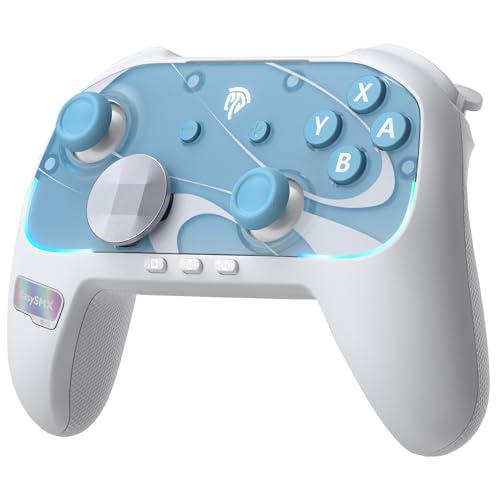
EasySMX S10 Controller for Switch 2
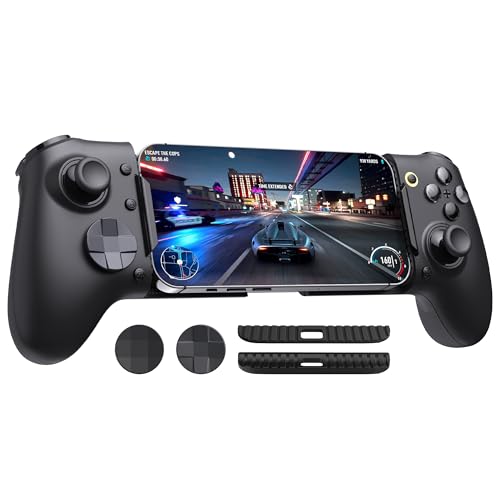
EasySMX M20 Phone Gaming Controller

EasySMX X15 Wireless PC Controller
2-Pack Hotas Desk Mount for Flight Sim

ISHAKO Wireless Controller for PS4 and PC
The Strengths Of Each Pick
Split-screen nights get a lot easier when nobody is fighting over the single first-party pad. The ISHAKO 2-Pack ships a Ghost Flame and a Ghost White unit, which makes color-coding roommates, partners, or visiting siblings feel natural. The controllers pair over Bluetooth to PS4, Pro, and Slim, and they fold in wired PC support for the occasions when you want a pad for an indie on Steam.
For a household where two people game on the same console most nights, the second-pad problem is solved in one box. Owners commonly report that initial pairing requires the included USB cable, then the controllers stay remembered on the console. You may find the finish a touch slick compared to the textured grip of premium pads, so a silicone sleeve is a cheap upgrade for long sessions.
The Good Stuff
- Two pads in a single box removes the second-controller cost barrier
- Bluetooth wireless on PS4/Pro/Slim with wired PC fallback
- Color-matched pair keeps multiplayer nights organized
- Standard layout means muscle memory from a first-party pad transfers
Worth Noting
- First-time pairing requires the included USB cable before wireless use
- Smooth shell can feel slippery in long sweaty sessions
Made For
Two-player households that want a clean color-coded setup without paying for a second official pad.
Where Another Pick Suits Better
Solo PC gamers who mostly play single-player titles will get more out of the EasySMX X15, since it adds Hall-effect sticks and a 2.4GHz dongle.
Nothing beats a pair of Joy-Cons for the “I just want to play one game on the couch” moment. The Pastel Purple and Pastel Green pair splits into two single-hand controllers, which is how Nintendo designed local multiplayer on Switch. Each side has its own analog stick, face buttons, and shoulder trigger, and they pair back into a full-size gamepad in seconds.
For Switch owners with limited space, the detachable form factor is the whole reason to own one. A black wrist strap ships in the box to give the smaller side a bit more security during motion control. You may find that long sessions of traditional games like RPGs feel cramped without a grip accessory, since each half is small in the hand.
Positive Takeaways
- Detach to share with a second player anywhere, no dock needed
- Built-in motion controls work with Switch fitness and party games
- Compact enough to slide into a small bag for travel
- Pastel colors stand out from the standard gray and red sets
Honest Caveats
- Smaller buttons and sticks can fatigue hands during long RPG sessions
- A comfort grip is a smart add-on for anyone playing solo for hours
Whose Shelf It Belongs On
Switch players who travel, host couch multiplayer nights, or want a spare pair tucked in a drawer for guests.
Swap It Out When
Switch 2 owners who want a wake-up shortcut and a more traditional grip should look at the EasySMX S10, which supports Switch 2 over a dedicated mode.
This is the one entry in the list that does not have buttons, and that is exactly the point. The Venom Cable Guys figure is an officially licensed 8-inch PVC statue with a flat base and outstretched hand designed to cradle a PS5 or Xbox pad, a phone, or even a TV remote. It earns its spot because every controller on this list needs a place to live between sessions.
For anyone who treats their gaming corner as a display, the Venom theming is a fun tie-in to Marvel’s anti-hero roster. The heavy base keeps the figure planted on a desk, so the DualSense does not slide off mid-day. The wider base footprint does mean you need a real slice of flat surface, which is something to weigh if your setup is a narrow media shelf.
Strong Points
- Officially licensed Marvel sculpt doubles as collectible decor
- Stable base supports a DualSense or Xbox pad without wobble
- Multi-purpose cradle handles phones, e-readers, and remotes too
- PVC build wipes clean with a dry cloth, no special care needed
Trade Offs
- Not a functional controller, so it pairs with another entry on this list
- An 8-inch figure needs a real patch of clear desk space
Key Product Details
Best Suited To
Marvel fans and DualSense owners who want a collectible that earns its shelf space by holding a controller every night.
Reach For A Different Pick When
Anyone chasing actual sim-racing realism should skip this and spend on the Logitech G RS pedals, where the value lives in the brake feel.
Throttle and brake inputs are where sim racing actually lives, and a stiff pedal set feels like a different sport than a flimsy one. The Logitech G RS pedals use a 75 kg load cell brake, which is a sensor that measures how hard you press rather than how far the pedal travels, giving you repeatable trail braking lap after lap. Hall-effect sensors on the accelerator and clutch mean there are no contacting parts to wear out.
For sim racers stepping up from a gamepad, the difference shows up in the consistency of your corner entry. Adjustable pedal positions let you tune the reach to your seat and rig height, which matters more than people expect for comfort. You may want to budget for a solid mounting solution, since a load cell brake is heavy enough to scoot across a smooth floor under hard use.
Standout Benefits
- Load cell brake measures pressure, not travel, for precise trail braking
- Hall-effect accelerator and clutch avoid sensor wear over time
- Adjustable pedal faces fit a wide range of seat-to-wheel distances
- Works with Windows, Xbox, and PlayStation racing setups
Points To Note
- Brake stomp is heavy enough to require a solid rig or floor mount
- Full benefit only shows up with a matching Logitech wheelbase
Feature Snapshot
Who Should Grab It
Sim racers chasing realistic brake modulation, especially anyone who already owns a Logitech wheelbase and wants the matching pedal feel.
A Better Fit Elsewhere
Casual racers playing a few hours a week will find the EasySMX X15 a smarter spend, since the controller is far more versatile for non-racing games.
The Switch 2 launched a new generation, and the EasySMX S10 was built with that console in mind. The big quality-of-life win is the one-key wake-up, which is a dedicated button that wakes the console from sleep without pressing the power button on the dock or the screen. A toggle on the back switches between S and X modes for Switch and PC use, so the same pad covers your docked and laptop sessions.
For households splitting time between a Switch 2 and a PC, the S10 saves you from owning two separate controllers. The first connection to Switch 2 asks you to hold the Home button for about three seconds until the LED flashes fast, which is a minor setup tax you only pay once. You may notice the button layout is closer to a Switch Pro than an Xbox pad, so PC players used to ABXY positions will want a quick muscle-memory reset.
Real-World Strengths
- One-tap wake-up skips the dock power dance
- Cross-mode toggle between Switch and PC without re-pairing
- Symmetric stick layout suits first-person Switch shooters
- Single controller covers three platforms, so luggage stays light
Soft Spots
- First-time Switch 2 pairing needs a Home-button hold of around three seconds
- Stick positions may feel off to anyone coming from a 30-year Xbox muscle memory
Who It Suits Best
Switch 2 owners who also PC game on the same pad and want to skip the dock button to start a quick session.
Not Your Match When
Mobile-first players should consider the EasySMX M20, which is built around a clamping phone holder rather than a console dock.
Touchscreen shooters on a long commute are exactly the use case the M20 was built to fix. The controller stretches open to clamp a phone, with Type-C, Lightning, and Bluetooth connections covering Android, iPhone, and iPad. A dual ABXY layout switch toggles between Xbox-style and PlayStation-style button labels, which keeps games like Genshin and COD from surprising you mid-fight.
For anyone who plays on both sides of the mobile aisle, that one-button layout swap is a real time-saver. LED indicators mirror the chosen layout, so you never wonder which position means jump. You may find the clamp is happiest with cases removed on the very largest phones, since the stretch is generous but not infinite.
What Stands Out
- One-button toggle between Xbox and PlayStation button layouts
- Three connection paths cover nearly every modern phone
- Stretch clamp fits most phones used without a case
- LED sync removes the guesswork from layout changes
Room For Improvement
- Biggest phones with thick cases may need a case-off play session
- Tablet grip is steadier with the phone removed first
Quick Facts
Right Fit For
Mobile-first gamers who bounce between COD, Genshin, Roblox, and Minecraft and want real sticks instead of a touchscreen.
Look Elsewhere When
PC-only players who never game on a phone will leave the M20’s clamp unused, and the EasySMX X15 is a stronger console-and-PC alternative.
Stick drift is the most common failure on cheaper pads, and Hall-effect sticks are built to avoid that. The X15 uses magnets and sensors rather than physical contact, which means the sticks do not wear out the way standard potentiometer-based sticks do. Add a 2.4GHz wireless dongle, Bluetooth, and a wired Type-C option, and the controller adapts to just about any PC setup.
For PC gamers who put long hours into a game, the longevity of the sticks is the standout spec. Steam support and Android compatibility make this a true cross-platform pick, though it stops short of Xbox and PlayStation consoles. You may want to confirm Steam Input recognition for older titles, since a few legacy games still expect an Xbox controller layout to behave as expected.
Where It Helps
- Hall-effect sticks resist drift over years of heavy use
- Three connection modes cover desktop, laptop, and Android sessions
- Wired Type-C option drops input lag for competitive shooters
- Standard PC button layout reads cleanly in Steam
Things To Consider
- Not compatible with Xbox or PlayStation consoles
- Legacy PC titles may need manual remapping in Steam
Perfect Match For
PC and Steam players logging long sessions who want a pad that survives heavy daily use without stick drift.
Consider Something Else When
Anyone centered on a Switch 2 setup should skip the X15 and go for the EasySMX S10, which has the dedicated wake-up shortcut for that console.
A HOTAS setup, which stands for hands on throttle-and-stick, is only as stable as the mount holding it. This 2-pack from XRhinorth clamps to the edge of your desk and presents a stable platform for your throttle and stick. A dual-clamp design grips from the top, so the mount resists the side-to-side torque of aggressive maneuvers in combat flight sims.
For flight sim players building out a mid-tier rig, the clamp is a smarter starting point than bolting a permanent solution to a coffee table. Optional anti-slip pads let you tune the grip for a slicker or rougher desk surface. You may find the mount is a no-go on table edges thicker than about 6 cm, so measure your desk edge before ordering.
What Earns Its Place
- Two mounts ship together, one for stick and one for throttle
- Top-down dual clamps resist side-to-side push from maneuvers
- Optional anti-slip pads let you tune the grip feel
- No permanent drilling, so the desk stays intact
Points To Keep In Mind
- Table edges thicker than 6 cm will not fit the clamp
- Sticks and throttles are not included, so plan the rest of the rig separately
At A Glance
Built With In Mind
Flight sim pilots assembling a HOTAS rig on a standard desk and wanting a non-permanent, stable mounting solution.
Skip It When
Sim racers belong with the Logitech G RS pedals, since racing force feedback lives in the brake, not in a flight stick mount.
This second ISHAKO entry swaps the Ghost Flame colorway for a Batman-themed Bat White and Bat Black pair, and the bigger change is broader cross-platform support. The pads work with PS4, Pro, Slim, Windows PC, Android, and iPhone or Mac over Bluetooth, with a wired fallback for the first console pairing. For a household that splits time between a TV console and laptops, that flexibility removes the second-pad problem on more than one device.
For family game nights that bounce between a PS4 in the living room and a laptop on the kitchen table, one box covers both rooms. The first console connection needs the included USB cable and a five-second Home-button hold, which is a small one-time step. You may want a quick tutorial for less tech-comfortable relatives, since the Share-plus-Home combo for non-console devices is not always obvious on the first try.
Useful Strengths
- Works on PS4 family of consoles plus PC, Mac, Android, and iPhone
- Two color-coded pads for guest play and multiplayer
- Bluetooth wireless with a wired option for first-time pairing
- Standard button layout reads as familiar to first-party pad users
Possible Compromises
- First console pairing requires a five-second Home-button hold and USB cable
- Non-console Bluetooth pairing needs a Share-plus-Home combo that may confuse newcomers
Feature Rundown
Who Will Love This
Mixed-console families and party hosts who want one controller pair that travels between a PS4, a laptop, and a phone.
Another Choice May Suit
PC-only players chasing stick durability should consider the EasySMX X15, whose Hall-effect sticks outlast standard potentiometer designs.
What To Weigh Before Choosing A Controller
Compatibility comes first, and it sounds obvious until you try to pair the wrong pad to the wrong console. A PS4-only controller will not appear on a Switch, and a Switch Joy-Con does nothing on a PS5. Confirm the supported platforms list before anything else, and decide whether you want one controller that travels across devices or a dedicated pad for a single console.
Connection type changes the feel of play. Bluetooth is convenient but can introduce input lag in competitive shooters, which is why the EasySMX X15 keeps a wired Type-C mode in the box. A 2.4GHz wireless dongle, which is a small USB receiver that creates a direct radio link to the controller, usually feels closer to wired than Bluetooth does. If you play ranked matches, weigh the connection path the same way you weigh stick hardware.
Stick technology matters for anyone who games more than a few hours a week. Hall-effect sticks use magnets instead of physical contacts, so they resist the stick drift that ends most budget pads after a year. Standard potentiometer-based sticks are fine for casual play, and they keep cost down, but they are the most common reason a controller gets replaced early.
Shopper Slip-Ups And Smart Upgrades
Wrong Turns To Avoid
Buying a controller for the console you own today and forgetting the one you might buy next year is the most common trap. Cross-platform pads cost a little more up front but avoid the second purchase later. The other easy mistake is ignoring stick technology, since stick drift is the single most common reason a controller ends up in a drawer long before its real end of life.
Where The Extra Money Goes
Premium pads and pedals charge more for hardware that wears better and feels more consistent. A load cell brake on the Logitech G RS pedals measures pressure rather than travel, which is a more expensive sensor that improves lap-to-lap consistency. Hall-effect sticks in the EasySMX X15 use contactless sensors, which is why the X15 costs more than a basic PC pad. The honest read is that the upgrade pays off most for people who put real hours in, while casual players can stick with the basics and enjoy them.
Frequently Asked Questions
Which controller works with the most platforms?
The ISHAKO 2-Pack for PS4 and PC supports the widest mix here, covering PS4, Pro, Slim, Windows, Mac, Android, and iPhone over Bluetooth. The EasySMX S10 is the right pick if a Switch 2 is the center of the setup.
Do I need Hall-effect sticks for casual play?
Not necessarily. Standard potentiometer-based sticks work fine for a few sessions a week. Once you start logging long hours or notice stick drift, Hall-effect sensors like those in the EasySMX X15 become worth the upgrade.
Why do sim racers buy a separate pedal set?
Gamepad triggers cannot replicate the precise, repeatable brake pressure that sim racing rewards. A load cell pedal like the Logitech G RS measures how hard you press rather than how far, which is closer to the feel of a real car.
Are Joy-Cons comfortable for long RPG sessions?
The small form factor is great for travel and multiplayer, but most people find a comfort grip helpful for solo RPGs that last hours. For pure home play on Switch 2, the EasySMX S10 has a more traditional grip.
What does a HOTAS mount actually do?
A HOTAS mount clamps your flight stick and throttle to the edge of a desk so they stay put during maneuvers. The XRhinorth 2-pack is a non-permanent alternative to bolting hardware into a dedicated rig.
Wrap Up
The right controller is the one that matches the way you play, the platform you play on, and the hours you log. PS4 households get a clean second-pad solution from the ISHAKO pairs, mobile players get real sticks from the EasySMX M20, and PC or Steam heavy hitters get stick durability from the EasySMX X15. Match the pad to the platform first, then think about how long you actually play, since that decides whether a premium upgrade is worth it.


