


A good speaker setup changes how every match feels, from the rumble of an explosion to the click of a precise headshot. Plenty of desks already hide soundbars, subwoofers, and retro one-box novelties worth knowing about. This lineup gathers ten computer gaming speakers that suit different desks, budgets, and room sizes, with honest notes on what each one trades away.
A Closer Look At The Lineup

Edifier G2000 Pro 2.0 RGB Gaming Speakers 64W Black
Edifier G2000 Pro 2.0 RGB Gaming Speakers 64W White

Edifier Hecate RGB Gaming Speakers 32W Black

Divoom MiniToo Retro PC-Style Speaker Pixel Screen

Dahszhi BIOS Beep Alarm Internal Speakers 30-Pack

Nylavee Hi-Res Desktop Speakers with LDAC

Nylavee 2.1 PC Soundbar with Subwoofer 60W

Nylavee PC Speakers with 6 Lighting Modes

Nylavee 2.1 PC Speakers Subwoofer 8 Lighting Modes
Nylavee PC Sound Bar with Bluetooth and AUX
Meet The Standout Selections
The Edifier G2000 Pro 2.0 in black is the speaker most people picture when they imagine a modern gaming desk. Each unit houses a three-inch full-range driver, and a pair of bass reflex ports sit at the back to help low frequencies land with weight. You get 64 watts of peak output (a measure of the loudest possible burst of sound) and 32 watts of RMS, the continuous power level you can actually expect in real use, which is enough to fill a mid-size bedroom without strain.
Connection options cover USB-C, AUX, and Bluetooth 5.4, the latest standard that keeps wireless audio stable and low-latency. Hook it up to a PC over USB and the HECATE companion software unlocks a virtual 7.1 mode, a digital trick that fakes multi-speaker surround through two physical speakers, for positional cues in shooters. The 270-degree TempoFlow lighting ring wraps the base with 20 LED strips and around 100 individual RGB beads, so the glow reads from almost any angle on your desk.
The Case For It
- 64W peak output drives loud competitive play without distortion at high volumes
- Three-inch drivers with dual bass reflex ports deliver real low-end thump in a 2.0 setup (meaning a left/right pair with no separate subwoofer)
- Bluetooth 5.4, USB-C, and AUX let you switch between PC, PS5, and phone in seconds
- Virtual 7.1 surround over USB gives directional audio cues without buying a multi-speaker rig
- 270-degree lighting bar adds genuine visual energy to a streaming or battlestation setup
Things To Consider
- Virtual 7.1 only activates on PC with the HECATE software installed, so console players lose that feature
- The glossy finish tends to show fingerprints and dust, so plan on quick wipe-downs
Who It Suits Best
Competitive PC players who want room-filling sound, clear directional cues, and RGB lighting that matches the rest of their rig.
Consider Something Else When
The Divoom MiniToo Retro PC-Style Speaker fits better for casual listeners who care more about desk personality than raw volume.
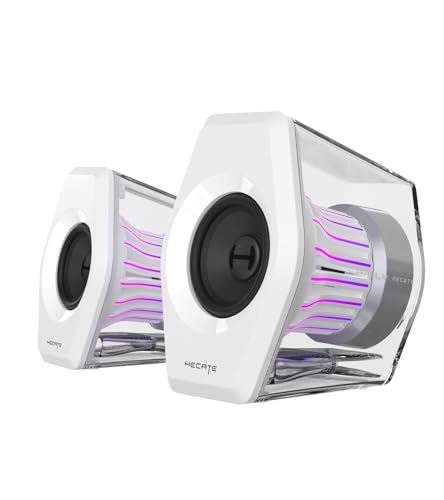
Identical hardware to the black G2000 Pro above, but dressed in matte white. The same 64W peak output, three-inch full-range drivers, and dual bass reflex ports deliver the same audio profile, so the difference comes down to the look. White cases have become a quiet trend in PC building, and most of the leading cases ship in either black or white, so this finish blends into a clean aesthetic without screaming for attention.
You still get USB-C, AUX, and Bluetooth 5.4 input, plus the same HECATE virtual 7.1 mode over USB on PC. The 270-degree RGB lighting ring pops more dramatically against a white enclosure, since the glow reflects off the inner baffle. White plastic hides scratches better than glossy black but tends to yellow slightly over years of UV exposure, depending on how much sunlight reaches your desk.
Features That Help
- Same 64W peak and bass reflex design as the black version, so no audio compromise
- White finish pairs with modern cases and peripherals for a cohesive battlestation
- Multi-input design covers PC, console, and phone without a separate adapter
Worth Noting
- Light enclosure may show scuffs along the bottom edge over time
- Virtual 7.1 still depends on the HECATE software, which only runs on Windows
Made For
Builders running a white or pastel PC theme who want matching audio gear without hunting for a third-party wrap or paint job.
Look Elsewhere When
The Edifier Hecate RGB Gaming Speakers 32W Black suits small desks where the larger G2000 enclosure simply will not fit.
Step down in size and the Edifier Hecate delivers a more disciplined desktop footprint. Each satellite holds a 2.75-inch full-range driver, and the pair together peaks at 32 watts. That number is roughly half the G2000’s output, but in a typical bedroom or dorm the extra headroom rarely gets used anyway.
Three preset modes, labelled Game, Movie, and Music, shape the EQ curve (the balance of bass, mids, and treble) for different content. Twelve RGB lighting effects cycle through the base, with options for static colors, breathing pulses, and audio-reactive flashes. Bluetooth 5.1 covers wireless streaming, while USB and a 3.5mm AUX handle wired sources. You can run the Hecate from a console, a PC, or even a phone without thinking about drivers.
Bright Spots
- 2.75-inch drivers in a compact enclosure free up space for monitors and microphones
- Three listening modes adjust the sound profile without leaving the desk
- Bluetooth, USB, and AUX in one unit removes the need for a separate DAC (digital-to-analog converter) or adapter
Room For Improvement
- 32W peak feels light in larger living-room setups
- No dedicated subwoofer, so low rumble in action games is limited
Key Specs
Best Suited To
Owners of compact desks who still want the HECATE sound signature and RGB styling.
Another Choice May Suit
The Nylavee PC Speakers with 6 Lighting Modes give you a more straightforward budget option when Bluetooth and presets are less important.
The Divoom MiniToo is a small speaker shaped like a tiny retro PC, complete with a 1.77-inch pixel display on the front. Output tops out around 5 watts, which sounds modest, but the unit is tuned for near-field listening, meaning you sit close to it, and that style of use does not need much more. Vocals come through clean and bass stays warm without bloating.
Where the MiniToo sets itself apart is the screen. The Divoom companion app unlocks over 70 retro clock faces, pixel animations, and text messages that scroll across the front panel. The enclosure looks like a miniature beige computer from the late 80s, which fits a particular aesthetic that a plain black bar simply cannot match.
Key Advantages
- Pixel display turns the speaker into a desk ornament when music is paused
- Near-field tuning keeps vocals crisp at low volumes, ideal for podcasts and study sessions
- Compact footprint fits on crowded desks, nightstands, or shared shelves
Honest Caveats
- 5W output cannot compete with full-size 2.1 systems in larger rooms
- App-driven customization means you need a phone nearby to swap animations
Who Will Love This
Listeners who want a small speaker that doubles as desk decor and feel nostalgic about early home computing.
Skip It When
The Edifier G2000 Pro 2.0 RGB Gaming Speakers 64W Black is a stronger fit when room-filling volume and competitive audio cues matter more than charm.
A 30-pack of internal motherboard speakers sits in a different category from everything else on this list. Each small buzzer is designed to plug into a four-pin header on a motherboard and emit the diagnostic beep codes (short and long tones that signal hardware problems during startup) used by the BIOS (the firmware that boots your PC before any operating system loads). Modern cases often ship without this speaker included, leaving builders to wonder what those tones mean when a fresh build refuses to post.
Each unit has a roughly 6 cm cable and a 2.54 mm pitch connector, which is the standard spacing for motherboard headers. You only need one for a build, but buying a multi-pack makes sense for repair shops or anyone who services multiple machines a year. For typical home users, one or two spares tucked into a drawer are usually plenty.
Where It Excels
- Standard 2.54 mm pitch connector fits most ATX, Micro-ATX, and Mini-ITX motherboards
- Bulk packaging suits repair shops and frequent builders
- Low cost per unit makes spares easy to keep on hand
A Few Limitations
- Only emits diagnostic beeps, not music, voice, or game audio
- Polarity matters during installation, since reversed wiring can silence the buzzer entirely
Right Fit For
PC builders, repair technicians, and IT tinkerers who need to decode BIOS error tones during troubleshooting.
Not Your Match When
Any of the Edifier or Nylavee speakers above serve better once the system is up and running and you actually want to hear something.
Where most computer gaming speakers focus on RGB and bass, the Nylavee Hi-Res pair leans toward music fidelity. Each enclosure pairs a 1.5-inch silk dome tweeter with a 3-inch glass fiber mid-bass driver, a combination more typical of bookshelf speakers than gaming rigs. Silk domes deliver smoother high frequencies, while glass fiber cones hold their shape under heavy excursion, the back-and-forth movement of the driver, for cleaner bass at high volumes.
LDAC support (a Sony-developed Bluetooth codec that streams up to 96 kHz/32-bit audio over the air, roughly three times the data of standard Bluetooth) makes the unit a real option for lossless-leaning listeners on compatible Android phones. USB-Audio tops out at 96 kHz/24-bit, which covers most high-resolution tracks. The front panel includes a headphone jack for late-night sessions, plus dedicated bass and treble knobs. Inputs cover Bluetooth 6.0, USB, AUX, and RCA, the red-and-white analog jacks found on older audio gear.
Notable Upsides
- Silk dome tweeters give a smoother treble than the metal domes common in gaming speakers
- LDAC wireless streaming preserves detail that standard Bluetooth discards
- Front headphone jack and tone controls keep you out of the operating system menus
Possible Compromises
- No RGB or gaming-styled lighting, so the look is more studio than battlestation
- Glass fiber drivers benefit from break-in time, a few hours of regular play, before sounding their best
Feature Snapshot
Who Should Grab It
Listeners who split their time between music, movies, and gaming, and care more about detail than lighting effects.
Reach For A Different Pick When
The Nylavee 2.1 PC Soundbar with Subwoofer 60W brings real low-end thump for action games and blockbuster movies.
A 2.1 setup (two satellite speakers plus a dedicated subwoofer) usually means three boxes on your desk, but this Nylavee model flattens the satellites into a single soundbar that sits beneath your monitor. The sub still lives on the floor or under the desk, but the soundbar form factor keeps the visual footprint small. Output peaks at 60 watts, which is plenty for a 2.1 system, and the unit draws power from an included AC adapter rather than the PC’s USB bus.
The soundbar houses dual soft-dome silk tweeters and full-range drivers, while the wired subwoofer handles the deep bass. A unique internal cavity design helps the bar keep its tonal balance even when you push volume. Connectivity runs through Bluetooth 5.4 or a wired 3.5mm AUX jack. Most users will plug into the PC headphone port and leave it.
Practical Advantages
- Soundbar form factor clears desk space versus traditional left/right speaker pairs
- Dedicated subwoofer delivers bass that the Edifier Hecate 32W simply cannot match
- Silk tweeters on the bar keep dialogue and treble effects from sounding harsh
Small Caveats
- AC adapter adds another wall outlet to your power strip
- No USB input, so PC connection requires the 3.5mm AUX cable
Whose Shelf It Belongs On
Owners of clean monitor-arm setups who want a single visible audio component plus a hidden sub.
A Better Fit Elsewhere
The Nylavee 2.1 PC Speakers Subwoofer 8 Lighting Modes adds USB-C input and more RGB, which helps when flexibility matters more than minimalism.
USB-powered, lightweight, and stripped of extras, this Nylavee pair is the kind of speaker that ends up in a dorm room or a first apartment. Each enclosure carries a full-range dual-magnet driver, a design that uses two magnets instead of one to tighten the magnetic field around the voice coil, helping the small driver hold its composure at higher volumes. The two bass-boost ports on the back add a sense of low-end weight, though expectations should match the size.
Six RGB lighting modes cycle through the front baffle, and power comes straight from the PC’s USB port. The 3.5mm AUX cable handles audio, so there is no driver install or app to wrestle with. Plug it in, pick a color, and you are playing within minutes. That simplicity is the point.
A Strong Showing
- USB power means one cable to the PC, no extra wall adapter
- Plug-and-play setup with no software or driver installation
- Compact size suits laptop desks and portable setups
Where It Is Less Suited
- USB power caps maximum volume, since the port supplies limited current
- No Bluetooth, so phone streaming requires a separate adapter or cable
Spec Overview
Perfect Match For
Students, first-time PC builders, and anyone who needs a simple plug-and-play speaker for casual use.
Where Another Pick Suits Better
The Nylavee Hi-Res Desktop Speakers with LDAC pulls ahead for music listeners who want clearer treble and wireless high-resolution streaming.
Where the previous Nylavee 2.1 soundbar traded the satellite pair for a single bar, this model keeps the traditional left/right speaker pair but adds a wired subwoofer. Peak output climbs to 60 watts, with the sub taking most of the heavy lifting on explosions, engine rumbles, and bass-heavy music. Eight RGB lighting modes cycle through the speakers, giving a wider range of visual presets than the six-mode sibling.
Inputs are where this 2.1 setup pulls ahead. You get Bluetooth 5.4, USB, USB-C, and 3.5mm AUX, which covers everything from a desktop tower to a modern phone. The AC adapter powers the system through a wall outlet, freeing the speakers from the limited current of a USB port and letting the sub hit harder.
Real-World Strengths
- 2.1 layout with dedicated sub delivers real chest-thump in action games and EDM
- Bluetooth 5.4, USB, USB-C, and AUX cover modern and legacy sources
- Eight lighting modes offer more visual variety than the six-mode sibling
Factors To Consider
- Three separate components take up more desk and floor space than a soundbar
- AC adapter must reach a wall outlet, which can clutter cable management
Built With In Mind
Owners of larger desks or small living-room gaming setups who want the rumble of a real sub without going to a full home-theater rig.
Swap It Out When
The Nylavee 2.1 PC Soundbar with Subwoofer 60W is the cleaner pick when desk space is tight and a single bar under the monitor looks better.
The Nylavee sound bar closes the list as a competent all-rounder that does not specialize in any one area. The bar carries two double-layer neodymium-magnet full-range drivers and two independent bass diaphragms, small passive radiators (flat plates that vibrate with the air inside the cabinet to add bass without a separate subwoofer) for low-end reinforcement. Output is enough for a desktop or shared office space without overpowering coworkers.
Bluetooth and 3.5mm AUX cover the usual sources, and USB power means a single cable back to the PC. Four dynamic lighting modes add visual flair without overcomplicating things. For most people, the appeal is the shape: one slim bar, one cable, one piece of gear to manage. The honest read is that it does the basics well and stays out of the way.
Why It Works Well
- Sound bar fits under most 24 to 32-inch monitors without blocking the screen
- USB power keeps cable clutter to a single line to the PC
- Independent bass diaphragms add a bit of warmth without a separate sub
Some Limits To Know
- USB power limits maximum loudness, so large rooms may feel underfilled
- Four lighting modes offer less variety than the eight-mode sibling
Quick Facts
The Right Fit
Home office users, laptop owners, and shared-desk situations where one simple bar handles calls, music, and casual gaming.
Not Your Match When
The Edifier G2000 Pro 2.0 RGB Gaming Speakers 64W Black is the right call for dedicated gaming rooms that benefit from full power and surround-style imaging.
Choosing The Right Computer Gaming Speakers For Your Setup
Start with where the speakers will actually live. A compact dorm desk pairs best with USB-powered options like the Nylavee PC Speakers with 6 Lighting Modes or the Nylavee PC Sound Bar with Bluetooth and AUX, since both run on a single cable. Larger rooms and dedicated gaming spaces benefit from the Edifier G2000 Pro’s 64W peak output or the Nylavee 2.1 systems with their dedicated subwoofers.
Connection type matters more than most shoppers expect. Bluetooth is convenient for phone streaming, but the highest-resolution wireless audio still requires LDAC, which only the Nylavee Hi-Res Desktop Speakers include. USB and USB-C give the cleanest digital signal from a PC, while a 3.5mm AUX cable is the universal fallback. Look for the inputs you will actually use on day one.
Drivers determine the sound character before any tuning kicks in. Full-range drivers cover the whole frequency range in one unit, which keeps designs compact but limits how deep the bass can go. Two-way designs, like the Nylavee Hi-Res pair, use separate tweeters and woofers, which produces cleaner highs and tighter bass. A dedicated subwoofer is the only way to get true low-frequency rumble, and the Nylavee 2.1 PC Soundbar with Subwoofer and the Nylavee 2.1 PC Speakers with Subwoofer both include one.
RGB lighting is a personal call. Lighting modes and brightness do not change sound quality, but they do add visual energy that fits streaming or themed builds. Plain enclosures look cleaner in a home office. The Divoom MiniToo takes a different route, using a pixel display for personality instead of traditional RGB strips.
A small note on the BIOS buzzer in this list. It belongs in a PC builder’s toolkit, not on a desk for music. Anyone who has just assembled a new build and heard a series of unfamiliar beeps will recognize why a spare internal speaker earns its place in a drawer.
Key Considerations Across These Picks
Where Shoppers Go Wrong
Plenty of first-time shoppers pick speakers by wattage alone, then wonder why their chosen pair sounds thin at the volumes they actually use. Peak power tells you the loudest possible burst, while RMS power, the continuous rating, is what you hear during normal play. Two speakers rated at 32W peak can sound quieter in a real room than one rated at 32W RMS, since RMS is a more honest measure of sustained output.
Another common slip is ignoring the acoustic environment. A hard, bare desk reflects sound waves and makes audio sound harsh, while a cluttered room absorbs it and dulls detail. Adding a small cloth mat under the speakers or angling them toward your ears at ear level improves the sound more than upgrading to a pricier pair in many cases.
Where The Extra Money Goes
Moving up the price ladder buys three things in this category. First, better driver materials, such as silk domes and glass fiber cones, which hold their shape under stress and produce cleaner sound. Second, dedicated low-frequency hardware in the form of a subwoofer, which a small 2.0 or 2.1 bar cannot replicate. Third, useful extras like LDAC for high-resolution Bluetooth, virtual surround over USB, and front-panel tone controls.
The honest upgrade case looks like this: pick a 2.0 pair with quality drivers if you mostly play competitive games where directional cues matter. Add a sub if you watch action movies or play single-player titles where bass rumble shapes the experience. Spend on materials and connectivity before spending on more RGB patterns, since lighting does not change the sound.
Frequently Asked Questions
How many watts do I need for computer gaming speakers?
For a small bedroom or dorm, 20 to 32 watts of RMS power is enough for near-field listening. Mid-size rooms benefit from 50 to 64 watts of peak output, especially when you want headroom for explosions and bass-heavy music without distortion.
Do gaming speakers need a subwoofer?
A subwoofer adds physical low-frequency rumble that small drivers cannot reproduce. Competitive players can skip it for cleaner directional audio, but anyone playing single-player games, watching movies, or listening to bass-heavy music will notice the upgrade.
Is Bluetooth audio good enough for gaming?
Standard Bluetooth adds latency (a slight delay between the on-screen action and the sound you hear) that becomes noticeable in fast-paced games. Bluetooth 5.4 reduces this, and LDAC support on the Nylavee Hi-Res pair preserves more detail over the air. For competitive play, a wired USB or AUX connection is still the safer bet.
What is virtual 7.1 surround sound?
Virtual 7.1 is a digital processing technique that simulates the effect of seven surround speakers plus a subwoofer through two physical speakers. It works best on PC with companion software like the HECATE app that runs on the Edifier G2000 Pro. Console players may not get access to the same tuning tools.
Can I use computer gaming speakers with a console?
Yes, most of the speakers on this list support a 3.5mm AUX input, which connects directly to console controllers. Bluetooth models also pair with PS5 and Xbox for wireless audio, though you may lose certain software-based surround features reserved for PC use.
The Takeaway
A solid pair of computer gaming speakers changes how every session feels, from ranked matches to late-night single-player runs. The Edifier G2000 Pro 2.0 in black or white suits competitive players who want power and clear imaging, while the Nylavee 2.1 systems bring real subwoofer rumble for cinematic titles. Smaller desks and casual listeners do well with the Edifier Hecate or the Divoom MiniToo, and the Dahszhi buzzer belongs in every builder’s spare-parts drawer. Match the speakers to the room, the input type, and the kind of games you actually play, and the rest takes care of itself.


