


Shopping for a new home for your gaming PC feels like picking an apartment. The shape, the airflow, the cable routing, and how proudly it shows off your GPU all matter at once. Most cases claim to do everything, but the differences in cooling headroom, glass quality, and fan bundles show up fast during a build. The nine options below each handle that balance a little differently, so the right pick depends on whether you care most about silence, thermals, RGB, or just a clean first build.
A Closer Look At The Lineup
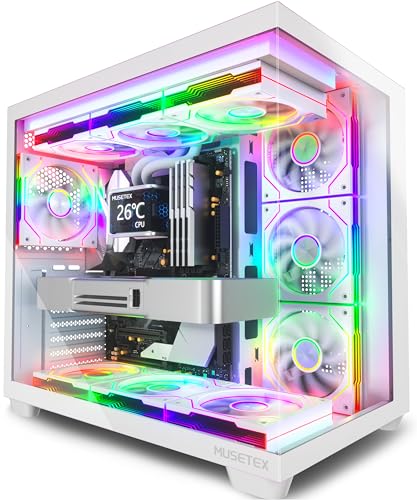
MUSETEX Y6 PC Case with 7 ARGB Fans (White)

Fractal Design Meshify 2 Compact ATX Case (Black)

NZXT H6 Flow Compact Dual-Chamber Case (Black)
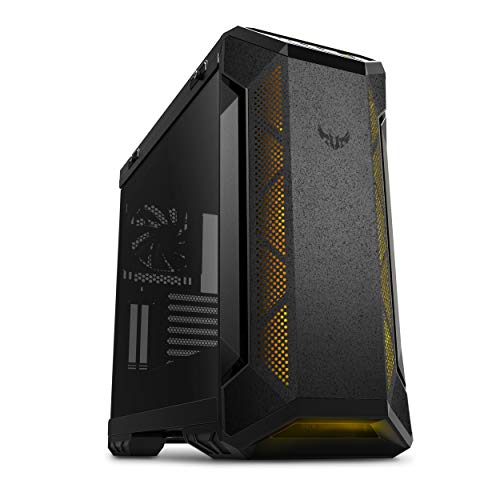
ASUS TUF Gaming GT501 Mid-Tower Case

NZXT H6 Flow Compact Dual-Chamber Case (White)

MUSETEX Y6 PC Case with 7 ARGB Fans (Black)

MUSETEX Y6 PC Case with 4 Non-LED Fans (Black)
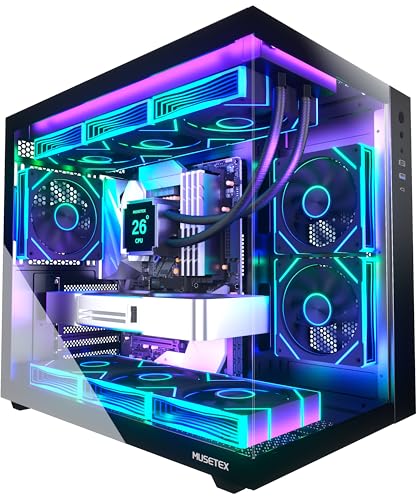
MUSETEX Y6 PC Case with 6 ARGB Fans

MUSETEX GR3 PC Case with Vertical GPU Mount
A Deeper Look At The Lineup
If your gaming room leans bright and you want the build to read as art rather than just hardware, the white MUSETEX Y6 leans into that identity from every angle. The 270-degree tempered glass wrap covers the front and most of the side, so the seven pre-installed fans stay visible without a big metal seam cutting through the view. A front-panel Type-C port keeps modern device charging and headset connections tidy on the desk.
For first-time builders, the seven-fan bundle removes one of the most expensive upgrade decisions right out of the box, since PWM fans (fans whose speed is automatically controlled by the motherboard) usually cost extra. Airflow across the front and top should keep a mid-range CPU and GPU cool in most setups, though the lit infinity-mirror look does lean showy, so it fits a showcase rig more than a muted office corner.
What Works In Its Favor
- Seven ARGB fans included, skipping a separate fan purchase for most beginners
- 270-degree tempered glass gives an almost panoramic view of the interior
- Front Type-C port supports modern phones, drives, and headsets
- White finish brightens dark rooms and pairs well with RGB lighting
- ATX mid-tower form fits standard motherboards without a clearance fight
Things To Consider
- Strong RGB personality may feel loud in a low-light or office setting
- Glass-heavy shells typically need more frequent dusting than mesh fronts
Who It Suits Best
First-time builders and RGB enthusiasts who want a complete, lit-up case in a single purchase.
Consider Something Else When
Pick the Fractal Design Meshify 2 Compact instead if quiet, restrained airflow matters more than RGB spectacle.
The Meshify 2 Compact sits on the opposite end of the personality spectrum from the MUSETEX Y6, trading rainbow lighting for a stealth-inspired mesh front and bolt-free flush glass. Inside, the angular mesh pulls in cool air through filtered intakes, which is a quiet win for gamers running warm GPUs. A front USB Type-C port rounds out the modern connection set without drawing attention to itself.
This case suits builders who plan to upgrade over several years, since the interior accommodates GPUs up to 360mm and a 240mm radiator up top. The compact mid-tower footprint helps on tighter desks, and the fully removable top panel makes installation less of a knuckle-scraping exercise. You may find the visual style less exciting than the Y6 if RGB is part of the appeal.
Why It Works Well
- Iconic mesh front filters dust while feeding cool air to the GPU
- Compact mid-tower fits full-size GPUs up to 360mm long
- Flush tempered glass side panel gives a clean, bolt-free look
- Removable top panel simplifies first-time installation
Points To Keep In Mind
- No included RGB or fans beyond what the chassis needs out of the box
- Compact frame can limit tall air cooler clearance in some builds
- Stealth aesthetic feels muted next to glass-and-RGB showpieces
Feature Snapshot
Right Fit For
Quiet-focused enthusiasts who prefer airflow and clean lines over RGB-heavy showcase designs.
Look Elsewhere When
Skip this for the MUSETEX Y6 with 7 ARGB Fans in white if a fully lit, ready-to-show build is the goal.
Where the Meshify 2 Compact leans on mesh, the NZXT H6 Flow leans on glass, with wraparound panels that read almost like a fish tank around the components. A dual-chamber layout separates the power supply and cables from the main hardware, which keeps the visible side clean and improves thermal separation at the same time. Three 120mm fans come pre-installed for an immediate airflow baseline.
Compared to the MUSETEX Y6, the H6 Flow trades a heavy RGB fan bundle for fewer fans and a more organized interior, which tends to appeal to builders who want a tidy photo-ready look without LED clutter. If you tend to swap GPUs every few years, the roomy interior should accommodate most modern cards. Depending on your cable management habit, the dual chamber can feel like a small luxury.
Real Benefits
- Wraparound glass creates an unobstructed interior showcase
- Dual-chamber design hides cables and the PSU behind the motherboard tray
- Three pre-installed 120mm fans provide immediate airflow
- Compact mid-tower footprint suits smaller desks
Trade Offs
- Glass-heavy design requires routine cleaning to stay clear
- Fewer included fans than the MUSETEX Y6 line for RGB-heavy setups
Best Suited To
Mid-tower builders who want a clean dual-chamber layout and a panoramic glass view.
A Better Fit Elsewhere
Pick the ASUS TUF Gaming GT501 instead if you run a larger EATX board or want a heavier steel chassis for a flagship build.
The TUF Gaming GT501 feels heavier than the rest of this list the moment you lift it, thanks to a steel chassis and metal side panels built around EATX support. Four pre-installed fans and room for up to seven 120mm fans give cooling plenty of headroom, while magnetic dust filters on the intakes simplify routine cleaning. Smoked tempered glass hides cable mess behind a tinted panel.
Builders planning custom water loops benefit from the pre-drilled mounting holes and the room for two 360mm radiators, which is more generous than the MUSETEX Y6 layout in some ways. A USB 3.0 front panel keeps older peripherals happy, though you will not find a Type-C port on the front. You may find the chunky frame less friendly on a tight desk.
Everyday Perks
- Steel chassis feels sturdy and absorbs fan noise well
- EATX support opens the door to flagship motherboards
- Four included fans plus room for up to seven total
- Room for two 360mm radiators suits custom loops
- Magnetic dust filters simplify periodic cleaning
Honest Caveats
- No front Type-C port on the listed configuration
- Larger footprint than compact mid-towers like the H6 Flow
- Heavier chassis is harder to reposition for LAN-style moves
Quick Facts
Who Will Love This
Flagship builders running EATX boards, custom loops, or extra-wide GPUs that need breathing room.
Swap It Out When
Pick the NZXT H6 Flow in black instead if you prefer a compact, glass-forward mid-tower for a smaller desk.
The white version of the H6 Flow shares the same dual-chamber layout as its black sibling, but it lands in a different visual lane for builders who want a brighter setup. The wraparound glass plus clean white frame gives the interior a gallery-like feel, especially when paired with white cables and white fans. Three 120mm fans come pre-installed for immediate airflow.
Compared to the white MUSETEX Y6, this case skips the heavy seven-fan RGB bundle in favor of a quieter visual identity. Cable management lives in the rear chamber, so the main view stays uncluttered even on a long-term build. You may find fewer fan headers free on the motherboard, so plan for a fan hub if you intend to expand later.
Standout Benefits
- White finish pairs with white components and bright rooms
- Panoramic glass panel maximizes interior visibility
- Three included 120mm fans provide solid baseline airflow
- Dual-chamber design keeps cables hidden from the main view
Small Caveats
- White interiors can show dust and fingerprints faster than dark cases
- Only three fans included, fewer than the MUSETEX Y6 lineup
Made For
Minimalist builders with bright rooms who want a calm, photo-ready look over RGB spectacle.
Where A Sibling Pick Shines
Choose the MUSETEX Y6 with 7 ARGB Fans in white instead if a fully lit, fan-heavy showcase is the priority.
This is the black counterpart to the white MUSETEX Y6, and it shares the same seven-fan ARGB bundle plus 270-degree glass layout, but with a darker frame that makes the rainbow lighting pop harder. A front Type-C port rounds out the modern connection set, and the ATX mid-tower form factor accepts standard motherboards without clearance tricks.
For dark-room gaming setups, the black shell plus lit fans gives the case an almost cinematic glow, which is part of the appeal. The full glass front and side mean dust shows up on internal surfaces, so expect to wipe down panels more often than you would on the mesh-faced Meshify 2. You may also find the seven fans need a fan hub to plug into the motherboard cleanly.
Useful Strengths
- Seven pre-installed ARGB fans for an instant showcase look
- Black frame intensifies the glow of RGB lighting
- Front Type-C port for modern phones and storage
- Wide glass front and side panels maximize component visibility
Room For Improvement
- Glass-heavy design needs more frequent interior cleaning
- RGB-heavy look may clash with minimalist room decor
Spec Overview
Right Fit For
Dark-room enthusiasts who want a high-contrast RGB showcase in a single package.
Not Your Match When
Pick the Fractal Design Meshify 2 Compact instead if you prefer a quieter, mesh-first airflow design.
Not every build wants a rainbow light show, and that is exactly where this non-LED version of the MUSETEX Y6 finds its audience. You still get the 270-degree tempered glass wrap and the ATX mid-tower frame, but with four plain fans instead of seven ARGB models. A front Type-C port stays on the I/O panel, keeping modern device support intact.
For office-leaning setups or shared spaces where RGB feels out of place, the matte black shell reads as a normal desktop tower with a glass side. Compared to the seven-fan Y6, you trade a lot of the lit spectacle for a calmer visual and a slightly leaner build. You may find airflow is enough for mid-range parts, though a hot GPU could push you to add fans later.
Good Reasons To Consider
- Glass-forward design without RGB noise, ideal for shared spaces
- Front Type-C port matches modern device habits
- Matte black frame blends with most desks
- Four included fans give a usable baseline without LED clutter
Points To Note
- Less visual flair than the seven-fan ARGB siblings
- Four fans may need supplementation for high-TDP (thermal design power, the maximum heat a component is rated to produce) builds
Built With In Mind
Quiet, low-RGB builders who want a clean glass showcase without LED distraction.
Skip It When
Pick the MUSETEX Y6 with 7 ARGB Fans in black if a fully lit, fan-heavy build is the goal.
This version of the MUSETEX Y6 cuts the fan count from seven to six, but the trade lands in cooling capacity: 360mm radiator support, which is the largest common AIO (all-in-one liquid cooler) size. Six PWM ARGB fans handle airflow while still putting on a light show, and the 270-degree glass keeps the interior visible from most angles.
AIO builders and light custom-loop enthusiasts get a case that is genuinely ready for a 360mm cooler out of the box, which is more than some compact mid-towers can claim. The Type-C port keeps modern connections simple on the front I/O. You may still want a fan hub if your motherboard has limited headers for six ARGB fans.
Notable Gains
- 360mm radiator support fits the largest common AIO coolers
- Six ARGB fans balance lighting and airflow
- Front Type-C port supports modern devices and storage
- ATX mid-tower fits standard high-end gaming hardware
Where It May Fall Short
- Six ARGB fans may require a fan hub for clean cable management
- Glass panels need regular interior dusting in fan-heavy builds
Whose Shelf It Belongs On
AIO and entry custom-loop builders who want 360mm radiator support and pre-installed fans.
Reach For A Different Pick When
Choose the ASUS TUF Gaming GT501 instead if you want room for dual 360mm radiators in a steel chassis.
The MUSETEX GR3 changes the formula by adding a vertical GPU mounting design, which means your graphics card sits facing outward through the glass instead of being hidden behind the motherboard. Five pre-installed PWM ARGB fans handle airflow, and 360mm radiator support leaves room for a top-tier AIO if the build goes that route. The Type-C port keeps the front I/O modern.
For builders whose GPU is the visual centerpiece, this layout is the closest thing in the list to a real showcase design. The vertical mount also reduces GPU sag (the gradual downward bend of heavy graphics cards over time) and keeps the PCIe slot stress lower. You may find the vertical cable run adds a small step to the build, and some extra-thick GPUs need clearance checks before ordering.
Well-Handled Touches
- Vertical GPU mount turns the graphics card into the visual centerpiece
- Five PWM ARGB fans included for immediate lighting and airflow
- 360mm radiator support for high-end AIO coolers
- Front Type-C port supports modern devices and storage
Less Ideal Details
- Vertical GPU mounting adds an extra step during the build
- Some very thick GPUs may need a clearance check before installation
Perfect Match For
GPU-first builders who want their graphics card displayed face-out through the glass.
Where Another Pick Suits Better
Pick the MUSETEX Y6 with 7 ARGB Fans in black if a wider RGB fan array matters more than vertical GPU mounting.
What Matters When Picking a Gaming PC Case
Form factor sets the floor. An ATX mid-tower covers the vast majority of gaming builds, while compact mid-towers like the NZXT H6 Flow or Fractal Design Meshify 2 Compact save desk space at the cost of GPU and cooler clearance. EATX cases like the ASUS TUF Gaming GT501 only pay off if you genuinely need that board size, so most mid-range builds can skip them.
Cooling capacity drives thermals more than case brand ever will. Look at the maximum supported radiator size (the liquid cooling loop length that fits inside), the number of included fans, and the GPU clearance in millimeters. PWM fans are the friendlier default because the motherboard controls their speed automatically, keeping noise down during light tasks.
Airflow design shapes the noise-versus-temperature balance. Mesh fronts like the Meshify 2 Compact pull in cool air more efficiently and trap less dust on internal surfaces, while panoramic glass fronts prioritize the look but trade some thermal headroom. Decide which matters more in your room before falling for the prettier option.
Build quality shows up in materials, panel fit, and cable management. Steel chassis feel sturdier and absorb noise, while lighter frames are easier to move. A dual-chamber layout, magnetic dust filters, and a removable top panel turn a long build into a faster one, and those small touches are worth more than the average spec sheet implies.
Real Talk Before You Click Buy
Common Shopping Slip Ups
The biggest trap is matching on looks alone. A glass-and-RGB case can still trap heat if the front intake is restricted, so check the airflow path before deciding. The other common mistake is ignoring GPU length, since flagship cards have grown long enough to collide with front-mounted radiators in some mid-towers. Measure twice, especially if you are building around an existing graphics card.
Where The Extra Money Goes
Spending more usually buys quieter fans, thicker steel, better cable management, and longer warranties. A premium case often ships with sound-dampening material and a wider range of radiator mounts, which pays off on a long-term build. The upgrade is worth it for a PC you intend to keep for five or more years, but first-time builders on a tight budget get plenty of value from a mid-range case like the MUSETEX Y6 lineup.
Frequently Asked Questions
What size case do I need for a gaming PC?
An ATX mid-tower covers most gaming builds. Compact mid-towers work for shorter GPUs and smaller desks, while EATX cases only matter for the largest motherboards and multi-GPU setups.
How many fans should a gaming case include?
Three to four fans is a workable baseline, while five to seven gives more thermal headroom for hot GPUs. PWM fans are easier to live with because the motherboard can slow them down during light tasks.
Are tempered glass cases bad for cooling?
Not necessarily, but they often run a few degrees warmer than mesh-fronted cases because the glass blocks some intake airflow. The gap is usually small with enough pre-installed fans.
Do I need a vertical GPU mount?
Only if you want the graphics card to face outward for a showcase look. A standard horizontal mount works fine for performance and saves you one build step, plus a PCIe riser cable (a small extension ribbon that reroutes the GPU connection to the motherboard).
Is a 360mm radiator worth it in a mid-tower?
A 360mm AIO is the easiest path to cool high-end CPUs without the noise of a large air cooler. It pays off most for overclocked chips or video editing rigs that hold heavy CPU loads for long stretches.
Closing Thoughts
The right gaming case is the one that matches your room, your parts list, and the time you want to spend on cable management. Match the case to the hardware you actually plan to run, not the parts you might add in three years, and you will end up with a build that looks right and runs cool on day one.


