


A compact mouse used to mean compromise, but the latest crop proves otherwise. Today’s small-format wireless picks pair ultralight shells with flagship sensors, freeing up desk space and keeping aim precise. This roundup focuses on shoppers who want quick flicks, claw or fingertip control, and a mouse that disappears in the hand during long sessions.
The Choices Worth Comparing
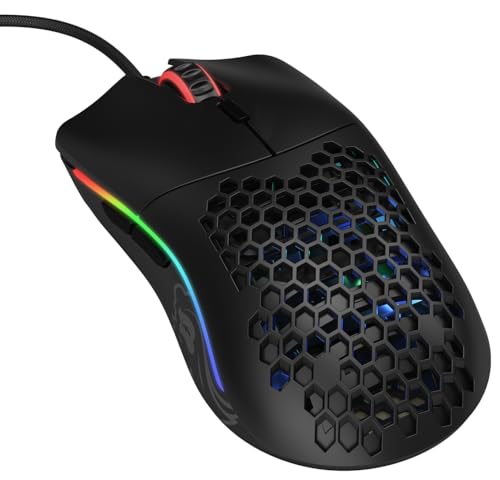
Glorious Model O- (Minus) Compact Wired Gaming Mouse 58g (Matte Black)
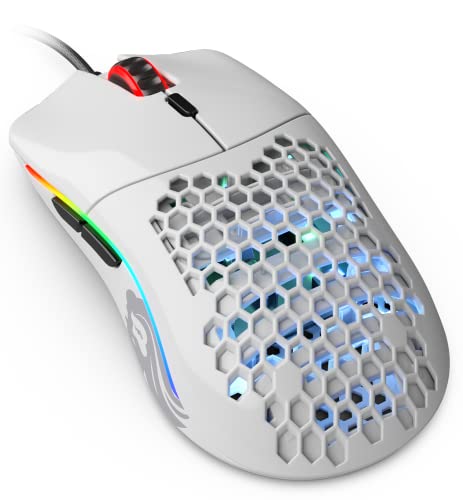
GLORIOUS Model O- (Minus) Compact Wired Gaming Mouse 58g (Glossy White)

Pulsar Gaming Gears X3 Crazylight Wireless Gaming Mouse, Mini (Jet Black)

Pulsar Gaming Gears X3 Crazylight Wireless Gaming Mouse, Mini (Uyuni White)

Pulsar Gaming Gears X3 LHD Crazylight Gaming Mouse, Mini (Uyuni White)

GLORIOUS Model O- (Minus) Compact Wired Gaming Mouse 58g (Glossy Black)

GravaStar Mercury M2 Wireless Gaming Mouse (Transparent Black)

Pulsar Gaming Gears X3 LHD Crazylight Gaming Mouse, Mini (Jet Black)

HyperX Pulsefire Haste 2 Mini Wireless Gaming Mouse (Black)
A Closer Look At Each Pick
The Matte Black Model O- has earned its place in countless setups for a reason. At roughly 58 grams with a honeycomb shell, it sits light in the hand and stays cool during marathon sessions, and the ambidextrous shape welcomes claw, fingertip, and small palm grips alike.
Glorious pairs that shell with a Pixart 3360 sensor, a sub-0.7mm lift-off distance, and a 1000 Hz polling rate, so flick shots register exactly where you intend. Compared to the wired competition, the paracord-style cable keeps the drag low enough that you may forget the mouse is tethered at all.
Bright Spots
- Featherweight shell at around 58g for effortless micro-adjustments
- Symmetric shape suits both right- and left-handed play
- PTFE mouse feet deliver smooth, low-friction tracking on most pads
- Omron switches rated for long-term click durability
Things To Consider
- Honeycomb shell can collect dust and skin oils, so routine cleaning keeps the finish looking sharp
- Wired design means one less thing to charge, but you trade that for cable management on the desk
Made For
Competitive players with small to medium hands who want ultralight control without the price jump to wireless flagships.
Consider Something Else When
Strict left-hand ergonomics matter more than ambidexterity, where the Pulsar Gaming Gears X3 LHD Crazylight offers a sculpted southpaw fit.
The Glossy White Model O- shares the same bones as the matte version but trades the soft-touch finish for a clean, almost ceramic look. Under RGB lighting, the white shell glows and the honeycomb pattern shows off internal components, which suits minimalist desk builds.
Performance mirrors the matte sibling: 58g weight, Pixart 3360 tracking, and the same flex-light cable. If you favor the way white hardware photographs in setup shots without sacrificing the responsive feel, this is the cosmetic variant that earns its keep.
Key Advantages
- Bright finish that pairs naturally with white keyboards and light wood desks
- Sub-60g shell keeps fast flicks effortless over long sessions
- 1000 Hz polling for accurate input on wired setups
- Flexible cable reduces snag during wide-angle swipes
Worth Noting
- Glossy plastic shows fingerprints and smudges faster than the matte option, so a microfiber cloth becomes part of the routine
- Same wired tethering limits the clean-cable look unless you invest in a bungee
Right Fit For
Aesthetic-driven shoppers who care as much about desk styling as competitive responsiveness and don’t mind a quick wipe-down between sessions.
Look Elsewhere When
Wireless freedom outweighs cosmetic concerns, where the Pulsar Gaming Gears X3 Crazylight in Jet Black skips the cable entirely.
The X3 Crazylight in Mini size is one of the lightest wireless mice you can find, weighing around 43g. That sub-egg weight matters during long FPS sessions where every gram of wrist fatigue adds up, and the hybrid “RelaxClaw” shape blends palm and claw contact for sustained control.
Inside, the exclusive XS-1 sensor pushes up to 32,000 DPI with 750 IPS tracking and 50g acceleration, paired with optical switches that resist the accidental double-clicks that plague older mechanical designs. Compared to the wired Model O-, this pick trades a small amount of weight for cable-free aiming and top-tier sensor specs.
What Earns Its Place
- ~43g wireless shell rivals the heft of wired competitors
- XS-1 sensor delivers flagship-level precision for tracking-heavy shooters
- Optical switches reduce double-click wear over years of use
- Asymmetric hybrid shape supports claw and palm-claw grip styles
Trade Offs
- Wireless design means periodic charging, so keeping a cable handy for long tournaments is wise
- Mini shell may feel cramped for users with larger hands or full palm grip preferences
Best Suited To
Competitive FPS and Valorant-style players who want wireless freedom with sensor specs that match the lightest wired flagships.
Swap It Out When
You want a sculpted left-hand-specific fit, in which case the Pulsar Gaming Gears X3 LHD Crazylight (Jet Black) is purpose-built for southpaw aim.
The Uyuni White version of the X3 Crazylight keeps every internal spec from the Jet Black sibling while trading to a salt-flat-inspired white finish. For minimal battlestation builds, the lighter color makes the small mouse read cleaner against dark pads and monitor arms.
You still get the 32,000 DPI XS-1 sensor, the optical switches, and the same 43g-ish wireless build. For shoppers who want flagship performance but prefer white hardware, this colorway removes the compromise between aesthetics and competitive specs.
What Helps Most
- Bright finish that pairs with white keyboards and pastel lighting setups
- Same flagship XS-1 sensor as the Jet Black variant
- Hybrid grip shape reduces hand fatigue during multi-hour play
- Wireless freedom eliminates cable drag for low-sensitivity aimers
Honest Caveats
- Light surfaces show dirt and dye transfer from mousepads more readily than darker shells
- Battery life depends on RGB and polling choices, so heavy users may tweak settings to extend runtime
Who It Suits Best
Aesthetic-focused gamers who want top-tier wireless performance in a clean white shell that complements lighter desk themes.
Reach For A Different Pick When
You need a true left-handed ergonomic shape, where the Pulsar Gaming Gears X3 LHD Crazylight (Uyuni White) keeps the same color but flips the form factor.
Most gaming mice are mirrored in name only, but the X3 LHD is a true left-hand-dominant shape, meaning the thumb rest, side buttons, and hump all sit where a southpaw’s hand naturally lands. That makes a real difference in long sessions where the wrong contours can cramp the ring and pinky fingers.
Beyond the shape, this Uyuni White LHD keeps the same wireless sensor stack and 43g-ish lightweight build as its right-handed sibling, so left-handed players no longer have to settle for a generic ambidextrous shell. For the rare left-hand FPS competitor, this might be the most considered option on the list.
Benefits That Matter
- True left-hand ergonomic shape with thumb-side support
- Optical switches resist double-click drift over time
- Lightweight wireless build eases wrist strain
Points To Note
- Fewer side button options than right-handed alternatives, which may limit MMO players
- White finish requires more frequent cleaning if your pad sheds dye
Whose Shelf It Belongs On
Left-handed competitive players who need a shape designed for their grip, not just a mirrored shell.
Skip It When
You game right-handed and want broader side-button support, where the standard Pulsar Gaming Gears X3 Crazylight (Jet Black) fits the bill.
The Glossy Black Model O- lands as the friendlier-finish version of Glorious’s classic 58g shell. It uses the same Pixart 3360 sensor, sub-0.7mm lift-off distance, 1000 Hz polling, and Omron switches rated for 20 million clicks, so you don’t trade responsiveness for the lower-tier price.
For first-time competitive shoppers or anyone moving up from a heavy office mouse, this pick delivers most of the wired flagship experience without flagship pricing. The honeycomb design shaves weight where it counts, and the paracord-style cable keeps swipes fluid.
Useful Strengths
- Proven Pixart 3360 sensor with zero acceleration for accurate tracking
- Omron switches built for years of heavy clicking
- Six programmable buttons with macro support for varied game libraries
- Lightweight shell eases fatigue during long ranked sessions
A Few Limitations
- Glossy finish can show fingerprints and may feel slicker than the matte option for some users
- Wired only, so you’ll need to manage cable routing to keep the desk tidy
Perfect Match For
Entry-level competitive gamers who want flagship-tier sensor accuracy and switch durability without paying for a wireless premium.
A Better Fit Elsewhere
You’d rather skip the cable and want a flagship sensor at the same time, where the Pulsar Gaming Gears X3 Crazylight (Jet Black) is the natural step up.
The Mercury M2 leans hard into visual drama, with a transparent shell that exposes the internal PCB and a multi-zone RGB underglow. Around 79g, it’s heavier than the X3 Crazylight but still well below traditional wireless office mice, and the hollowed-out body keeps airflow against the hand during long sessions.
Inside, the Pixart PAW3395DM sensor delivers up to 26,000 DPI and a 1K Hz polling rate, paired with five programmable buttons for shortcut-heavy workflows. For shoppers who want a mouse that doubles as a desk conversation piece, this is the most distinctive pick on the list.
Practical Advantages
- Transparent shell with multi-zone RGB makes the mouse the visual centerpiece of any setup
- PAW3395DM sensor handles both casual and competitive play with high tracking accuracy
- Five programmable buttons support productivity shortcuts beyond gaming
- Wireless design keeps the desk cable-light
Points To Keep In Mind
- At around 79g, it sits heavier than the other compact wireless picks, so flick-heavy FPS players may notice the difference
- The transparent shell can collect dust inside the honeycomb over time, requiring occasional deep cleaning
Built With In Mind
Style-led buyers who want a wireless mouse that doubles as a desk showpiece and don’t mind a bit of extra weight for the visual payoff.
Not Your Match When
Every gram of weight matters in competitive shooters, where the lighter Pulsar Gaming Gears X3 Crazylight (Jet Black) makes a stronger play.
The Jet Black LHD variant keeps the same southpaw-tuned ergonomic shape as the Uyuni White version but trades the bright finish for a darker, more office-friendly look. For left-handed users who game in shared spaces or stream on camera, the understated shell blends in without giving up the wireless performance.
You still get the 43g-ish lightweight build, the optical switches, and the same hybrid grip shape that supports both claw and palm-claw styles. For a left-handed shopper who values a low-key aesthetic, this is the stealth counterpart to the flagship colorway.
Real-World Strengths
- Dark shell hides wear and smudges in shared or work environments
- Wireless lightweight design keeps aim quick without cable drag
- Optical switches reduce double-click issues common with older mechanical designs
Where It May Fall Short
- Limited side-button layout compared to right-handed MMO-focused mice
- Mini shell favors smaller hands, so left-handed users with larger paws may find it compact
Who Should Grab It
Left-handed users who need a wireless mouse that performs in ranked play but doesn’t look out of place in a home office.
Where Another Pick Suits Better
Right-handed shoppers after a wider feature set should look at the standard Pulsar Gaming Gears X3 Crazylight (Jet Black) instead.
The Pulsefire Haste 2 Mini trims down the standard Haste 2 wireless shell by roughly 16%, making it one of the more compact wireless options for laptop-only setups. At under 60 grams, it slips into carry sleeves and small desk pads without dominating the space, which matters for commuters and cafe players.
Dual-mode wireless connectivity covers both 2.4GHz receivers for low-latency gaming and Bluetooth for travel with phones or tablets. For users bouncing between a desktop at home and a laptop on the road, this pick pulls double duty without needing a second mouse.
The Helpful Details
- Sub-60g wireless build fits easily in laptop bags and small desk setups
- Dual-mode wireless supports both 2.4GHz gaming and Bluetooth travel use
- Compact shell matches smaller hands and short finger grips
Less Ideal Details
- Smaller shell may feel cramped for users with medium-to-large hands who prefer palm grip
- Battery life depends on whether you stay on 2.4GHz or switch to Bluetooth for travel
Made For
Traveling gamers and laptop-first setups who want a single mouse that handles competitive play at home and casual sessions on the go.
Not Your Match When
You need a true left-handed shape, in which case the Pulsar Gaming Gears X3 LHD Crazylight (Jet Black) is purpose-built for southpaw grip.
Picking The Right Compact Wireless Gaming Mouse For Your Setup
Start with grip and hand size before anything else. Compact mice work best for claw and fingertip holds, and undersized shells can cramp medium-to-large hands during longer sessions. The right fit reduces wrist compensation and keeps aim consistent, so a quick size check matters more than a flashy spec sheet.
Sensor accuracy and tracking speed come next. A high DPI rating alone doesn’t help if the sensor’s IPS (inches per second) tracking can’t keep up with your flick speed. For fast-paced shooters, look for sensors with strong IPS ratings and reliable 1K Hz polling so your movements translate cleanly without perceived lag.
Weight, switches, and battery life shape daily ownership. Lighter mice reduce fatigue, optical switches resist the double-click drift that plagues older mechanical designs, and battery life determines whether you’ll think about charging or not. If you forget to plug things in, prioritize a quick-charge or a longer-rated runtime over RGB flair.
Finally, decide on wireless versus wired. Wireless adds charging habits to your routine but cleans up the desk and removes cable drag. Wired picks stay plug-and-play and tend to cost less for comparable sensor performance, which matters if you’re building a first competitive setup on a tighter budget.
Smart Considerations Before You Commit
Pitfalls Shoppers Hit
Compact wireless mice get marketed on weight alone, and shoppers often buy the lightest option without checking grip fit. A 43g shell is wasted if it cramps the hand or encourages awkward wrist angles. Always match the mouse to your hand size and grip style before chasing the lowest number on the scale.
Battery life claims also get oversold when RGB is enabled at full brightness, so expect the realistic runtime to land below the headline figure. Heavy users who stream or play daily should plan to top off mid-week, or look for hot-swap battery designs if absolute uptime matters.
When Paying More Pays Off
Premium tiers typically buy better sensor tracking at speed, optical switches that last longer, and lighter shells without sacrificing durability. For casual play, a mid-range pick handles the job. For ranked competitive play, the upgrade often pays for itself in fewer misclicks, smoother tracking, and a shell that disappears in the hand. The honest read is that paying more only matters once your skills demand the precision.
Frequently Asked Questions
How important is mouse weight for competitive play?
Lighter shells reduce the wrist effort needed to start and stop flicks, which helps during long sessions. The benefit shows up most for claw and fingertip grips, and once a mouse feels heavy, going back to lighter designs often reveals the difference. For casual play, weight is less critical than fit and sensor quality.
Are wireless gaming mice good enough for competitive use now?
Modern wireless mice use 2.4GHz receivers with latency low enough that most players can’t feel the difference from wired. For most competitive scenarios, wireless has reached parity, and the cable-free desk simplifies setup. Wired still wins on long tournaments where charging isn’t an option.
What does polling rate actually do?
Polling rate is how often the mouse reports its position to your PC, measured in Hz. A 1000 Hz polling rate means 1000 reports per second, which translates to smoother tracking and lower perceived input lag. Lower polling rates can feel choppy in fast shooters, so 1000 Hz has become the standard for competitive play.
How do I know if a mouse fits my hand?
Measure your hand from the tip of the longest finger to the base of the palm, then check the mouse’s length against that number. For most adults with small to medium hands, compact mice under 120mm tend to fit well. Claw grip players can usually stretch a few millimeters longer than palm grip users.
Is it worth spending extra for optical switches?
Optical switches register clicks with light rather than metal contacts, so they resist the double-click wear that affects older mechanical switches over time. For heavy clickers or anyone keeping a mouse for years, optical switches extend usable life. Light users may not notice the difference for a long time.
Closing Remarks
A compact wireless mouse that fits your hand and tracks reliably can quietly upgrade every game you play. Match the shape to your grip, weigh battery habits against cable freedom, and pick the sensor tier that matches how hard you push your aim. Once those basics line up, the rest comes down to which finish and form factor you want to live with day after day.


