


Prebuilt gaming rigs used to mean compromise: hot cases, dated GPUs, and bloatware that took an afternoon to uninstall. That reputation is largely outdated. Today’s budget-friendly desktops ship with modern Ryzen and Core Ultra processors, DDR5 memory, and current-generation GeForce RTX graphics, enough horsepower to handle 1080p and 1440p gaming without forcing you to learn how to build a PC.
This roundup sorts through ten prebuilt options on the retailer to find machines that genuinely earn their space under your desk. The goal is straightforward: honest builds, real specs, and clear matches for different kinds of players, from casual couch gamers to those chasing high refresh rates in competitive shooters.
An Overview Of The Picks

Andromeda Insights Ultra 50 V3 Gaming PC (RTX 5080, Ryzen 7 9800X3D)

Horizon Autherium Dragon RGB I9 RTX Gaming PC (64GB RAM, 5TB)

CYBERPOWERPC Gamer Master Gaming PC (Ryzen 5 7600, RTX 4060)

Skytech Azure 3 Gaming PC (Ultra 7, RTX 5060)

CyberpowerPC Gamer Xtreme VR (GXiVR8060A10)
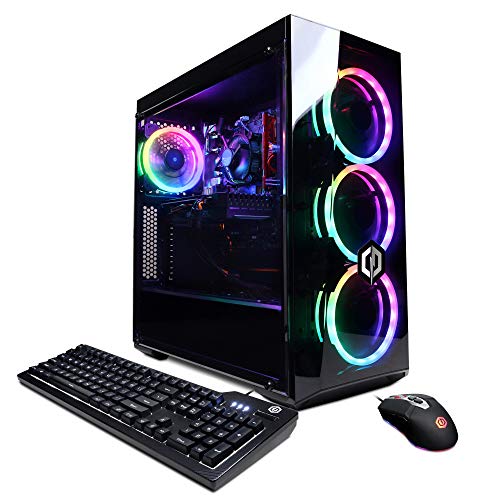
CyberpowerPC Gamer Xtreme VR (GXiVR8060A9)
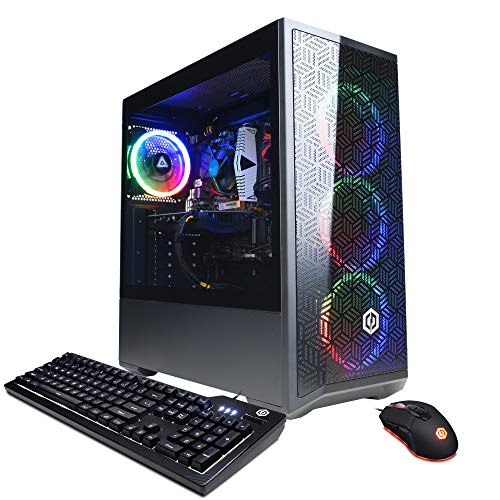
CYBERPOWERPC Gamer Xtreme VR (i5-12400F, RTX 3050)

Skytech Storm Gaming PC (Ryzen 5, RTX 5050)

Skytech King 95 Gaming PC (Ultra 7, RTX 5070 Ti)

Lenovo Legion Tower 5i Gaming PC (Ultra 7 265F, RTX 5070 Ti)
What Each Pick Brings To The Table
The Ultra 50 V3 is the kind of prebuilt that makes the case for skipping a custom build altogether. It pairs AMD’s Ryzen 7 9800X3D, widely praised for its 3D V-Cache design that boosts cache-heavy workloads, with an NVIDIA RTX 5080 delivering 16GB of GDDR7 memory. For anyone gaming at 4K or pushing high-refresh 1440p, that combo is the current sweet spot in raw throughput.
Storage and memory match the silicon ambition. The 2TB Gen4 SSD leaves room for a hefty Steam library without constant uninstalls, and 32GB of DDR5 at 6000MHz handles modern titles and background apps without choking. An 850W Gold-rated PSU and ARGB fans round out the package, making this a credible alternative to building a comparable rig piece by piece.
The Value In It
- Ryzen 7 9800X3D plus RTX 5080 covers 4K ultra settings in current AAA titles.
- 32GB DDR5-6000 memory and a 2TB Gen4 NVMe drive handle large game libraries without compromise.
- 850W Gold PSU provides clean, efficient power with headroom for future GPU swaps.
- ARGB fans and a tempered-glass layout let you see (and tune) the cooling setup.
Worth Noting
- At this tier, custom builders can sometimes match specs for less, so the convenience premium is real.
- High-end cases with this much airflow tend to need occasional dust clearing on the front intake filters.
- Windows 11 Home is preinstalled, which means budgeting time for any bloatware removal on day one.
Key Specs
Made For
Enthusiast gamers running a 4K monitor or a 1440p display with a 144Hz-plus refresh rate who want a ready-to-ship system.
Consider Something Else When
You mostly play esports and want a smaller, cooler-running system; the Skytech Azure 3 Gaming PC is a more reasonable fit for that use case.
Where the Ultra 50 V3 chases raw frame rates, the Horizon Autherium Dragon chases capacity. It ships with a Core i9 processor that boosts up to 5.4GHz, 64GB of system memory, and a combined 5TB of storage split between a fast NVMe drive and a 7200RPM HDD. That kind of configuration is built for creators who edit, render, and game on the same machine.
The factory-overclocked RTX 5070 OC handles the graphics side, and a 360mm AIO liquid cooler keeps the CPU thermals in check under sustained loads. For a household where one rig has to cover a working week plus weekend gaming, the storage headroom alone makes a strong argument.
Points In Its Favor
- 64GB of RAM is roughly double what most prebuilts ship with, and it helps with video editing and large project files.
- 5TB of total storage means game libraries, raw footage, and archives can coexist without an external drive.
- 360mm AIO liquid cooling keeps the Core i9 temperatures stable during long rendering sessions.
- Factory-overclocked RTX 5070 OC gives a small but meaningful bump over stock clocks.
Trade Offs
- An HDD-based secondary drive is noticeably slower than the primary NVMe, so loading big game libraries from it takes patience.
- RGB-heavy cases with multiple tempered-glass panels tend to show dust on internal components more readily.
Who Will Love This
Content creators, streamers, and power users who need a single machine for editing, recording, and gaming without juggling external drives.
Skip It When
You mostly play one or two games at a time and don’t need the extra storage, since the Skytech Azure 3 covers the same gaming experience with less overhead.
The Gamer Master is what most shoppers actually picture when they imagine a budget gaming PC: a tempered-glass case with RGB lighting, an AM5-platform AMD processor, and a current-generation RTX card. The Ryzen 5 7600 is a 6-core, 12-thread chip with a 3.8GHz base clock, and it pairs neatly with the GeForce RTX 4060 8GB for solid 1080p performance in current titles.
CYBERPOWERPC also includes 16GB of DDR5 and a 500GB NVMe SSD, which is enough storage to start with and easy to expand later. The I/O panel is generous for the price: six USB 3.1 ports, two USB 2.0, gigabit Ethernet, and 802.11AC Wi-Fi. A keyboard and mouse are part of the bundle, so you can plug in and start playing without buying a single extra peripheral.
What Pays Off
- Ryzen 5 7600 on the AM5 platform gives you a genuine upgrade path for years to come.
- RTX 4060 8GB supports DLSS and ray tracing at 1080p, which most modern titles target.
- 16GB DDR5 plus 500GB NVMe is a balanced starting configuration that can be expanded later.
- Tempered-glass side panel and RGB lighting come standard, which is rare at this tier.
Possible Compromises
- 500GB fills up quickly with a few modern AAA installs, so budgeting for a secondary drive is realistic.
- The included keyboard and mouse are functional rather than exciting, depending on your preferences.
Perfect Match For
Entry-level players running a 1080p monitor who want a ready-to-go system with a clear upgrade path.
Look Elsewhere When
You regularly stream or multitask with browser-heavy workloads, since the Skytech Storm Gaming PC ships with 32GB of RAM out of the box.
Skytech positions the Azure 3 around the Intel Core Ultra 7 270K, a chip with a 3.7GHz base and a 5.4GHz turbo boost, paired with the RTX 5060 8GB. For most mainstream gamers, this is the comfortable middle of the lineup: faster than the older 12th-gen and 10th-gen parts on the cheaper picks, but not chasing enthusiast-tier 4K numbers.
It also comes with 32GB of DDR5-5200 memory and a 1TB NVMe SSD, which is a meaningful step up from the smaller 500GB drives on the Gamer Master and Gamer Xtreme. A 360mm AIO handles CPU cooling, and Wi-Fi 6 covers the wireless side. For 1440p gaming on a high-refresh monitor, this is the configuration most players will be happy with for years.
Advantages To Know
- Intel Core Ultra 7 270K is a strong multi-core performer for gaming and productivity side by side.
- 32GB DDR5-5200 and 1TB NVMe strike a sensible balance for modern game libraries.
- 360mm AIO keeps thermals controlled during extended sessions.
- Wi-Fi 6 provides fast, low-latency wireless on supported routers.
A Few Limitations
- The 5060 8GB is comfortable for 1440p but may require settings adjustments in the heaviest modern releases.
- Preinstalled Windows 11 Home occasionally arrives with bundled apps that need cleaning up.
Quick Facts
Best Suited To
Mainstream 1440p gamers with high-refresh monitors who want a balanced build without overshooting enthusiast pricing.
Reach For A Different Pick When
You’re targeting 4K or competitive 240Hz-plus frame rates, in which case the Skytech King 95 Gaming PC with its RTX 5070 Ti is the better fit.
The Gamer Xtreme VR is the most affordable entry on this list, and it shows where prebuilt gaming has come from rather than where it’s going. A 10th-gen Intel Core i5-10400F runs six cores at 2.9GHz, paired with a GeForce GTX 1660 Super 6GB. That’s a last-generation GPU by 2026 standards, but it’s still capable in esports titles and older AAA games at 1080p.
The 8GB of DDR4 and 500GB NVMe keep the configuration lean. Windows 10 Home comes preinstalled, which matters if you have software that doesn’t love Windows 11 yet. For someone outfitting a starter gaming setup for a kid’s room, a college dorm, or a casual secondary machine, this is a sensible low-commitment build.
What Earns Its Place
- Lowest barrier to entry in this roundup, ideal for tight budgets.
- GTX 1660 Super handles esports titles like CS2 and Valorant at high frame rates in 1080p.
- 500GB NVMe boots Windows and loads games noticeably faster than a spinning hard drive.
Things To Consider
- 10th-gen Intel platform is older, so the CPU upgrade path is limited compared to AM5 or LGA 1700.
- 8GB of DDR4 is workable for now but fills up quickly with modern browsers and Discord running alongside games.
- Windows 10 Home is approaching end of mainstream support, so a free Windows 11 upgrade is worth considering.
Right Fit For
Light gamers focused on esports, indie games, or older AAA titles who want the lowest possible entry cost.
A Better Fit Elsewhere
You want a longer-lasting platform for newer releases, the CYBERPOWERPC Gamer Xtreme VR with the i5-12400F and RTX 3050 is a more current alternative.
Functionally, the GXiVR8060A9 is nearly identical to its sibling above: same Core i5-10400F, same GTX 1660 Super 6GB, same 8GB of DDR4 and 500GB NVMe. The differences are minor SKU variations, which is why the experience feels familiar if you’ve read about the Gamer Xtreme line before.
The honest read is that this is a safe, well-understood prebuilt. The hardware has been around long enough that driver support is mature, the case layout is the same tempered-glass RGB tower used across the Gamer Xtreme family, and the price sits comfortably below current-generation alternatives. For a casual 1080p setup that won’t be pushed too hard, it’s a low-risk pick.
Benefits That Matter
- GTX 1660 Super still holds up for 1080p in games from a few years back.
- Mature driver support means fewer surprises on game launch day.
Small Caveats
- 8GB of DDR4 is the limiting factor for heavy multitasking alongside modern games.
- 10th-gen Intel platform caps meaningful future CPU upgrades.
Built With In Mind
Casual 1080p gamers on a strict budget who want a familiar, dependable CYBERPOWERPC build.
Swap It Out When
You want access to DLSS and ray tracing, the CYBERPOWERPC Gamer Xtreme VR with the RTX 3050 is a more forward-looking choice.
The 12th-gen i5-12400F in this Gamer Xtreme variant is a meaningful step up from the 10th-gen parts on the previous two picks, even though the RTX 3050 8GB is a modest entry-level GPU. The chip is a 6-core, 12-thread part that runs cool and handles everyday gaming and productivity without breaking a sweat, and the LGA 1700 platform offers more meaningful upgrade paths than the older 10th-gen socket.
16GB of DDR4 and a 500GB NVMe cover the basics, and Windows 11 Home comes preinstalled. For a first-time PC gamer, this hits a sweet spot of modern platform, manageable price, and a tempered-glass case that doesn’t look out of place in a living room or shared office. You may find yourself wanting to add a secondary drive within a year, but that’s a routine upgrade.
Real Benefits
- Intel Core i5-12400F is a modern, efficient chip that handles most games well.
- RTX 3050 8GB supports DLSS and entry-level ray tracing in supported titles.
- LGA 1700 platform allows for future CPU upgrades to 13th- or 14th-gen Intel chips.
Honest Caveats
- 8GB of VRAM on the RTX 3050 may require lowering texture settings in the heaviest modern releases.
- 16GB of system RAM is the minimum comfortable amount, depending on how many background apps you keep open.
Feature Snapshot
Who Should Grab It
First-time PC gamers and families setting up a shared gaming machine who want a current platform without overspending.
Where Another Pick Suits Better
You want faster storage and more RAM out of the gate, the Skytech Storm Gaming PC doubles both for a similar profile.
The Storm is the more practical cousin of the Azure 3, trading a Core Ultra 7 for an AMD Ryzen 5 5500 and pairing it with the RTX 5050 8GB. The Ryzen 5 5500 runs at 3.6GHz with a 4.2GHz boost, which is a modest performer, but the GPU is the headline: current-generation RTX 50-series silicon at an entry-level price point.
What makes the Storm feel less entry-level is the 32GB of DDR4-3200 memory and a 1TB NVMe SSD. Skytech also avoids bloatware, which is a small but real quality-of-life win on day one. For a budget build that targets current 1080p games without skimping on RAM or storage, this configuration is hard to argue with.
Useful Touches
- 32GB of DDR4 gives you room to keep browser tabs, Discord, and a game running simultaneously.
- 1TB NVMe SSD is a meaningful capacity bump over the 500GB drives in this price range.
- RTX 5050 brings current-generation features like DLSS to the budget tier.
- No bloatware preinstalled means less cleanup time on arrival.
Points To Keep In Mind
- The Ryzen 5 5500 lacks the upgrade headroom of AM5 chips, so the long-term path is mainly GPU.
- Wi-Fi 5 (802.11ac) is a step behind the Wi-Fi 6 found in newer Skytech builds.
Whose Shelf It Belongs On
Budget-minded 1080p gamers and multitaskers who want generous memory and storage without paying for a high-end CPU.
Not Your Match When
You want a longer CPU upgrade path, the CYBERPOWERPC Gamer Master Gaming PC with its Ryzen 5 7600 on AM5 is a stronger foundation.
The King 95 is where Skytech steps into serious performance territory. An Intel Core Ultra 7 270K boosts up to 5.4GHz, paired with an RTX 5070 Ti 16GB and 32GB of DDR5-6000 RGB memory. For high-refresh 1440p gaming in competitive shooters or running demanding sims at max settings, this is a configuration that won’t feel outdated for years.
The 1TB Gen4 NVMe SSD keeps load times short, and the 850W Gold ATX 3.0 power supply is a thoughtful inclusion for a high-wattage GPU. A 360mm ARGB AIO keeps the CPU temperatures in check, and Wi-Fi 6 covers the wireless side. It’s the closest thing to a flagship gaming build on this list without stepping into RTX 5080 territory.
A Few Strong Suits
- RTX 5070 Ti 16GB handles high-refresh 1440p and entry-level 4K in demanding games.
- 32GB of DDR5-6000 RGB matches what custom builders pick for high-end builds.
- 850W Gold ATX 3.0 PSU provides clean power delivery with future GPU headroom.
- 360mm ARGB AIO keeps thermals and aesthetics in line with the spec sheet.
Factors To Consider
- Premium components mean premium weight; the case is large and needs adequate desk clearance.
- RGB fans and liquid coolers may require occasional dust management on radiators and shrouds.
Technical Sheet
Made For
Competitive gamers and sim enthusiasts running high-refresh 1440p or 4K monitors who want a near-flagship prebuilt.
Look Elsewhere When
You mainly play single-player AAA games and want to save on the GPU, the Skytech Azure 3 Gaming PC is a quieter, more efficient fit.
Lenovo brings something the boutique builders can’t always match: brand-name serviceability and a familiar chassis. The Legion Tower 5i pairs an Intel Core Ultra 7 265F with an RTX 5070 Ti, the same GPU class as the Skytech King 95 but in a quieter, more office-friendly case. 32GB of memory and 1TB of storage round out a configuration that handles both gaming and family use comfortably.
The Legion Coldfront cooling design is built to keep the system quiet under load, which matters if the PC lives in a shared living space. Three months of PC Game Pass comes bundled, so you can try a rotation of recent titles without buying anything upfront. For a household looking for one PC to cover work, school, and weekend gaming, this is the most balanced mainstream-brand option on the list.
What Works In Its Favor
- RTX 5070 Ti 16GB handles modern AAA and competitive titles with room to spare.
- Legion Coldfront cooling prioritizes quiet operation during long sessions.
- Three months of PC Game Pass gives you a starting library without extra cost.
- Lenovo’s mainstream-brand support and parts availability are real advantages if anything goes wrong.
A Few Things To Weigh
- The case design favors a more understated look, so RGB enthusiasts may find it visually plain.
- Bundled software occasionally includes trial apps that need uninstalling depending on your tolerance.
Who Should Grab It
Families and mainstream shoppers who want a recognizable brand, quiet thermals, and enough power for both work and play.
Skip It When
You’re chasing maximum frame rates and aggressive RGB, the Skytech King 95 Gaming PC leans further into that enthusiast territory.
Picking A Prebuilt Gaming PC That Actually Fits
GPU generation and VRAM are the first filters. A current-generation RTX 50-series card with 8GB of VRAM is the realistic floor for modern 1080p gaming, while 12GB to 16GB opens the door to 1440p and 4K. The RTX 3050 and GTX 1660 Super options on this list are still viable, but they’re starting to show their age in texture-heavy releases.
CPU and platform come next. AMD’s AM5 socket (Ryzen 5 7600 and up) and Intel’s LGA 1700 (12th-gen and newer) both have clear upgrade paths, which matters if you plan to keep the case for three to five years. Older 10th-gen Intel parts are still functional, but the upgrade ceiling is much lower.
RAM, Storage, And Cooling
16GB of system RAM is the modern minimum, and 32GB has become the comfortable standard. For storage, a 1TB NVMe drive hits a sensible middle ground; 500GB fills up fast with a few modern titles, and adding a secondary drive later is routine. Liquid cooling (AIO) is a plus on higher-wattage CPUs but isn’t strictly necessary on most budget-to-midrange builds.
Form Factor And Connectivity
Match the case size to your desk space. A mid-tower fits almost anywhere, while a full tower needs clearance for airflow around the radiator. Look for at least Wi-Fi 5 (802.11ac) and a healthy mix of USB 3.0 or 3.1 ports. Front-panel USB-C is a quiet luxury that becomes hard to give up once you’ve used it.
Brand And Warranty
Mainstream brands like Lenovo and CYBERPOWERPC offer established support channels and recognizable warranty terms. Boutique builders often push specs further at the same price but with thinner support infrastructure. For a first prebuilt, the mainstream option usually wins on peace of mind.
What To Watch Before You Click Buy
Common Shopping Slip Ups
The most common mistake is shopping on a single spec without checking the platform. A cheap 10th-gen Intel system might look similar to a 12th-gen build on paper, but the upgrade path is far weaker. A close second is underestimating storage: 500GB sounds fine until a handful of modern titles fills it.
Where The Extra Money Goes
Spending more on a prebuilt typically buys you a current-generation GPU with more VRAM, a stronger CPU with a longer platform lifespan, and a larger SSD. The jump from 16GB to 32GB of RAM is the easiest upgrade to justify if you multitask, while a liquid cooler matters most on chips with higher base wattages.
Key Considerations Across These Picks
Pitfalls Shoppers Hit
The trap with budget prebuilts is conflating raw CPU speed with gaming performance. A 10-core older chip can lose to a 6-core current-gen part in many games, because frame rates depend on GPU muscle and per-core CPU speed more than core count. The Gamer Xtreme VR variants are clear examples: older platform, modest GPU, but the price reflects that.
Where The Extra Money Goes
Moving from an RTX 4060 to an RTX 5070 Ti roughly doubles the GPU cost, but it also opens the door to high-refresh 1440p gaming and ray tracing without compromise. Pairing a stronger GPU with 32GB of RAM and a 1TB NVMe is what separates the entry-level builds from the machines that last four or more years without feeling slow.
Frequently Asked Questions
How Much Should I Spend On A Cheap Prebuilt Gaming PC?
A reasonable floor sits around the budget-to-midrange tier covered by the CYBERPOWERPC Gamer Xtreme VR and Skytech Storm picks. Below that, you start giving up meaningful modern features; well above it, you’re in enthusiast territory. Match your budget to the resolution and refresh rate of your monitor.
Is A Prebuilt PC Worth It Over Building My Own?
Prebuilts make sense when you want a working system out of the box with warranty coverage and don’t want to research parts, BIOS updates, and Windows licensing. Building your own can save money at the mid-to-high end, but the time and learning curve aren’t free, especially for a first build.
How Long Will A Budget Prebuilt Gaming PC Last?
Three to four years of comfortable 1080p gaming is realistic for the budget picks, while a midrange build with an RTX 5070-class GPU and 32GB of RAM can stretch to five or six years at 1440p. Storage and RAM are easy to upgrade later, which extends useful life.
Do These PCs Come With Windows Preinstalled?
Yes, all ten systems ship with Windows preinstalled. Most newer builds use Windows 11 Home, while older models on this list still use Windows 10. You can keep the preinstalled copy or replace it with a clean install once you’re settled.
Can I Upgrade These Prebuilts Later?
Most modern prebuilts use standard ATX cases, so RAM, storage, and GPU upgrades are usually straightforward. CPU upgrades depend on the socket: AM5 and LGA 1700 are both alive, while older 10th-gen Intel platforms are effectively at the end of their upgrade path.
The Takeaway
The right prebuilt depends less on chasing the biggest spec sheet and more on matching hardware to the monitor you actually use. A 1080p 60Hz display asks very different things of a GPU than a 1440p 165Hz panel, and the picks here cover that full spread. Start with the resolution and refresh rate you want, then pick the machine that hits that target without paying for headroom you won’t see.


