


A solid gaming rig does not need a flagship board to hold its own, and that is where this list comes in. You will find nine motherboards that pair well with mid-range CPUs, fit standard ATX and mATX cases, and leave room in the budget for a better GPU or more storage. Whether you are piecing together your first build or replacing a tired socket, these picks cover AMD and Intel at approachable price points.
Your Options, Compared

ASUS TUF Gaming B650E-PLUS WiFi AM5 Motherboard

MSI B450 Tomahawk MAX II AM4 Motherboard
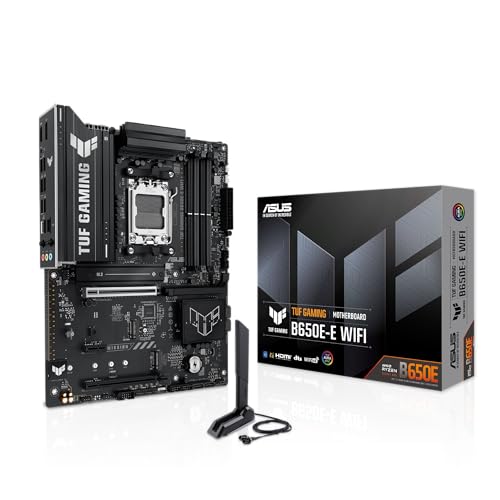
ASUS TUF Gaming B650E-E WiFi AM5 Motherboard

ASUS ROG Strix B450-F Gaming ATX Motherboard
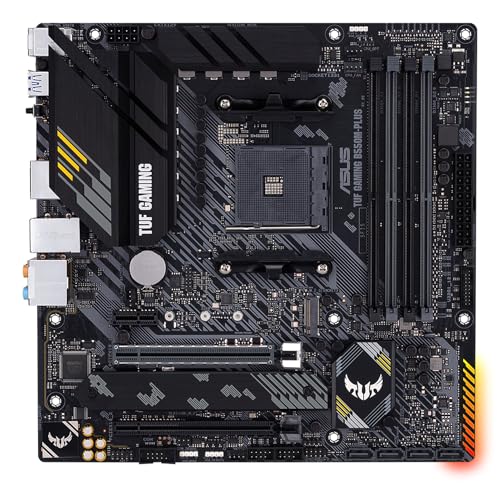
ASUS TUF Gaming B550M-PLUS mATX Motherboard

MSI MAG X570S Tomahawk MAX WiFi Motherboard

ASUS TUF Gaming B560M-PLUS WiFi Motherboard
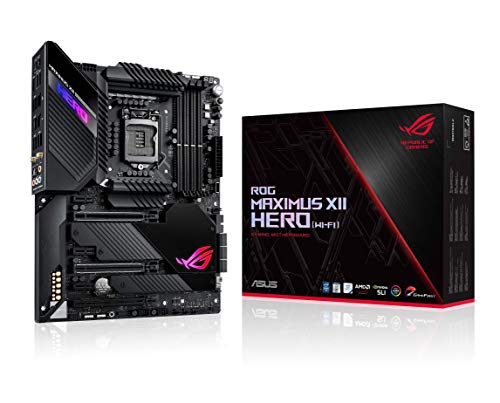
ASUS ROG Maximus XII Hero Z490 Motherboard
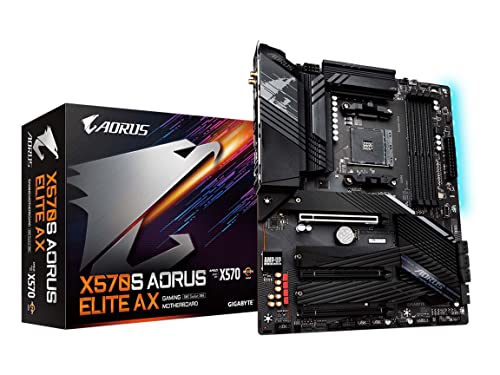
GIGABYTE X570S AORUS Elite AX Motherboard
More On The Choices That Made The List
Pick this board if you want a real path forward on AMD’s AM5 platform without paying flagship money. The TUF Gaming B650E-PLUS WiFi supports Ryzen 7000, 8000, and 9000 series CPUs, which means your next two or three CPU upgrades will likely drop right in. Compared to the older B450 Tomahawk below, this is a generational jump in power delivery and I/O.
The board uses a 12+2+1 DrMOS (draped MOSFET power stages that combine driver and MOSFET for cleaner power delivery) layout on an 8-layer PCB (printed circuit board, the green platform everything solders onto), and you get ProCool 8+8 pin power connectors for stable current under load. DDR5 memory support means faster bandwidth for modern GPUs. PCIe 5.0 readiness on the primary slot is a nice buffer for next-generation graphics cards.
Useful Highlights
- AM5 socket supports Ryzen 7000 through 9000, giving your build real upgrade headroom
- WiFi 6E built in, so you skip buying a separate adapter for fast wireless
- 12+2+1 DrMOS power stages handle mid-to-high tier Ryzen chips without choking
- Multiple M.2 slots let you run a fast NVMe boot drive plus game storage without juggling
Points To Keep In Mind
- BIOS updates may be needed out of the box for early Ryzen 9000 shipments, which can complicate a first build
- DDR5 memory kits add to the total cost even on a budget board
Key Specs
Who It Suits Best
Builders planning a long-lived Ryzen 7000 or 9000 system who want a no-compromise AM5 foundation.
Look Elsewhere When
The MSI B450 Tomahawk MAX II is the better fit for shoppers on the tightest budgets sticking with older Ryzen CPUs.
For shoppers stretching every dollar, the B450 Tomahawk MAX II is the kind of board that quietly does its job. It supports 1st, 2nd, and 3rd Gen Ryzen processors, which means you can pair it with a budget chip today and still have room to upgrade later. The heavy-plated heatsinks give it a tougher look than most boards in this price range.
You also get DVI and HDMI outputs, which is handy if you want to test the system with an old monitor before your dedicated GPU arrives. Realtek ALC892 audio covers headset and speaker duties without complaint. The trade-off shows up in features: no WiFi, no PCIe 4.0, and DDR4 only. For many entry builds, that is a fair deal.
What Pays Off
- Wide CPU support covers affordable Ryzen options, lowering total build cost
- Robust heatsinks help VRMs (voltage regulator modules, the small components that feed power to your CPU) stay cool during long sessions
- HDMI and DVI outputs let you boot without a discrete GPU for troubleshooting
Trade-Offs To Consider
- No built-in WiFi means an extra adapter if your desk is far from the router
- No PCIe 4.0 support, so you cannot take full advantage of the latest NVMe and GPU bandwidth
- Limited future CPU headroom past 3rd Gen Ryzen without a BIOS update
Made For
First-time builders pairing a budget Ryzen CPU with a mid-range GPU who want a no-frills AM4 start.
Swap It Out When
The ASUS TUF Gaming B650E-PLUS WiFi is the smarter pick for anyone planning to step up to Ryzen 7000 or later.
The B650E-E WiFi is what happens when you want every modern port without crossing into the high-end price band. The 8+2+1 80A DrMOS layout is more than enough for a Ryzen 7 or even a tuned Ryzen 9, and the board’s 8-layer PCB keeps signals clean under thermal load. WiFi 6E and 2.5Gb Ethernet give you both fast wireless and fast wired options in one package.
Three M.2 slots (one at PCIe 5.0) cover even the most ambitious storage setups, and the front-panel USB 20Gbps Type-C header is great for modern cases. PCIe 5.0 x16 with Q-Release makes swapping GPUs painless. The honest read is that most gamers will not use every port, but having them in reserve is a comfort.
Everyday Wins
- Three M.2 slots mean a generous NVMe setup without resorting to slower SATA drives
- USB 20Gbps front-panel header works beautifully with modern cases for fast external access
- WiFi 6E plus 2.5Gb Ethernet cover both wireless and wired high-speed needs
- PCIe 5.0 readiness on the GPU slot futureproofs the rig for upcoming graphics cards
Honest Caveats
- DDR5 pricing still adds noticeable cost over a comparable DDR4 AM4 build
- The I/O density can make cable management tighter in smaller mid-towers
Feature Snapshot
Right Fit For
Power users, streamers, and content creators who want top-shelf I/O on a budget-friendly AM5 board.
Reach For A Different Pick When
The MSI B450 Tomahawk MAX II makes more sense for builds where every dollar matters more than port density.
ASUS’s ROG (Republic of Gamers) Strix line carries a recognizable reputation, and the B450-F lives up to it. The board supports 1st through 3rd Gen Ryzen CPUs, which makes it a reliable pick for anyone on the AM4 platform who wants polished software and a refined feature set. Aura Sync RGB lighting is the visual cherry on top for builders who care about case aesthetics.
You get Intel Gigabit Ethernet with ASUS LANGuard, plus GameFirst for traffic prioritization during online matches. Dual M.2 slots, USB 3.1 Gen 2 Type-A, and a Type-C port cover modern storage and peripherals without breaking a sweat. The 5-Way Optimization tool helps with tuning for users who do not want to fiddle with manual settings. For a mid-range AM4 gaming PC, the balance here is hard to argue with.
Notable Upsides
- Aura Sync RGB gives builders a unified look with other compatible components
- 5-Way Optimization handles tuning for less experienced users
- Intel LAN with GameFirst keeps online sessions responsive under heavy traffic
Less Ideal Details
- No built-in WiFi, so wireless setups need a separate card or USB adapter
- Limited upgrade path past 3rd Gen Ryzen without a BIOS flash
Core Details
Who Should Grab It
Mid-range AM4 builders who want ROG polish, dependable networking, and RGB without going over budget.
Consider Something Else When
The GIGABYTE X570S AORUS Elite AX is a stronger call for anyone who wants built-in WiFi 6E on AM4.
Small cases deserve real gaming motherboards, and the TUF B550M-PLUS fits that brief. The micro-ATX form factor (a smaller board size that fits compact cases while keeping expansion slots) tucks cleanly into compact cases, but you still get PCIe 4.0 support and dual M.2 slots. For a dorm room or a desk-side build, this is a sensible middle ground.
The 10 DrMOS power stages handle a Ryzen 5 or 7 with grace, and 2.5Gb Ethernet is a quiet upgrade over the older gigabit standard for users with fast home networks. USB 3.2 Gen 2 Type-A and Type-C ports cover most modern peripherals. DDR4 support up to 4400 MHz gives memory enthusiasts room to play. The honest trade-off is reduced expansion compared to full ATX boards, but for a small build, that rarely matters.
Bright Spots
- Micro-ATX footprint fits compact cases without sacrificing core features
- PCIe 4.0 support keeps you current with the latest GPUs and NVMe drives
- 2.5Gb Ethernet is a real upgrade for fast home network users
Soft Spots
- Fewer expansion slots than full ATX, so multi-GPU or capture card setups will not fit
- No built-in WiFi on this variant, depending on the listing
Best Suited To
Gamers building a compact AM4 rig who want modern features without a full-size ATX board.
A Better Fit Elsewhere
The MSI MAG X570S Tomahawk MAX WiFi is the right step up for builders wanting full ATX expansion with WiFi 6E.
The X570S Tomahawk MAX WiFi is the kind of board that makes sense for an AM4 builder planning to stay on the platform for a long time. It supports 2nd and 3rd Gen Ryzen CPUs, and the Frozr heatsink design with a patented fan keeps VRM temperatures in check even during heavy sessions. PCIe 4.0 support with Lightning Gen4 M.2 unlocks the fastest current NVMe drives.
WiFi 6E gives you a future-facing wireless option, and DDR4 memory support up to 4600 MHz is plenty for gaming and most productivity. The Extended Heatsink Design and M.2 Shield Frozr both contribute to sustained performance. Crossfire support opens multi-GPU possibilities, though most gamers now favor a single strong card. The trade-off is that this board is more than a basic B450 build, so it suits users with higher-tier Ryzen chips.
Everyday Perks
- Frozr heatsink with active fan keeps VRMs cool under prolonged gaming loads
- WiFi 6E support cuts cable clutter without sacrificing speed
- PCIe 4.0 across GPU and M.2 unlocks the fastest current storage bandwidth
Points To Note
- The chipset fan is generally quiet but can spin up under sustained load
- Higher tier price compared to B550 options, so value-focused builders may look elsewhere
Spec Overview
Whose Shelf It Belongs On
AM4 builders who want premium power delivery, fast storage, and WiFi 6E without jumping to a flagship board.
Skip It When
The ASUS TUF Gaming B550M-PLUS is the smarter call for compact mATX case builds.
For Intel 10th and 11th Gen builders, the TUF B560M-PLUS WiFi covers the basics with a few niceties. The mATX size keeps things compact, while PCIe 4.0 support means you can pair an 11th Gen CPU with a current GPU without bandwidth loss. Thunderbolt 4 header support is a nice premium touch for users with compatible cases and docks.
The 8+1 power stages are enough for a Core i5 or i7, though extreme overclocking is not the focus. WiFi 6, 2.5Gb Ethernet, and dual M.2 slots round out the feature list. Real-world ownership is straightforward: drivers install cleanly, and the BIOS is easy to navigate. The honest trade-off is that 12th Gen and newer Intel CPUs need a different LGA socket, so this board caps your Intel upgrade path.
Noteworthy Benefits
- Thunderbolt 4 header support is rare in this price range
- WiFi 6 and 2.5Gb Ethernet cover modern home networking needs
- Compact mATX size fits small and mid-tower cases alike
Factors To Consider
- B560 chipset (the Intel chip that controls board-level features) does not allow CPU overclocking, which limits headroom for performance tuners
- No path to 12th Gen or newer Intel CPUs without a different board
Perfect Match For
Intel 10th or 11th Gen builders who want a compact, well-connected mATX setup with WiFi 6.
Not Your Match When
The ASUS ROG Maximus XII Hero Z490 is a stronger option for enthusiasts chasing premium Intel features.
The ROG Maximus XII Hero sits at the higher end of this list, and for good reason. Built for Intel 10th Gen CPUs on the LGA 1200 socket, it delivers 14+2 power stages with ProCool II connectors, alloy chokes, and durable capacitors for stable current. This is the kind of board for users who want a tuned, near-flagship Intel experience.
5Gb Ethernet plus Intel Gigabit, dual M.2 slots, USB 3.2 Gen 2, and Intel WiFi 6 cover connectivity without compromise. AI overclocking and AI cooling help users push performance safely, while the optimized thermal design keeps the board quiet under load. The honest read is that the Z490 platform has aged, and newer Intel CPUs need a different socket, so this is a fit for a deliberate 10th Gen build rather than a future-proof investment.
The Good Stuff
- 14+2 power stages support tuned 10th Gen Intel chips with confidence
- 5Gb Ethernet is rare in this category and great for fast local transfers
- AI tuning tools make overclocking approachable for less experienced builders
Where It Is Less Suited
- Premium pricing puts it well above the budget tier this list targets
- No upgrade path to 12th Gen or newer Intel CPUs
Technical Highlights
Who Will Love This
Enthusiast builders chasing premium power delivery and connectivity on a deliberate 10th Gen Intel rig.
Where Another Pick Suits Better
The ASUS TUF Gaming B560M-PLUS WiFi is the more sensible pick for compact, value-focused Intel 10/11th Gen builds.
GIGABYTE’s X570S AORUS Elite AX covers a wide swath of AM4 builders. It supports Ryzen 2000 through 5000 series processors, so anyone upgrading from an older chip can keep their board and gain faster storage, networking, and memory support. Twin 12+2 phase digital VRM with 60A DrMOS handles mid-to-high tier Ryzen chips without breaking a sweat.
AMD WiFi 6E and Bluetooth 5.2 are built in, which means no extra adapter. Triple NVMe PCIe 4.0/3.0 M.2 slots with thermal guards give you a generous storage setup, and the fully covered thermal design with high-coverage MOSFET heatsinks keeps things cool. SuperSpeed USB 3.2 Gen 2×2 Type-C rounds out a modern I/O layout. For an AM4 builder who wants a balance of features and price, this is a comfortable middle path.
Useful Touches
- AMD WiFi 6E and Bluetooth 5.2 keep you connected without extra hardware
- Triple M.2 slots with thermal guards support ambitious storage setups
- 12+2 phase VRM with 60A DrMOS powers tuned Ryzen chips reliably
Some Limits To Know
- Larger ATX board needs a mid-tower or full-tower case, so small builders should look at mATX options
- X570 chipset has higher platform power draw than B550 alternatives
Feature Facts
Built With In Mind
AM4 upgraders on Ryzen 3000 or 5000 who want built-in WiFi 6E and ample storage in a standard ATX board.
Another Choice May Suit
The ASUS ROG Strix B450-F Gaming is a smarter option for budget-first AM4 builders who do not need WiFi 6E.
What To Weigh Before Picking A Gaming Motherboard
Socket And CPU Match Come First
The single biggest decision is matching the board’s socket to the CPU you plan to use. AMD’s AM4 covers a huge range of Ryzen chips from early generations through 5000 series, while AM5 hosts Ryzen 7000 and newer. Intel’s LGA 1200 handles 10th and 11th Gen, and newer Intel CPUs use different sockets entirely. Choosing a board without confirming socket match is the most common reason builds stall on day one.
Form Factor Sets The Case Boundaries
ATX boards offer the most expansion slots, mATX boards fit compact cases, and mini-ITX pushes into tiny enclosures. Your case size dictates which board sizes fit cleanly, and the right choice depends on whether you need multiple GPUs, capture cards, or many storage drives. Builders who travel with their PC or want a desk-friendly rig tend to favor mATX, while those chasing maximum flexibility lean ATX.
Power Delivery And VRM Quality
For mid-range and high-tier CPUs, VRM design matters. Higher phase counts with DrMOS stages support sustained boost clocks, especially during long gaming sessions. Budget boards with weaker VRMs throttle earlier, which can be a quiet bottleneck. Look for boards that list phase counts and current ratings if you plan to use a higher-wattage CPU.
Connectivity And Storage Priorities
WiFi 6E, 2.5Gb Ethernet, USB 3.2 Gen 2, and multiple M.2 slots are now realistic even on budget boards. Decide which connections matter to you, and check the rear I/O plus internal headers. PCIe 4.0 support is increasingly standard, and PCIe 5.0 readiness on AM5 boards buys you a generation of GPU bandwidth headroom.
Key Considerations Across These Picks
Common Buying Mistakes
The most common slip is buying a board before confirming CPU and case compatibility. Socket mismatch is the headline issue, but case clearance for tall CPU coolers, GPU length, and front-panel USB headers are close behind. Shoppers also tend to overspend on features they will never use, like dual Ethernet on a system that only ever runs one cable.
Why Some Boards Cost More
Higher-tier boards typically bring stronger power delivery, more M.2 slots, faster networking, and better thermal design. The upgrade makes sense for users running tuned or higher-wattage CPUs, multi-drive storage setups, or fast home networks that benefit from 2.5Gb or 5Gb Ethernet. For a budget build with a mid-range CPU, a value-focused board usually delivers all the real-world performance most gamers need.
Frequently Asked Questions
Do I Need WiFi On A Gaming Motherboard?
WiFi matters if your router is far from your PC or you cannot run an Ethernet cable easily. Built-in WiFi 6E gives you fast wireless without buying a separate adapter, but wired Ethernet remains the most consistent option for low-latency online play.
Is AM4 Still Worth Buying In 2026?
AM4 is a sensible choice for budget builds and upgraders who already own a Ryzen CPU. The platform is mature, parts are widely available, and performance for the money remains strong. AM5 is the better long-term investment if you plan to upgrade CPUs in the next few years.
What Is The Difference Between B450, B550, And X570?
B450 is the older budget-to-mid chipset, B550 adds PCIe 4.0 support and modern features at a moderate price, and X570 brings the most connectivity and the strongest power delivery. For most gaming builds, B550 hits the sweet spot. X570 makes sense for users with high-end Ryzen chips and many drives.
How Much Should I Spend On A Budget Motherboard?
For a budget gaming build, the sweet spot typically sits at the lower end of the B550 range or a feature-rich B450 board. Spending more only pays off if you need extra M.2 slots, stronger VRMs, or features like WiFi 6E and 2.5Gb Ethernet.
Do Motherboards Affect Gaming Performance?
The motherboard itself has a minimal direct effect on frame rates. What matters is whether the board supports the CPU, RAM, and GPU you want to use without bottlenecks. Strong VRMs and good thermal design help your CPU maintain boost clocks, which can show up as a small but real performance edge in CPU-heavy titles.
The Takeaway
A cheap gaming motherboard should match your CPU socket, fit your case, and cover the connections you actually use. For most builders, a B550 or B650 board hits the balance between price, features, and longevity. If you already own an older Ryzen chip, an AM4 board keeps costs down. For a fresh build with a longer upgrade horizon, AM5 is the safer bet. Match the board to your real needs rather than chasing the longest spec sheet.


