


If your squad can hear the footsteps but not your callouts, your mic is the weak link. Plenty of streamers and casual gamers sit a few feet from a headset that just doesn’t translate well over Discord, and upgrading to a dedicated mic changes the whole experience. The good news is, you don’t need a small fortune to sound clear. These ten picks cover the range from straightforward USB plug-ins to studio-style XLR setups, all aimed at gamers who want clean vocal capture without overspending.
The Main Contenders

Elgato Wave:3 MK.2 USB Condenser Microphone
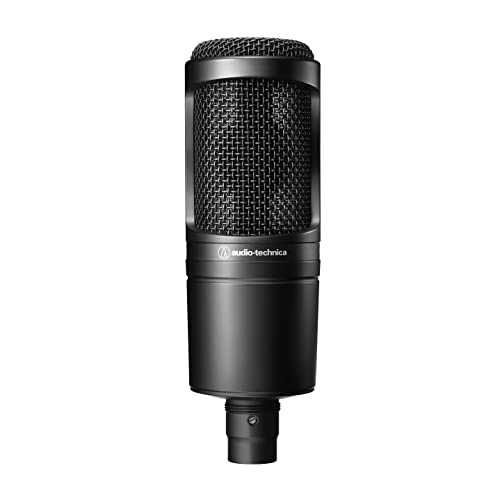
Audio-Technica AT2020 Cardioid Condenser XLR Microphone

MXL 770 Large Diaphragm Condenser Microphone
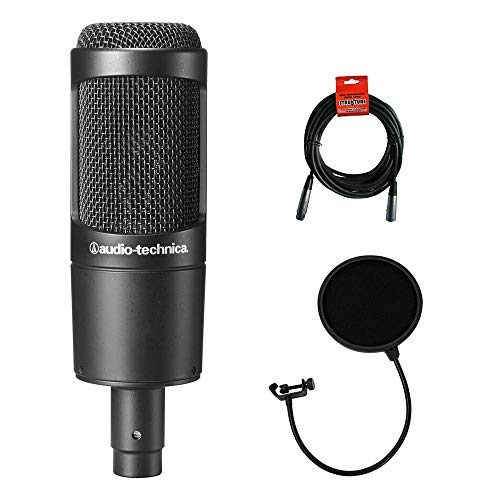
Audio-Technica AT2035 Condenser Microphone Bundle

Elgato Wave:1 USB Condenser Microphone
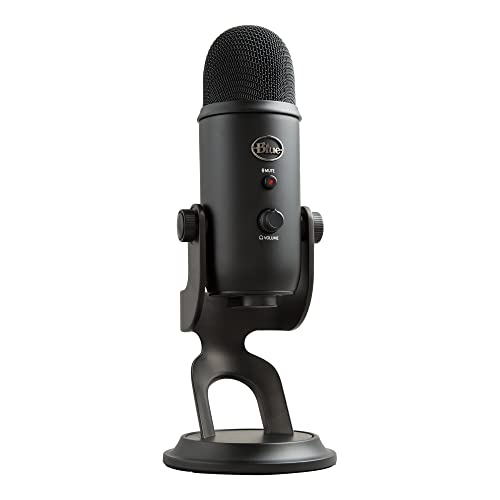
Blue Yeti USB Microphone (Blackout)

HyperX QuadCast S RGB USB Microphone

HyperX QuadCast USB Condenser Gaming Microphone

TENLAMP USB Gaming Microphone with Gain

RØDE NT-USB Versatile Condenser Microphone
The Picks, Examined More Closely
Elgato designed the Wave:3 MK.2 for streamers who want polished audio without juggling a rack of outboard gear. The built-in DSP (digital signal processing, basically on-board audio cleanup that runs inside the mic) handles gain staging and voice shaping, so your mix stays consistent even when your voice shifts from a whisper to a heated callout. A condenser capsule, where a thin membrane picks up detailed vocal nuances, captures speech with a focused cardioid pattern that rejects keyboard noise from the sides.
If you already use a Stream Deck or spend your evenings on Twitch, the Wave Link mixer software ties everything together. The Wave:1 below shares the same DNA, but this MK.2 adds the higher-bit DSP and a tactile capacitive mute button. For most gamers upgrading from a headset mic, this is the step that genuinely changes how the audience hears you.
Strengths Worth Knowing
- Onboard DSP removes the need for a separate mixer or interface
- Cardioid (heart-shaped) pickup rejects off-axis noise, so mechanical keyboard clatter fades into the background
- USB-C connection means true plug-and-play on PC and Mac with no drivers to chase down
- Capacitive mute button gives silent, instant muting mid-game without hunting for a hotkey
- Wave Link software creates separate mixes for your headphones and stream output
Things To Consider
- Lacks a polar pattern selector, so it only does cardioid, which can feel limiting for group calls
- Best results lean on the companion software; ignore it and you miss half the value
Feature Snapshot
Who Will Love This
Solo streamers and content creators who want studio-level control without the cable spaghetti of an audio interface.
Skip It When
Your setup leans on multi-person podcasting, where the Blue Yeti’s switchable polar patterns would serve you better.
The AT2020 has earned a near-cult following among home studio builders for one simple reason: it sounds more expensive than it is. Its low-mass diaphragm, a tightly tensioned membrane that responds quickly to vocal nuances, delivers a clean, detailed capture that flatters both gaming chatter and the occasional guitar session. The all-metal body shrugs off desk bumps and travel, which matters when your streaming spot doubles as a homework station.
Unlike the Elgato Wave:3 above, the AT2020 uses XLR, the three-pin professional audio cable found on stage and studio gear, so you’ll need an audio interface or mixer to run it. That extra box adds cost, but it also means your mic grows with you as your setup matures. For a gamer pivoting into podcasting or music, that headroom is the whole point.
Advantages To Know
- Wide dynamic range handles loud outbursts and quiet asides without distorting
- Cardioid polar pattern keeps focus on your voice and minimizes room echo
- Sturdy metal chassis holds up to frequent repositioning
- Trusted studio pedigree at a price beginners can justify
Worth Noting
- Requires an audio interface and XLR cable, both sold separately
- No built-in mute button or headphone jack, so monitoring happens through the interface
- Pops and sibilance, that harsh “sss” sound, can creep in without a separate pop filter
Best Suited To
Budget-conscious creators ready to invest in a small interface and build a setup that can grow beyond gaming.
Reach For A Different Pick When
You’d rather stay USB-only, in which case the Elgato Wave:1 delivers comparable vocal clarity with zero extra hardware.
The MXL 770 invites first-time XLR users in with a forgiving sound and a price that doesn’t punish experimentation. Its large-diaphragm design, meaning a bigger capsule that picks up more low-end warmth and body, gives voices a rounder, more broadcast-like quality, which helps thinner voices fill out a stream. The cardioid pattern keeps your roommate’s TV out of the recording, which is the kind of quiet win that matters when you share walls.
Versus the Audio-Technica AT2020 directly above, the MXL trades some top-end sparkle for a warmer midrange. For spoken-word and casual gaming, that character tends to feel smoother in untreated bedrooms. You’ll still need an interface and cable, but the learning curve is gentler than older studio condensers.
The Helpful Details
- Large-diaphragm capsule adds body to thinner voices, useful for long streaming sessions
- Balanced bass response keeps your voice grounded without muddying background music
- Cardioid pattern rejects off-axis noise like PC fans and AC hum
- Compatible with standard XLR interfaces and mixers
Trade Offs
- Build quality feels lighter than the AT2020, so handle it with care during setup changes
- No included shock mount, so desk thumps can transmit without an aftermarket add-on
The Right Fit
First-time XLR shoppers who want a friendly entry into studio-style capture without a steep learning curve.
Swap It Out When
You prioritize ruggedness, in which case the Audio-Technica AT2035 bundle offers a sturdier body plus a pop filter in the box.
Audio-Technica’s AT2035 sits a tier above the AT2020, with a higher SPL (sound pressure level) handling ceiling and a slightly more refined capsule. The bundle version layers in a 2-layer mesh pop filter and a 10-foot XLR cable, which means you can unpack, mount, and record without making a second shopping run. For a gamer just crossing into the XLR world, that convenience is worth more than it sounds.
Cardioid rejection keeps the focus on your voice, while the included pop filter softens the harsh “p” and “b” blasts that often plague condenser mics. The trade-off versus the cheaper MXL 770 is mostly build polish and detail retrieval, both of which favor the AT2035 in side-by-side listening.
Real-World Strengths
- Bundle includes pop filter and 10-foot XLR cable, so recording starts fast
- Higher SPL handling tolerates loud laugh-reactions and energy spikes
- Smooth, natural sound profile suits both gaming chat and occasional vocals
- Cardioid pattern minimizes room noise in untreated spaces
Room For Improvement
- Still requires an audio interface for power and connection
- Pop filter requires careful positioning to work effectively
Feature Rundown
Whose Shelf It Belongs On
Creators stepping into XLR who want one box that includes the accessories they’d otherwise buy separately.
A Better Fit Elsewhere
If you want to keep your desk footprint tiny, the Elgato Wave:1 trades the bundle extras for a single USB cable and a smaller body.
The Wave:1 takes everything the Wave:3 above offers and trims it down to the essentials, a USB cardioid condenser with a solid anti-distortion circuit and a clip-free safety net for loud moments. For a gamer who wants to skip the interface rabbit hole, this is the friendliest on-ramp in the Elgato lineup. The included Wave Link app still lets you mix game audio, voice chat, and music into separate output streams.
Where the Blue Yeti leans into physical controls and pattern switching, the Wave:1 leans on software. That choice keeps the body compact and the learning curve low, though it does mean your best settings live inside the app rather than on the mic itself.
Where It Helps
- USB-C plug-and-play requires zero audio knowledge to get started
- Anti-distortion circuitry protects streams from sudden volume spikes
- Wave Link software supports multi-source mixing without extra hardware
- Compact body fits cramped desks and small streaming corners
Honest Caveats
- Single cardioid pattern limits flexibility for interviews or roundtable chats
- Software features feel thin on macOS compared to the Windows experience
Made For
First-time streamers and remote workers who want a clean, fuss-free upgrade over a built-in webcam mic.
Not Your Match When
You regularly record with multiple speakers, where the HyperX QuadCast S and its four polar patterns would be a smarter tool.
The Blue Yeti has been a fixture on gaming desks for years because it answers a question few rivals do: what if one mic could do everything? The Blackout edition keeps the classic design with a darker finish, while offering four switchable polar patterns (stereo, omnidirectional, cardioid, bidirectional) that adapt to solo streaming, group chats, or in-person interviews. The Blue VO!CE software adds voice modulation and broadcast effects for creators who like to experiment.
Compared to the Elgato Wave:1, the Yeti is heavier and more desk-anchored, with controls built directly into the body. That physicality is a plus for tinkerers and a minus for anyone chasing a minimal setup. For most gamers, the cardioid pattern is the daily driver, but having the others ready when the use case shifts feels like a quiet luxury.
Strong Points
- Four polar patterns cover nearly every recording scenario from one mic
- Built-in gain control and headphone jack enable zero-latency monitoring
- Blue VO!CE software unlocks vocal effects and HD audio samples
- Adjustable stand lets you fine-tune height without buying a boom arm right away
Points To Note
- Larger footprint crowds smaller desks, so many users add a boom arm early
- Condenser sensitivity picks up room noise more than dynamic alternatives
- Body weight and metal construction feel premium but reduce portability
Quick Facts
Perfect Match For
Multi-role creators who split time between solo gaming, podcasting, and group recordings and want one mic to do it all.
Look Elsewhere When
Your rig is all about compact minimalism, in which case the Elgato Wave:1 takes up far less desk real estate.
The QuadCast S is the version streamers reach for when their camera frame matters as much as their audio. Radiant RGB lighting wraps the body, customizable through the HyperX Ngenuity software, and a built-in shock mount uses elastic suspension to keep desk bumps and keyboard vibrations out of the recording. The included pop filter sits inside the frame, so there’s no extra accessory to mount.
It shares the same DNA as the original QuadCast below, but the RGB treatment and software polish make it feel like a more deliberate on-camera tool. If your setup lives on Twitch, YouTube, or any place where the mic is in frame, the visual upgrade is more than a gimmick.
Notable Upsides
- Customizable RGB lighting creates a striking on-camera presence
- Internal pop filter and shock mount reduce the need for aftermarket accessories
- Tap-to-mute sensor with LED indicator prevents accidental broadcasts
- Four polar patterns cover solo, interview, and group scenarios
A Few Limitations
- RGB effects require the Ngenuity software, which adds setup time on first use
- Heavier than typical USB mics, so the included stand works best on stable surfaces
Right Fit For
On-camera streamers who want their mic to look as polished as their audio and who value tactile controls.
Where Another Pick Suits Better
If you want pro-grade vocal capture for music or voiceover work, the RØDE NT-USB offers cleaner, more neutral character without the RGB.
The original QuadCast trades the S model’s RGB for a steady red LED ring, which keeps the body simple while keeping every feature that made the line popular. Console players appreciate that it works on PS4, PS5, and Mac without driver downloads, which is rarer than it should be. The same shock mount, pop filter, and tap-to-mute sensor from the QuadCast S carry over unchanged.
Where the QuadCast S above leans into on-camera flair, this one feels more like a workhorse. The red glow is subtle enough to fit a serious streaming aesthetic, and the price typically lands lower, which makes it the smarter call for gamers who care more about sound than stage lighting.
Where It Excels
- Console compatibility covers PS4, PS5, PC, and Mac out of the box
- Tap-to-mute sensor with LED status keeps mid-game muting quick and clear
- Built-in shock mount reduces desk rumble without extra accessories
- Four polar patterns adapt to streaming, podcasting, or voice chat
Minor Gripes
- Lacks the RGB customization that some streamers prefer for branding
- Weight and size demand a stable surface or a proper boom arm
Who Should Grab It
Multi-platform gamers who plug into consoles as often as PCs and want consistent audio quality across both.
Consider Something Else When
You need broader software mixing control, where the Elgato Wave:3 MK.2 and its Wave Link app offer finer routing.
The TENLAMP slots in for gamers who want modern features at a tight price. A long press on the body activates AI noise reduction, which targets keyboard clicks, room echo, and fan noise, the usual suspects in a home streaming space. Gain control sits on the front for quick adjustments, and a cardioid pattern keeps the focus on the speaker.
For a first mic or a tight-budget upgrade, the feature list punches above its weight. The honest read is that build quality won’t match the HyperX or Elgato options, and the AI noise profile takes experimentation to dial in, but for the price it’s a capable starting point.
Where It Delivers
- AI noise reduction tackles common background distractions without separate software
- Touch mute button keeps accidental broadcasts off the air
- Front-facing gain knob simplifies real-time level adjustments
- Cardioid pattern focuses on voice while reducing ambient room sound
Softer Spots
- Construction feels lighter than the HyperX or Elgato alternatives
- AI noise reduction works best after some experimentation with the long-press activation
Built With In Mind
Gamers streaming from shared or noisy rooms who need a budget tool that can clean up background distractions on the fly.
Another Choice May Suit
For pure vocal clarity at a similar tier, the Elgato Wave:1 delivers a more refined capture, though without the AI processing.
RØDE built the NT-USB for creators who want studio character without leaving the USB ecosystem. The side-address design, meaning you speak into the side of the mic rather than the top, feels familiar to anyone who’s spent time in a recording booth, and the included pop filter softens plosives right out of the box. A 3.5mm headphone jack on the body enables zero-latency monitoring, which is a real advantage when you’re tuning levels live.
Compared to the Blue Yeti, the NT-USB leans toward a more neutral, detailed sound rather than the Yeti’s warmer broadcast flavor. For vocal-heavy creators, that honesty can feel like a breath of fresh air, especially when the same mic doubles for music, voiceover, or streaming across the week.
Good Reasons To Consider
- Studio-quality condenser capture in a USB form factor
- Built-in headphone jack supports real-time monitoring with zero latency
- Included pop filter tames plosives without a separate purchase
- Compatible with PC, Mac, and even iPad for portable recording setups
Potential Drawbacks
- Single cardioid pattern, no quick switching for group scenarios
- Priced higher than most gaming-focused USB alternatives
- Included stand works fine but most owners eventually upgrade to a boom arm
Spec Overview
Who It Suits Best
Vocal-heavy creators who want honest, detailed capture and clean monitoring in a single USB package.
Where Another Pick Suits Better
If multi-pattern flexibility matters more than absolute vocal detail, the Blue Yeti or HyperX QuadCast S will flex more easily across formats.
Picking The Right Mic For Your Gaming Setup
USB versus XLR is the first fork in the road. USB microphones connect straight to your PC or console with a single cable, making them the obvious choice for plug-and-play simplicity. XLR microphones, like the AT2020 and MXL 770 above, route through an audio interface or mixer, which adds cost but also gives you upgrade headroom for music or podcasting later. If your gaming setup is your creative hub, XLR is worth considering; if it’s strictly for chat and streaming, USB is faster to live with.
Polar pattern, the shape of the area around the mic where it picks up sound, matters more than people expect. Cardioid focuses on the speaker directly in front and rejects side noise, which suits most gaming rooms. Omnidirectional captures everything equally, useful for group calls or roundtable podcasts. Stereo and bidirectional patterns, found on the Blue Yeti and HyperX QuadCast S, add flexibility for interviews or immersive room recordings. Choose based on how many people usually sit in front of the mic.
Build and accessories change daily ownership more than people realize. A shock mount reduces desk thumps. A pop filter softens harsh “p” sounds. A headphone jack on the mic body enables latency-free monitoring, which means hearing your own voice in real time without delay, so you can adjust gain on the fly. The HyperX QuadCast and RØDE NT-USB include some of these out of the box, while the AT2035 bundle layers them in for a complete first setup.
Finally, think about console compatibility. PS4, PS5, and Mac support varies between models, and not every USB mic works without extra adapters. The HyperX QuadCast line and Blue Yeti are well-documented console picks, while the Elgato models lean PC-first. Matching the mic to your platform avoids the frustration of an unsupported device showing up in your inputs list.
Key Considerations Across These Picks
Pitfalls Shoppers Hit
The most common mistake is buying a condenser mic without considering room treatment. Condensers pick up everything, including your AC unit, PC fans, and that one neighbor who always seems to be vacuuming. A dynamic mic or a condenser with strong noise reduction (the TENLAMP or Elgato options handle this better) can save you from hours of post-processing.
Another trap is underestimating cable and accessory costs. XLR mics look affordable until you add the interface, cable, and possibly a cloudlifter (a small inline device that boosts quiet mic signals), which can double the total. USB mics avoid this, but budget USB options sometimes ship without a pop filter or stand, so factor those in.
What The Higher Tier Buys
Spending more on a microphone usually buys you better capsule quality, which shows up in clarity and how the mic handles plosives and sibilance. The RØDE NT-USB and Audio-Technica AT2035 sit in this category, offering a more refined capture that translates to less editing later.
Premium tiers also tend to add useful extras: a built-in headphone jack for monitoring, a shock mount to tame desk noise, and software that gives finer control over EQ and compression. For gamers who stream regularly, those features pay back in saved editing time. For casual chat, the difference between a budget USB and a premium USB is real but smaller, so the upgrade is most worth it if you create content beyond gaming.
Frequently Asked Questions
Do USB microphones work on consoles?
Most USB microphones work with PS4, PS5, and Xbox, though some require an adapter or work only with specific apps. The HyperX QuadCast line is well-documented for console use, while the Elgato models lean toward PC and Mac support.
What is a cardioid polar pattern?
A cardioid polar pattern means the microphone is most sensitive to sound directly in front of it and rejects noise from the sides and rear, which is ideal for solo gaming and streaming in untreated rooms.
Can a cheap microphone sound professional?
Yes, especially when paired with good room treatment, a pop filter, and basic gain management. The Audio-Technica AT2020 and MXL 770 are common examples of affordable mics that produce studio-quality capture in the right conditions.
Do I need an audio interface?
Only for XLR microphones. USB models connect directly to your PC or console, while XLR mics like the AT2020 or AT2035 need an interface to convert the analog signal to digital and provide power.
How important is a pop filter?
A pop filter softens the harsh bursts of air from “p,” “b,” and “t” sounds that can cause distortion in condenser mics. It’s a small accessory that makes a noticeable difference in clarity, especially for streaming and voiceover work.
Closing Remarks
Your microphone is the piece of your setup your audience hears most, which is why the upgrade from a built-in webcam or headset mic feels so dramatic once you make it. Match the mic to your platform, your room, and how much post-production you actually want to do, and the rest tends to fall into place. The ten options above cover a wide range of budgets and use cases, so trust your gut on the one that fits your daily routine and start sounding like the gamer you already are.


