


Gaming keyboards have split into a sprawling category, and cheap no longer means flimsy. Plenty of budget boards now ship with mechanical switches, hot-swap sockets, and wireless connectivity that hold up to daily play. Whether you’re grinding ranked matches after class or building a clean battlestation without spending a fortune, the right pick comes down to layout, switch feel, and how much desk space you actually have. This list covers nine options that earn their place, including a few accessories and switch packs worth knowing about, so you can match form to function without overpaying.
The Lineup, Simplified

Elgato Stream Deck XL Advanced Studio Controller, 32 Keys

GravaStar Mercury K1 Pro 75% Wireless Mechanical Gaming Keyboard, Hot-Swap

YUNZII C75 Cute 75% Wireless Mechanical Keyboard (Beige, Candy Switch)

YUNZII B87 TKL Wireless Mechanical Keyboard (Pink, Milk Switch)

co2CREA Hard Case for Logitech POP Wireless Mouse, Purple+Mint

Kailh Box White V2 Switches, 5-Pin 45gf Clicky (36pcs)

KINESIS Gaming TKO Mechanical Keyboard, Clicky White, 60%
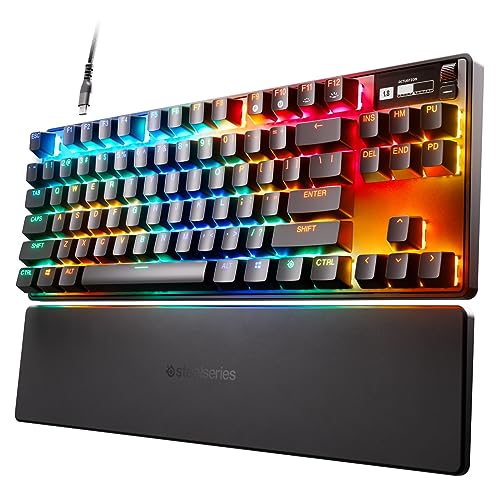
SteelSeries Apex Pro TKL HyperMagnetic Gaming Keyboard

GravaStar Mercury K1 75% Wireless Mechanical Gaming Keyboard RGB
A Closer Look At Each Pick
The Elgato Stream Deck XL earns a spot on a gaming keyboard roundup because it sits next to your keyboard and changes how you use it. Thirty-two LCD keys give you physical shortcuts for OBS, Twitch, lighting, and macros, so you spend less time alt-tabbing mid-match. It weighs around 410 grams without the stand, so it stays planted on the desk even when your other hand is hammering WASD.
Where it really earns its keep is during live production: triggering scene changes, muting mics, sending chat replies, all without breaking focus. For streamers who already own a separate mechanical board, this becomes the second input you didn’t know you needed.
The Case For It
- 32 customizable LCD keys (small screens that show icons or labels and reconfigure per app) let you map dozens of actions
- Plug-and-play integration with OBS, Streamlabs, Twitch, and YouTube
- Solid 410 g chassis stays steady during energetic play
- Remappable profiles mean you can swap layouts between gaming and editing
Things To Consider
- Pairs with a keyboard rather than replacing one, so it adds desk footprint
- Software updates are required to keep integrations current
Feature Snapshot
Made For
Streamers and content creators who already game with a dedicated mechanical board and want a tactile command center beside it.
Skip It When
You only need a single keyboard and don’t run live production. The SteelSeries Apex Pro TKL is a more direct match for pure gaming performance.
The GravaStar Mercury K1 Pro leans hard into the visual side of gaming gear. A skeletal aluminum frame makes the board look like a piece of sci-fi hardware, and the metal construction keeps the typing surface rigid during long sessions. The 75% layout trims the numpad and arrows to free up mouse space, which competitive Valorant or Apex players tend to appreciate.
Hot-swap sockets mean you can pull and replace switches without soldering. That matters if you want to try linear switches for FPS games and tactile switches for MOBAs without buying a second board. Compared to the Stream Deck XL above, this is the actual typing surface; the Deck is a companion tool, while this is the centerpiece.
The Upside
- Aluminum exoskeleton resists flex and stays cool to the touch
- Hot-swap PCB (the printed circuit board that lets you pull switches without soldering) supports switch experimentation
- Wireless connectivity reduces cable clutter for clean setups
- 75% footprint leaves more room for wide mouse sweeps
Honest Caveats
- Open-frame design lets crumbs and dust settle between keys more easily than enclosed boards
- Distinctive styling may not blend into a minimalist office
Who It Suits Best
Gamers who want a centerpiece board with personality, plenty of mouse room, and the option to tinker with switches over time.
Another Choice May Suit
If you want a quieter, more traditional closed frame, the YUNZII B87 TKL is a simpler everyday option without the skeletal styling.
The YUNZII C75 takes a softer approach to mechanical gaming. The beige chassis and pastel keycaps make it a natural fit for shared rooms, dorm setups, or any desk that doubles as a workspace. The 75% layout keeps the footprint small, and triple-mode connectivity (Bluetooth, 2.4 GHz wireless, and wired USB-C) means you can pair it with a laptop, a console, and a tablet without re-plugging.
Candy switches ship as stock and lean toward a creamy, thocky typing feel. For late-night gaming in thin-walled apartments, that smoother acoustic profile beats the loud click of traditional clicky switches. Where the Mercury K1 Pro above feels like a showpiece, this board disappears into your routine.
A Few Highlights
- Compact 75% layout saves desk space in small rooms
- Triple connectivity (Bluetooth, 2.4 GHz, USB-C) covers phone, PC, and console
- Stock switches land in a quieter, smoother acoustic range
- Wireless mode reduces cable clutter on minimalist desks
Small Caveats
- Pastel colorway may not match darker battlestation themes
- Smaller keycap legends can be harder to read in dim light
Best Suited To
Students, apartment dwellers, and casual gamers who want a tidy, quieter wireless board that works across multiple devices.
Look Elsewhere When
You want a true esports-grade tool. The KINESIS Gaming TKO 60% is stiffer and more tournament-oriented.
The YUNZII B87 is the gentlest on-ramp into mechanical keyboards on this list. An 87-key TKL (tenkeyless) layout keeps arrows, function row, and home cluster while dropping the numpad, so you don’t have to relearn key positions. The included soft-touch wrist rest adds comfort for long sessions, which beginners often overlook until soreness kicks in.
Milk switches give a smooth, linear feel with no bump or click. That makes the B87 a forgiving first board: no surprises mid-keystroke, just consistent travel. Wireless connectivity keeps your desk clean, and the ABS frame keeps weight manageable for transport between home and a study spot.
Useful Strengths
- TKL layout preserves arrow keys and function row for first-timers
- Stock linear switches feel predictable for new mechanical users
- Included wrist rest reduces fatigue during long sessions
- Wireless mode simplifies cable management
Points To Keep In Mind
- ABS plastic frame is lighter than aluminum alternatives like the Mercury K1 Pro
- Pink colorway is a love-it-or-leave-it choice
Quick Facts
Right Fit For
First-time mechanical keyboard shoppers who want something comfortable, familiar, and easy to live with day to day.
Reach For A Different Pick When
You want aluminum build quality and hot-swap flexibility. The GravaStar Mercury K1 Pro is the step up from this one.
This co2CREA case isn’t a keyboard, but it earns its spot because mobile gamers protect the gear that travels with them. The hard EVA shell (a tough, semi-rigid plastic foam that absorbs bumps) shields a Logitech POP or Pebble mouse from drops, scratches, and splash, with a slim zippered profile that slides into a backpack sleeve.
For gamers who bounce between library, café, and home, this case keeps the wireless dongle and USB-C cable from rattling around loose. Compared to the YUNZII C75 above, which also travels well, this is the accessory that makes that travel worry-free for your mouse.
Where It Delivers
- Hard-shell protection against drops and bumps
- Built-in carabiner clip for bag attachment
- Internal mesh pocket holds cable and dongle
- Compatible with multiple Logitech compact mice
Possible Compromises
- Mouse and accessories are not included, case only
- Form-fit design limits use to specific Logitech models
Perfect Match For
Students, remote workers, and travelers who carry a compact Logitech mouse between locations and want it to survive the trip.
Where A Sibling Pick Shines
For actual keyboard protection during travel, the KINESIS Gaming TKO bundle includes a dedicated carrying case built for that board.
The Kailh Box White V2 pack is for hobbyists who already own a hot-swap board like the GravaStar Mercury K1 Pro or the KINESIS TKO and want to refresh the feel. These are clicky switches, meaning each press produces a sharp tactile bump and an audible click, with a 45gf actuation force (the gram weight required to register a keypress) that feels firm under the fingers.
The standout spec is IP56 dust and water resistance (an industry rating meaning the switch is largely dust-tight and resists water jets), thanks to Kailh’s boxed design that fully encloses the contact leaves. That barrier reduces oxidation and extends switch life, which is helpful if you snack at the desk or game in a dusty room.
The Value In It
- Boxed design protects against dust and moisture ingress
- 5-pin layout (switches with five metal contact legs for firmer PCB seating) fits a wide range of hot-swap PCBs
- Clicky feedback works well for typing-heavy gaming sessions
Trade Offs
- Clicky sound is louder than linear or tactile alternatives, so it isn’t apartment-friendly
- You need a hot-swap board to use these without soldering
Feature Card
Who Should Grab It
Builders and tinkerers who already own a hot-swap keyboard and want a louder, more durable switch for typing or rhythm games.
Not Your Match When
You want a complete keyboard out of the box. Pick the YUNZII C75 or the SteelSeries Apex Pro TKL instead.
The KINESIS Gaming TKO is built for tournament desks. A 60% layout drops the function row, arrows, and numpad, so your mouse hand sits closer to the typing position and your forearm travel shrinks. The aluminum body gives the chassis a planted, rigid feel under aggressive keypresses, and the SF Shock Limited Edition travel case makes LAN trips painless.
Hot-swap sockets let you replace the clicky Kailh Box White switches with linear or tactile alternatives if your style changes. Split spacebar options help with thumb-bound bindings in MOBAs and fighters. Compared to the GravaStar Mercury K1 Pro above, this board is more about raw input performance than desk art.
Strong Points
- 60% layout maximizes mouse space for low-sensitivity aimers
- Aluminum chassis resists flex during fast inputs
- Hot-swap PCB accepts Kailh Box and MX-style switches
- Included carrying case simplifies LAN transport
Soft Spots
- 60% layout forces layer-based access to arrows and function keys
- Clicky stock switches are loud for shared spaces
At A Glance
Built With In Mind
Competitive FPS and MOBA players who want a tournament-style 60% board with a rigid aluminum frame and LAN-ready portability.
Consider Something Else When
You need arrows and a function row for productivity. The YUNZII B87 TKL keeps that layout without sacrificing wireless convenience.
The SteelSeries Apex Pro TKL sits at the top of the roundup because it solves a problem most boards ignore: every key can feel different. OmniPoint 2.0 switches use magnetic actuation, meaning the key registers based on how far a magnet travels rather than physical contact, and you can set each key anywhere from 0.1 mm to 4.0 mm of travel.
In practice, that means feather-light WASD for rapid strafing and deep, deliberate presses for ability keys that should not fire by accident. The integrated OLED screen and USB-C cable round out a board that handles both esports and long typing sessions. Compared to the KINESIS TKO above, this one trades raw compactness for granular control.
Practical Advantages
- Per-key adjustable actuation from 0.1 to 4.0 mm
- Rapid Trigger (dynamic key reset that re-registers on the way back up, not at a fixed point) helps with quick counter-strafing
- Tenkeyless layout keeps arrows and function row without numpad bulk
- PBT keycaps (a textured, durable plastic that resists shine) stay clean through heavy use
Points To Note
- Premium pricing puts it well above entry-level boards like the YUNZII B87
- Software customization is required to unlock the per-key features
Spec Overview
Whose Shelf It Belongs On
Competitive FPS players and serious enthusiasts who want per-key control, Rapid Trigger, and a board they can grow into over years.
A Better Fit Elsewhere
Casual players on a tight budget will get more value from the YUNZII C75 or the GravaStar Mercury K1.
The GravaStar Mercury K1 is the slightly stripped-down sibling to the K1 Pro. You still get the same aluminum exoskeleton and 75% layout, but at a lower entry point, with RGB backlighting as the visual centerpiece instead of more exotic finishes. The dual-layer PBT keycaps resist shine, so legends stay readable after months of use.
Wireless connectivity keeps the desk clean, and the symmetrical 75% footprint works well for both left- and right-handed mouse users. For shoppers who like the Mercury K1 Pro’s design language above but want to spend less, this lands as the practical middle ground.
Key Advantages
- Aluminum frame adds rigidity and premium feel
- 75% layout balances compactness with arrow keys
- RGB backlighting supports per-key customization
- Wireless mode simplifies cable management
Factors To Consider
- RGB is configurable but not as refined as higher-tier boards
- Lacks the hot-swap PCB found in the Mercury K1 Pro
Who Will Love This
Style-conscious gamers who want an aluminum build and wireless freedom without the higher cost of hot-swap sockets.
Swap It Out When
You want to swap switches later. The GravaStar Mercury K1 Pro adds hot-swap support for long-term tinkering.
What Matters Most When Shopping For Cheap Keyboards For Gaming
Layout and Desk Footprint
A full-size board includes a numpad and function row, which helps for productivity but eats mouse space. TKL drops the numpad, and 60% drops arrows and function keys entirely. Most cheap gaming boards land in the 75% range, which keeps arrows, function row, and a small footprint. Match layout to your desk depth and to the games you play most.
Switch Type and Feel
Linear switches press straight down with no bump, tactile switches have a small bump you can feel, and clicky switches add an audible click. Linear suits fast FPS play, tactile works for typing-heavy games, and clicky gives strong feedback but runs loud. Many cheap boards now ship with hot-swap PCBs so you can change switches later.
Wired Versus Wireless
Wireless boards used to mean input lag, but current 2.4 GHz and Bluetooth options feel nearly identical to wired for gaming. Pick wireless if your desk is clean and you switch devices often. Stay wired if you want the lowest possible latency and don’t want to charge batteries.
Build Quality and Keycaps
Aluminum and PBT keycaps outlast plastic frames and ABS caps (a cheaper, smoother plastic that develops a greasy shine over time). Weight and rigidity matter during aggressive play, since a flexing board feels hollow and can shift mid-match. Check whether the board includes a wrist rest, a carrying case, or replaceable parts.
Common Slip Ups and Where The Upgrade Goes
Pitfalls Shoppers Hit
The most common mistake is buying on switch color alone. “Red” switches are usually linear, “brown” tactile, “blue” clicky, but actuation force and travel distance vary between brands. Another trap is ignoring keycap material: ABS caps shine and wear within months, while PBT holds up. Finally, layout regret hits hard, so picture yourself using arrows and the function row before you commit to 60%.
Why Top Tier Costs More
Boards like the SteelSeries Apex Pro TKL earn their premium through features that budget boards skip. Magnetic switches let you tune each key’s actuation depth, software unlocks per-key Rapid Trigger, and integrated displays add real-time info without alt-tabbing. You also get sturdier chassis, better stabilizers (the mechanisms that keep larger keys like Space and Enter level and rattle-free), and longer warranties. For casual gaming, mid-range picks like the GravaStar Mercury K1 deliver most of the feel at a fraction of the cost. For competitive play, the upgrade tends to pay off quickly.
Frequently Asked Questions
Are cheap mechanical keyboards good for gaming?
Modern budget mechanicals use the same switch types as premium boards, often with hot-swap sockets that let you upgrade later. The main trade-offs are frame material, software polish, and wireless latency, not the core typing or gaming experience.
What layout should I pick for gaming?
75% is the most flexible for mixed gaming and typing. TKL adds a familiar feel, while 60% maximizes mouse space for low-sensitivity FPS play. Full-size makes sense if you also use the numpad for work.
Clicky or linear switches for gaming?
Linear switches feel smoother and faster for rapid inputs, which most FPS players prefer. Clicky switches give strong feedback but run loud. Tactile splits the difference and works well for MOBAs and MMOs.
Do I need wireless for gaming?
Not strictly, since wired still offers the most consistent latency. That said, modern 2.4 GHz wireless performs close to wired and cleans up your desk. Bluetooth is fine for casual play but adds slight input delay.
How long do cheap mechanical keyboards last?
Switch lifespan is usually rated for 50 to 80 million keystrokes, so even budget boards can run for years. Keycap material matters more for long-term appearance: PBT outlasts ABS by a wide margin.
Bottom Line
Cheap gaming keyboards in 2026 cover far more ground than they used to, from wireless pastel boards for shared spaces to aluminum 75% frames with hot-swap switches for tinkering. Start with layout and switch type, then narrow by build material and connectivity. The right pick depends less on budget ceiling and more on how you actually use your desk day to day.


