


You don’t need a flagship price tag to get a satisfying mechanical keyboard. Plenty of sub-$100 boards now deliver real switches, wireless freedom, and hot-swap flexibility, which means your first mech can feel grown-up without draining your wallet. The trick is knowing where corners actually cost you comfort and where you can safely save.
This roundup walks through nine budget-friendly mechanical boards covering different layouts, switch types, and connection styles, so you can match a keyboard to how you actually play, type, and travel.
The Lineup, Simplified

Logitech G713 Wired Gaming Keyboard (White Mist)

GravaStar Mercury K1 Pro 75% Wireless Mechanical Gaming Keyboard

YUNZII C75 75% Wireless Mechanical Keyboard (Beige)

AULA F75 75% Wireless Hot-Swappable Gaming Keyboard (Pink)

MechLands Aula F99 PRO 96% Mechanical Gaming Keyboard

Kailh Box White V2 Clicky Switches (36-Pack)

KINESIS Gaming TKO 60% Mechanical Keyboard (Clicky)
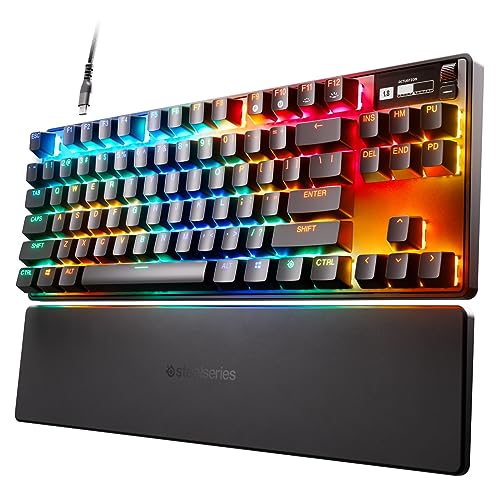
SteelSeries Apex Pro TKL HyperMagnetic Gaming Keyboard

GravaStar Mercury K1 75% Wireless Mechanical Gaming Keyboard
Inside Each Recommended Option
The Logitech G713 lands at the top of the list because it sidesteps the usual budget-board trade-offs. The tenkeyless frame keeps your mouse hand closer to the action, while the included palm rest actually earns its space during long typing sessions. For a writer grinding through deadlines or a streamer who types between matches, the GX Brown tactile switches feel light and predictable without the clicky rattle some roommates hate.
Compared to the wireless picks further down, this one trades Bluetooth freedom for a rock-solid USB connection that never needs charging. LIGHTSYNC RGB ties the lighting into supported games and ambient effects, so your desk reads as a unified setup rather than a solo peripheral.
Notable Upsides
- Tactile GX Brown switches stay quiet enough for shared offices and late-night gaming.
- Detachable palm rest adds comfort for long sessions without forcing a separate purchase.
- White Mist finish and floating keycap design give the board a clean, modern look on camera.
- Wired USB connection removes any worry about battery life during tournaments or streams.
Things To Consider
- No wireless mode, so you cannot pair it with a tablet or living-room setup on the fly.
- Tenkeyless design drops the numpad, which accountants and spreadsheet-heavy users may miss.
Quick Facts
Who It Suits Best
Wired-only desktop users who want a comfortable, quiet board for mixed gaming and typing marathons.
Consider Something Else When
The GravaStar Mercury K1 Pro is a better fit when wireless freedom and a flashier aluminum frame matter more than a bundled palm rest.
GravaStar leans hard into industrial design with the Mercury K1 Pro, and the aluminum alloy exoskeleton shows it the moment you lift the board. The skeletal, open-frame layout looks like a piece of sci-fi hardware, yet the typing feel stays grounded thanks to a gasket-mounted structure that softens bottom-out.
For battlestation builders who film their desk, this is the board your camera will notice. Hot-swap sockets let you swap switch types with a simple pull, so you can dial in linear, tactile, or clicky feedback without a soldering iron. It pairs over Bluetooth, 2.4GHz wireless, or USB-C, which is more flexibility than the Logitech G713 above offers.
Good Reasons To Consider
- Aluminum alloy frame resists flex and gives the board a satisfying heft.
- Hot-swap design lets you experiment with switch types over time.
- Tri-mode connectivity covers laptop, desktop, and tablet pairings.
- Distinctive skeletal design doubles as desk decor for content creators.
Worth Noting
- Open-frame design can collect dust in the gaps, so routine cleaning matters.
- Heavier chassis is less travel-friendly than the KINESIS TKO covered later.
Feature Snapshot
Made For
Style-conscious gamers who want a statement piece that still performs during long sessions.
Look Elsewhere When
The YUNZII C75 fits better when you want a softer, cuter aesthetic with creamy typing sound on a tighter budget.
The YUNZII C75 leans into a softer, friendlier look that feels more like a desk accessory than a hardcore gaming peripheral. The beige colorway and rounded keycap profiles give it a pastel, almost dessert-shop vibe that suits a home office or a study space just as well as a gaming nook.
Candy switches ship pre-installed for a creamy, marbly typing sound, and tri-mode wireless covers Bluetooth, 2.4GHz, and USB-C. The 75% layout preserves the function row and arrow keys, so first-time mech owners don’t lose shortcuts they rely on.
Useful Touches
- Compact 75% layout keeps essential keys while clearing desk space.
- Tri-mode wireless pairs easily with laptops, tablets, and phones.
- Creamy pre-lubed switches deliver a satisfying sound out of the box.
Trade Offs
- Cute aesthetic may feel out of place on a serious esports setup.
- Plastic-heavy build lacks the rigidity of the GravaStar K1 Pro’s aluminum frame.
Right Fit For
New mechanical keyboard owners who want a friendly-looking board that types nicely from day one.
Skip It When
The SteelSeries Apex Pro TKL is a smarter pick for serious competitive play, where adjustable actuation and a built-in OLED screen actually change how you game.
The AULA F75 crams an awful lot of features into a budget-friendly 75% frame. Tri-mode wireless (Bluetooth 5.0, 2.4GHz, USB-C) handles up to five paired devices, which means a single keyboard can hop between a desktop, a work laptop, and a media tablet without re-pairing.
LEOBOG Strawberry Mint switches ship pre-lubed for a creamy typing feel, and the hot-swap base accepts 3-pin or 5-pin switches for future tinkering. The 4000mAh battery is large for the category, and auto-sleep helps stretch that capacity across long workdays.
Strengths Worth Knowing
- 4000mAh battery delivers long wireless sessions between charges.
- Full-key macro programming through the driver boosts productivity in wired mode.
- Pre-lubed stabilizers reduce rattle on longer keys like the spacebar.
- 16.8 million RGB color options give you room to match any setup theme.
Honest Caveats
- Macro customization only works on Windows in wired mode, which limits some Mac users.
- Pink colorway is a strong visual commitment that may not blend with every desk.
Feature Rundown
Best Suited To
Power users who switch between multiple devices and want a single keyboard to handle the rotation.
Not Your Match When
The MechLands Aula F99 PRO works harder for anyone who needs a numpad and rotary knob for editing or media work.
The MechLands Aula F99 PRO targets a niche the cheaper boards often miss: people who actually need a numpad. The 96% layout squeezes a full number pad, arrow cluster, and function row into a footprint that’s noticeably tighter than a traditional 108-key board, while a rotary knob gives you quick volume or scroll control.
Gasket-mounted internals soften the typing feel, and tri-mode connectivity (BT 5.0, 2.4GHz, USB-C) keeps the board flexible across setups. Compared to the smaller YUNZII C75 above, this one trades pure cuteness for genuine office-and-gaming versatility.
A Favorable Mix
- 96% layout keeps the numpad without the bulk of a full-size board.
- Rotary knob adds tactile control for volume and scrolling.
- Gasket structure absorbs typing noise and harsh bottom-out feel.
- Tri-mode wireless covers most desk and travel scenarios.
Possible Compromises
- Still larger than 75% picks, so tight lap-desk use is less comfortable.
- Extra key count can slow muscle-memory adjustment for compact-board fans.
Who Will Love This
Hybrid work-and-play users who crunch numbers but don’t want a clunky full-size board on their desk.
Swap It Out When
The KINESIS Gaming TKO is a better choice for tournament players who need the smallest possible footprint for travel.
This is the only entry on the list that isn’t a finished keyboard, and that distinction matters. The Kailh Box White V2 36-pack is a set of replacement switches aimed at hot-swap board owners who want to refresh the feel of their existing setup or replace worn-out units.
The Box series is known for its enclosed “box” housing around the contact leaves, which reduces oxidation over time. IP56 dust and water resistance adds a layer of spill confidence that open-stem switches can’t match.
Reasons It Performs
- Clicky 45gf actuation delivers a crisp, audible bump for typists who like feedback.
- Boxed housing design slows contact oxidation for longer switch life.
- IP56 rating helps protect against accidental splashes and dust buildup.
Factors To Consider
- Requires a hot-swap compatible board, so it’s not a standalone purchase for new users.
- Clicky sound profile can be disruptive in shared or quiet spaces.
Perfect Match For
DIY keyboard builders refreshing an existing hot-swap board with clicky, water-resistant switches.
Reach For A Different Pick When
The AULA F75 is a better starting point for shoppers who don’t yet own a hot-swap board and want a complete package.
The KINESIS Gaming TKO caters to a specific crowd: competitive players who want maximum mouse space and minimum keyboard footprint. The 60% layout drops the function row, numpad, and arrow cluster, leaving your dominant hand free to swing wide in FPS titles.
An aluminum body gives the board surprising rigidity for its size, and the split spacebar lets you rebind one half to crouch or another action. The included travel case is a real perk for LAN tournament goers and remote workers who move between setups.
Bright Spots
- Aluminum chassis keeps the small frame from flexing under aggressive typing.
- Hot-swap sockets let you swap Kailh Box White switches for linear or tactile alternatives.
- Travel case protects the board during LAN trips and office commutes.
Soft Spots
- 60% layout requires a learning curve for users who depend on arrow keys or F-row shortcuts.
- Clicky switches are loud, which may bother housemates in shared spaces.
Spec Overview
Who Should Grab It
Tournament-going FPS players who want the smallest possible board with durable construction.
Where A Sibling Pick Shines
The GravaStar Mercury K1 Pro is a better fit when you need wireless freedom plus a 75% layout for more keys.
The SteelSeries Apex Pro TKL sits at the premium end of this list, and its standout feature explains why: OmniPoint 2.0 adjustable hypermagnetic switches. Each key lets you set its actuation point anywhere from 0.1mm to 4.0mm, so you can make WASD feather-light for rapid movement and ability keys deeper to dodge misfires.
For most casual gamers, that level of control is overkill. For ranked Valorant or CS2 players chasing every possible edge, the rapid trigger behavior and per-key tuning change how the game actually feels. The onboard OLED screen surfaces in-game stats, Discord alerts, or custom animations without alt-tabbing.
Positive Points
- 40 levels of per-key actuation let you tune each key to your playstyle.
- Rapid trigger uses travel distance rather than a fixed reset point, reducing latency in fast inputs.
- Tenkeyless aluminum frame balances desk footprint with a premium feel.
- OLED smart display keeps useful info visible mid-game.
Less-Strong Areas
- Premium pricing puts it well above most budget-focused picks on this list.
- Software ecosystem is Windows-centric, so Linux or Mac users get a reduced experience.
Built With In Mind
Competitive esports players who want per-key tuning and can justify the higher cost for measurable in-game performance.
A Better Fit Elsewhere
The Logitech G713 is a more comfortable daily choice for users who mostly type and game casually without needing adjustable actuation.
The standard GravaStar Mercury K1 sits just below the K1 Pro covered earlier, and it covers most of the same ground for shoppers who don’t need hot-swap flexibility. The aluminum alloy exoskeleton still gives the board that distinctive skeletal look, and the 75% layout keeps arrow keys and a function row intact.
Wireless connectivity covers Bluetooth and 2.4GHz for clean desk setups without a cable mess. Compared to the Pro version, you trade hot-swap switches for a lower entry price, which is a fair deal if you already know the switch type you like.
Where It Helps
- Aluminum frame adds long-term durability over plastic budget boards.
- RGB backlighting lets you personalize the look for streaming or ambient setups.
- Wireless modes reduce cable clutter on minimalist desks.
Points To Keep In Mind
- No hot-swap support, so you’re committed to the factory switch choice.
- Sakura Pink colorway may clash with darker, more neutral desk themes.
Whose Shelf It Belongs On
Casual wireless users who value build quality and style over deep customization options.
Another Choice May Suit
The AULA F75 is a stronger pick for shoppers who want a larger battery and a hot-swap base for future switch experiments.
What To Weigh Before Spending On A Budget Mechanical
Mechanical keyboards under $100 used to feel compromised, and on some cheap boards they still do. Focus first on the switch type, because that decides how every keystroke feels. Linear switches press straight down with no bump, tactile switches offer a small feedback bump at actuation, and clicky switches add an audible click on top of that bump. Pick the one that matches your room: linear for noise-sensitive spaces, tactile for general typing, clicky if you live alone and love feedback.
Layout is the next big call. A 60% board like the KINESIS TKO saves desk space but drops arrow keys, while a 75% keeps them in a compact shell. A 96% adds a numpad without a full-size footprint, and a tenkeyless cuts the numpad entirely. Match the layout to the work you actually do, not the layout that looks coolest on a forum post.
Connection style changes daily use. Wired USB means zero battery anxiety, while Bluetooth or 2.4GHz wireless lets you swap between a laptop, a tablet, and a desktop. Tri-mode boards like the AULA F75 and MechLands F99 PRO give you all three, which is genuinely useful if you regularly move between devices.
Hot-swap support is the sleeper feature. A hot-swap board lets you pull out a switch and slot in a new one without soldering, so you can experiment with switch types over time. If you don’t know your preference yet, hot-swap boards pay for themselves the first time you change your mind.
Key Considerations Across These Picks
Pitfalls Shoppers Hit
The most common budget mistake is buying a board with a switch type you can’t stand. Clicky switches feel great in a demo video and terrible in a quiet apartment at midnight. Look up sound profiles and consider a tactile switch if you share walls with anyone.
Another trap is ignoring keycap material. ABS plastic keycaps shine and feel slick after a year of use, while PBT holds its texture much longer. The KINESIS TKO ships with PBT caps for that reason, and it’s worth seeking out for daily drivers.
When Paying More Pays Off
Spending more usually buys better build materials, longer battery life, or per-key customization. The SteelSeries Apex Pro TKL costs more because its adjustable actuation genuinely changes how competitive games feel, not because of a fancier logo. If you game casually, save the money. If you play ranked daily, the upgrade pays off in fewer mis-clicks and faster reactions.
Frequently Asked Questions
Are cheap mechanical gaming keyboards actually good?
Yes, especially for the 2026 generation of budget boards. You can now get hot-swap sockets, tri-mode wireless, and gasket mounts in the sub-$100 range, features that lived on premium boards a few years ago. Stick with established switch types and the typing feel holds up well.
What switch type is best for gaming?
Most FPS players prefer linear switches for smooth, uninterrupted key travel, while MMO and typing-heavy users often like tactile switches for the feedback bump. Clicky switches work for gaming but tend to be loudest, which is worth considering in shared spaces.
Do I need a numpad on a gaming keyboard?
Not necessarily. Most games use the left-hand cluster and mouse for action, so dropping the numpad gives you more mouse-room and a smaller desk footprint. You only need a numpad if you regularly enter numbers for spreadsheets, accounting, or data work.
Is wireless mechanical keyboard lag a real problem?
Modern 2.4GHz wireless keyboards add latency that most people cannot feel, and Bluetooth 5.0 has closed the gap further. For competitive esports at the very top level, wired is still the safe choice, but for everyday play and streaming, wireless is more than good enough.
How long do cheap mechanical keyboards last?
Quality budget boards typically use switches rated for tens of millions of keystrokes, which is years of regular use. The weak point on cheaper boards is usually the keycaps and the wireless antenna over time, not the switches themselves.
The Takeaway
The best cheap mechanical gaming keyboard is the one that matches your switch preference, your layout needs, and your desk space, not the one with the loudest feature list. Start with how you want the keys to feel, then narrow down by size and connection style, and you’ll end up with a board that lasts for years without overpaying.


