


Building a gaming PC on a budget is less about cutting corners and more about choosing components that punch above their weight. The right parts deliver smooth frame rates, quiet operation, and years of service without forcing you into the premium tier. This roundup focuses on the cases, cooling, power, and tools that keep a budget build reliable and easy to live with.
The Choices Worth Comparing
Noctua NF-F12 PWM chromax.Black.swap Quiet Fan 120mm

NZXT H5 Flow Compact ATX Mid-Tower PC Gaming Case (White)

CORSAIR iCUE Link 3500X RGB Mid-Tower ATX PC Case

Thermalright CPU Contact Frame Anti-Bending Buckle for AM5

NZXT H6 Flow CC-H61FB-01 Dual-Chamber Mid-Tower Case (Black)
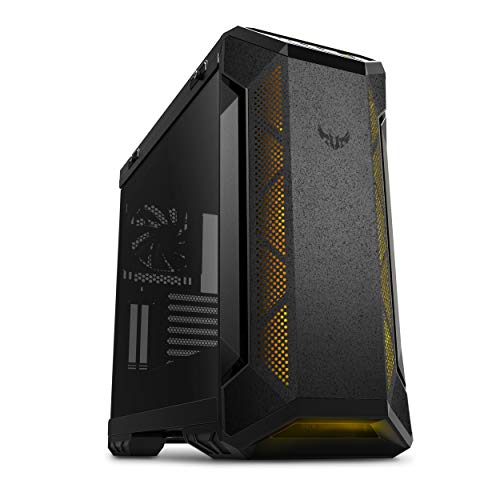
ASUS TUF Gaming GT501 Mid-Tower Gaming Case

NZXT H6 Flow CC-H61FW-01 Dual-Chamber Mid-Tower Case (White)

Corsair RM650 650W 80 Plus Gold Fully Modular Power Supply
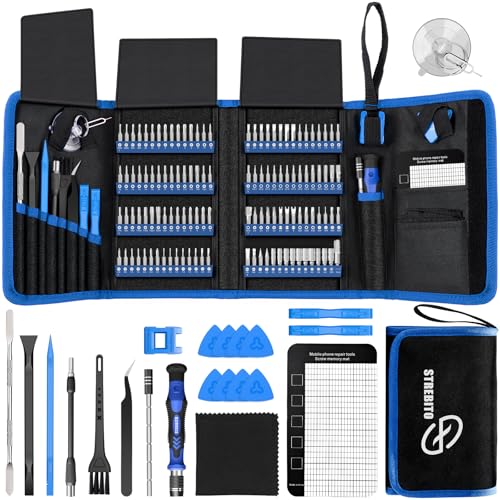
STREBITO Electronics Precision Screwdriver Set 142-Piece

EUREKA ERGONOMIC Height Adjustable PC Stand with Wheels
More Details On Our Top Picks
The Noctua NF-F12 in its chromax.Black.swap trim delivers a rare combination of low noise and strong static pressure, which is the pressure a fan produces to push air through dense obstacles like radiator fins or heatsink stacks. In real terms, that’s a fan that sits quietly behind a radiator while still pulling heat out of an overclocked CPU.
For builders chasing a near-silent rig without sacrificing cooling headroom, this fan is the kind of component you spec once and forget about. It’s noticeably more refined than generic PWM (pulse-width modulation, a speed-control signal) spinners, and the dark color scheme blends into a stealth-themed case better than Noctua’s traditional beige.
Key Advantages
- Excellent static pressure for radiator and heatsink use, meaning air moves efficiently through tight fin stacks rather than stalling.
- 4-pin PWM support lets your motherboard ramp the fan down to a near-inaudible idle when the system is cool.
- Black chromax design fits stealth builds without the loud tan-and-brown Noctua look.
- Long-term reliability that owners commonly report across multi-year cycles, reducing the chance of a noisy replacement down the road.
Trade Offs
- Costs more per fan than most budget alternatives, which adds up across a full case fan setup.
- Maximum 1500 RPM speed is conservative, so it may fall short in heavily overclocked systems with high heat output.
Made For
Quiet-focused builders running a radiator-cooled CPU who want one trusted fan to anchor their cooling loop.
Consider Something Else When
The CORSAIR iCUE Link 3500X RGB Mid-Tower ATX PC Case includes its own pre-installed RGB fans, making it a better fit for someone who wants integrated lighting and cable management without sourcing fans separately.
The NZXT H5 Flow takes the brand’s clean, minimalist look and trims the footprint down to a compact mid-tower. The perforated front and top panels feed filtered air straight to your GPU and CPU, which matters when you’re running long gaming sessions in a warm room.
Two pre-installed 120mm fans cover the basics, and there’s room for a 280mm radiator up front if you decide to add an AIO (all-in-one liquid cooler) later. The white finish pairs especially well with light-themed builds and bright RGB, while the tempered glass side panel keeps your components on display.
Everyday Wins
- High-airflow panel design keeps component temperatures lower than typical solid-front cases in the same price band.
- Compact mid-tower footprint fits smaller desks and apartment setups without sacrificing full-size ATX motherboard support.
- Tempered glass side panel showcases your build and RGB without requiring extra case lighting.
- 280mm radiator support gives you room to upgrade to liquid cooling down the line.
Room For Improvement
- Only two included fans means you may need to add more for high-end components or aggressive airflow targets.
- Cable management space is functional but not generous, so first-time builders may need to plan their routing carefully.
Feature Snapshot
Best Suited To
Builders working with a mid-range gaming spec who want a clean, compact case that doesn’t fight them on airflow or future cooling upgrades.
Look Elsewhere When
The NZXT H6 Flow CC-H61FB-01 Dual-Chamber Mid-Tower Case is a stronger fit if a hidden-cable layout is a priority, since its dual-chamber design keeps the cable clutter out of sight behind the motherboard tray.
The CORSAIR iCUE Link 3500X trades the typical front-glass convention for wraparound tempered glass that puts your entire build on display. Three pre-installed RX120 RGB fans come pre-wired into CORSAIR’s iCUE Link ecosystem, which means a single cable chain instead of the usual spaghetti of fan headers.
This is a case for builders who care about how the rig looks as much as how it runs. The reverse-connection motherboard compatibility helps keep the clean look intact, and the panoramic glass removes the visual barrier that splits most cases in half.
What Works In Its Favor
- Panoramic wraparound glass shows off RGB components from multiple angles, not just the side.
- iCUE Link single-cable chain reduces the cable clutter that typically accumulates behind the motherboard tray.
- Three included 120mm RGB fans cover baseline cooling and lighting out of the box.
- Reverse-connection motherboard support creates a cleaner view of cable-free front interior.
Points To Note
- Best lighting and fan control experience depends on staying within the CORSAIR iCUE ecosystem, which limits cross-brand flexibility.
- Panoramic glass means the interior stays visible at all times, so any dust buildup or messy cabling becomes a focal point.
Feature Rundown
Right Fit For
Builders who want a showpiece case with coordinated RGB out of the box and are already comfortable with or planning to adopt the CORSAIR iCUE software ecosystem.
Skip It When
The NZXT H5 Flow Compact ATX Mid-Tower PC Gaming Case is a better match for someone who prefers a more understated airflow-focused case without committing to a single RGB software platform.
The Thermalright AM5 Contact Frame is a small but meaningful upgrade for anyone running a Ryzen 7000 or 9000 series processor. AMD’s stock retention bracket is known to put uneven pressure on the CPU’s integrated heat spreader, which can lead to subtle bending and inconsistent cooler contact over time.
This replacement frame addresses that pressure point with a sturdier all-aluminum CNC-machined design, finished with a gold anodized coating for corrosion resistance. Installation requires removing the motherboard’s stock bracket, so it fits best into a fresh build or a planned cooler swap rather than a system that’s already running well.
What It Does Well
- Evenly distributes mounting pressure across the CPU, reducing the risk of IHS (integrated heat spreader) bending under heavy coolers.
- All-aluminum CNC construction feels noticeably more rigid than the stock plastic AM5 bracket.
- Gold anodized finish resists corrosion and stays visually clean behind a tempered glass side panel.
- Low cost relative to the cooling-stability benefit it provides on AM5 platforms.
Honest Caveats
- Requires partial disassembly, including cooler removal, which adds time to a build or upgrade.
- Limited to AM5 motherboards, so it’s irrelevant if you’re running an older AMD socket or any Intel platform.
Who Should Grab It
AM5 builders using a tower cooler who want more consistent CPU contact pressure and a small thermal-stability win for very little money.
Another Choice May Suit
The STREBITO Electronics Precision Screwdriver Set 142-Piece is a better first purchase if you’re still in the early stages of a build and need the right tools before touching the motherboard bracket at all.
The NZXT H6 Flow takes the dual-chamber concept and applies it to a compact mid-tower. By splitting the interior into a visible component chamber and a hidden cable chamber, it solves the two headaches that usually plague clean-build attempts: tangled cables and blocked airflow paths.
Three included 120mm fans provide a solid airflow foundation, and the panoramic glass panels let the GPU and CPU area breathe without exposing the cable mess behind the motherboard tray. The black finish gives the build a low-key, professional look that doesn’t depend on RGB to feel finished.
Why It Works Well
- Dual-chamber layout hides cables and the power supply behind a divider, keeping the visible side clean.
- Three pre-installed 120mm fans give you a complete airflow setup without immediate extra purchases.
- Panoramic glass with seamless edges maximizes the visible interior for showcase builds.
- Compact mid-tower footprint works in tighter desks and entertainment-center setups.
Where It May Fall Short
- Dual-chamber design can limit radiator placement options compared to single-chamber high-airflow cases.
- Three included fans may not be enough for very high-TDP (thermal design power) CPUs and GPUs running sustained loads.
Quick Facts
Built With In Mind
Builders who want a clean interior look without spending hours routing cables and prefer a black, low-key aesthetic over flashier RGB-forward cases.
Reach For A Different Pick When
The NZXT H5 Flow Compact ATX Mid-Tower PC Gaming Case is a simpler choice if you’d rather have a single-chamber layout with a smaller learning curve for first-time builders.
The ASUS TUF Gaming GT501 is the heavyweight of this roundup, with a steel chassis and panels that make it feel more like a small filing cabinet than a typical mid-tower. That weight translates into rigidity, which reduces vibration noise and gives the case a planted, premium-in-hand feel.
Four pre-installed case fans cover most cooling configurations out of the box, and there’s room for up to seven 120mm fans if you push the system harder. The smoked tempered glass keeps the interior visible without turning it into a glare-heavy display case.
Where It Helps
- Steel construction dampens fan vibration and feels sturdier than the typical aluminum-and-plastic mid-tower.
- Four included case fans give you a complete airflow setup before you buy anything extra.
- Smoked tempered glass reduces interior glare while still showing off your components and any RGB.
- USB 3.0 front panel keeps peripheral connections fast and accessible at the top of the case.
Potential Compromises
- Heavier steel chassis makes the case harder to move, so it’s less ideal if you swap desks or travel with your rig.
- Larger mid-tower footprint takes up more desk or floor space than compact dual-chamber alternatives.
Perfect Match For
Builders who plan to keep the system in one spot for years and value long-term chassis durability over compact size or light weight.
A Better Fit Elsewhere
The NZXT H6 Flow CC-H61FB-01 Dual-Chamber Mid-Tower Case is the smarter pick if you want a lighter, more compact case that’s easier to reposition on a desk or shelf.
The white version of the NZXT H6 Flow delivers the same dual-chamber airflow engineering as its black sibling, wrapped in a finish that brightens up a small room or a desk setup. The white panels reflect ambient light, which makes the build look more open in tight spaces.
Three included 120mm fans handle baseline cooling, and the panoramic glass keeps the GPU on display. For gamers working out of a small apartment or shared space, the lighter color scheme can make the whole setup feel less imposing than a darker, more industrial-looking chassis.
Where It Delivers
- White finish visually enlarges compact setups and blends well with bright or pastel room themes.
- Dual-chamber layout keeps cables hidden, so the visible side stays clean even in a well-lit room where dust shows easily.
- Compact mid-tower footprint fits apartments and small desks where larger cases would crowd the space.
- Three pre-installed 120mm fans cover standard gaming loads without extra purchases.
Where It Is Less Suited
- White surfaces show dust and fingerprints faster than darker finishes, so cleaning is part of regular upkeep.
- Three included fans may not be enough for high-TDP components running extended sessions.
Whose Shelf It Belongs On
Small-space gamers who want a clean, modern look and don’t mind wiping the case down every couple of weeks to keep the white finish looking sharp.
Where A Sibling Pick Shines
The NZXT H6 Flow CC-H61FB-01 Dual-Chamber Mid-Tower Case in black is the smarter pick if you want the same dual-chamber airflow without the extra dust visibility that comes with a white finish.
The Corsair RM650 has been a go-to mainstream PSU (power supply unit) for years, and the current version keeps the formula simple: 650 watts of capacity, 80 Plus Gold efficiency, and a fully modular cable design. 80 Plus Gold means the unit is rated to convert at least 87 to 90 percent of the wall power it draws into usable DC power for your components, with the rest lost as heat.
For most mid-range gaming builds with a single GPU, 650 watts leaves comfortable headroom for transient power spikes. Fully modular cabling means you only plug in the cables you actually need, which simplifies cable management in tighter cases like the H5 Flow or H6 Flow.
What Makes Sense
- 80 Plus Gold efficiency keeps wasted power and heat output lower than bronze-rated alternatives.
- Fully modular design reduces cable clutter, which is especially useful in compact mid-tower cases.
- 140mm rifle bearing fan stays quiet at low to mid loads, and supports a zero-RPM mode under light system use.
- 650W capacity covers most single-GPU gaming builds with room for moderate CPU and GPU upgrades.
Points To Keep In Mind
- 650W may be limiting for high-end multi-GPU configurations or power-hungry flagship GPUs that draw more under load.
- Industrial-grade 105°C-rated capacitors help longevity, but the unit still relies on case airflow for cooling, so a poorly ventilated case can shorten its life.
Key Product Details
Who Will Love This
Mid-range single-GPU builders who want a reliable, efficient PSU without paying for higher-wattage capacity they won’t use.
Swap It Out When
The CORSAIR iCUE Link 3500X RGB Mid-Tower ATX PC Case is a stronger starting point if you’re still choosing a case and want a coordinated RGB ecosystem to build around, since the RM650 fits cleanly into any case but doesn’t influence lighting decisions.
The STREBITO Precision Screwdriver Set is the kind of kit that turns a stressful first PC build into a calmer afternoon. With 120 bits covering everything from Phillips and Torx to pentalobe and tri-wing, it handles PC cases, laptop repair, game consoles, and even small electronics like phone internals.
The included accessories matter as much as the bits: a magnetic mat keeps tiny screws from rolling off the desk, ESD-safe (electrostatic discharge-safe, meaning it won’t fry sensitive components) tweezers handle ribbon cables, and a spudger pries open plastic clips without scratching anything. It’s a kit that earns its place long after the build is finished.
Points In Its Favor
- 120 bits cover virtually every fastener type you’ll encounter in PC building and consumer electronics repair.
- ESD tweezers and a magnetic mat reduce the chance of losing screws or shorting sensitive components.
- 22 included accessories, including a suction cup and cleaning brush, make the kit useful beyond a single build.
- Compact case keeps everything organized, which matters when you’re halfway through a CPU cooler swap.
Things To Consider
- Some bits wear faster than dedicated single-purpose drivers, so heavy daily use may shorten their lifespan.
- The sheer number of pieces can feel like overkill for someone who only plans to build one PC.
Who It Suits Best
First-time builders and hobbyists who want one kit that covers PCs, laptops, and small electronics without buying separate tools for each project.
Not Your Match When
The EUREKA ERGONOMIC Height Adjustable PC Stand is a smarter extra purchase if you’ve already built the system and need somewhere to put the tower rather than tools to take it apart.
The EUREKA ERGONOMIC PC Stand isn’t a component inside the build, but it changes how you live with the system. With six manual height gears spanning roughly 23 to 33 inches, it lets you raise the tower off the floor, slide it under a desk, or position it vertically next to a workstation.
Wheels on the base make it easy to roll the PC from one room to another, which is useful for shared workspaces or anyone who moves their setup for cleaning. The 2-tier design adds a shelf for laptops, accessories, or paperwork, turning the stand into a small mobile workstation rather than just a tower cradle.
Reasons It Performs
- 6-gear height adjustment lets you match the tower height to your desk or chair without tools.
- Wheels on the base make repositioning the PC across rooms or to a cleaning area simple.
- 2-tier design adds storage for accessories, peripherals, or a laptop next to the tower.
- Steel frame supports full-size ATX cases without flexing under heavier components.
Small Caveats
- Wheels can roll on sloped floors, so you may need to lock them or place the stand against a wall.
- Manual height gears require you to lift the tower to change levels, which is awkward with very heavy full-tower systems.
Right Fit
Gamers and home office users who want their tower off the floor and easy to move between rooms, especially in shared-space or hybrid work setups.
Skip It When
The STREBITO Electronics Precision Screwdriver Set 142-Piece is a better fit for shoppers still in the build phase, since tools to assemble the system matter more than a stand to place it on.
What Matters Most Before Choosing Cheap Gaming Pc Parts
Airflow and Cooling Capacity
Cheap gaming PC parts often bottleneck at thermals, not raw horsepower. A case like the NZXT H5 Flow with a perforated front panel moves more air than a closed solid-front case at the same price, and that translates directly into lower GPU and CPU temperatures during long gaming sessions. Pair the case with quality fans such as the Noctua NF-F12 PWM chromax.Black.swap to keep noise down without sacrificing static pressure through heatsinks and radiators.
For builders running sustained loads, look for cases that include at least three fans and support 240mm or larger radiators. That headroom prevents thermal throttling, which is when a component intentionally slows itself down to avoid overheating, and gives you room to upgrade later without replacing the chassis.
Power Supply Headroom
An undersized PSU is one of the most common budget-build mistakes. The Corsair RM650 650W 80 Plus Gold Fully Modular Power Supply covers most single-GPU gaming builds with comfortable headroom, and 80 Plus Gold efficiency keeps wasted energy and heat low. Fully modular cabling also makes it easier to route only the cables you need, which improves airflow inside compact cases.
Match PSU wattage to the combined draw of your CPU and GPU, then add 20 to 30 percent for transient spikes. Skimping here can lead to random shutdowns or shortened component life, neither of which makes for a satisfying budget build.
Build Quality and Tooling
Steel chassis panels like those on the ASUS TUF Gaming GT501 add weight, but that weight also means rigidity and lower vibration noise over time. Plastic-heavy cases can flex during installation and transmit fan noise more directly into the room. Consider the case material alongside the cooling layout, since both determine how the finished build sounds and feels.
The STREBITO Electronics Precision Screwdriver Set 142-Piece deserves a place in any builder’s toolkit. Quality bits reduce the risk of stripping screws on the case, motherboard, or cooler, which is a real concern when working with budget parts that may use softer metals. Having the right tool on hand turns a stressful first build into a smoother experience.
Form Factor and Layout
Compact mid-towers like the NZXT H6 Flow fit tight desks and apartment setups, while dual-chamber layouts hide cables and improve the visible-side aesthetic. Full-size ATX mid-towers like the ASUS TUF Gaming GT501 support larger radiators and more storage drives, but they take up more space. Match the case to your room size and your cooling ambitions, not just the price.
Key Considerations Across These Picks
Pitfalls Shoppers Hit
One common slip is matching a budget case to a power-hungry GPU and discovering that airflow isn’t enough to keep temperatures in check. Another is buying a non-modular PSU for a compact case, then struggling to close the side panel around excess cables. In both cases, the problem isn’t the parts themselves but the mismatch between them.
Less experienced shoppers sometimes assume a smaller case automatically means a cheaper build, only to discover that compact cases limit GPU length and radiator support, forcing later upgrades. Plan component sizes together rather than picking each part in isolation.
When Paying More Pays Off
Spending more on a case or PSU tends to pay off in longevity and noise reduction, even on a budget build. A sturdier chassis, a Gold-rated modular PSU, and a quality quiet fan like the Noctua NF-F12 deliver fewer headaches across years of use, while savings on those tend to show up later as fan noise, cable clutter, or thermal throttling.
The upgrade is worth it when the part will run daily for several years. It’s less justified for components that often get replaced sooner, like storage or RGB accessories, where mid-tier picks perform similarly to premium ones.
Frequently Asked Questions
What should I prioritize first when building a budget gaming PC?
Start with the case, PSU, and cooling, since these set the foundation for every component you add later. A solid airflow case and a reliable power supply protect the more expensive GPU and CPU from thermal and electrical stress.
Are cheaper cases safe for high-end GPUs?
Yes, as long as the case supports the GPU’s length and provides enough airflow. Compact cases with perforated panels like the NZXT H5 Flow handle mid-range to upper-mid GPUs well, while flagship cards may need more space and stronger cooling.
How important is a modular power supply for a budget build?
Modular cabling makes cable management much easier, especially in compact cases. It also improves airflow because you only install the cables you need, which reduces the clutter that blocks intake and exhaust paths.
Do I really need an anti-bending frame for AM5?
It depends on your cooler weight and how long you plan to keep the system. Heavy tower coolers benefit most from even pressure distribution, while light coolers or AIOs put less stress on the stock AM5 bracket.
Can a PC stand actually improve the build experience?
Yes, especially if your tower sits on carpet or in a hard-to-reach spot. A height-adjustable stand with wheels like the EUREKA ERGONOMIC model keeps the system off the floor, makes it easier to access rear ports, and lets you move the rig for cleaning.
Final Verdict
A smart budget gaming PC isn’t about cutting corners; it’s about choosing parts that work together. Start with airflow and a reliable PSU, then add quality cooling and a case that fits your space. The picks above cover the foundation, the tools to assemble it, and the accessories to live with it comfortably for years.


