


Building a gaming rig on a budget feels like solving a puzzle where every part has to earn its place. You want enough CPU muscle for smooth frame rates, a case that doesn’t choke your airflow, and a motherboard that won’t lock you out of upgrades next year. The parts below cover the core of any cheap gaming PC build: processors, cases, and boards at different price tiers. Whether you’re piecing together a first PC, a streaming workhorse, or a starter esports machine, there’s a logical match somewhere in this list.
The Lineup, Simplified

AMD Ryzen 9 3950X 16-Core, 32-Thread Unlocked Desktop Processor

NZXT H5 Flow Compact ATX Mid-Tower Gaming Case (White)
AMD Ryzen 9 3900XT 12-Core, 24-Thread Unlocked Desktop Processor

Fractal Design Meshify 2 Compact Black ATX Mid Tower Case

AMD Ryzen 7 2700 Processor with Wraith Spire LED Cooler

AMD Ryzen 5 4600G 6-Core, 12-Thread Desktop Processor

Intel Core i5-4690K Processor 3.5 GHz LGA 1150

Intel Core i3-10100 Desktop Processor 4 Cores up to 4.3 GHz LGA1200
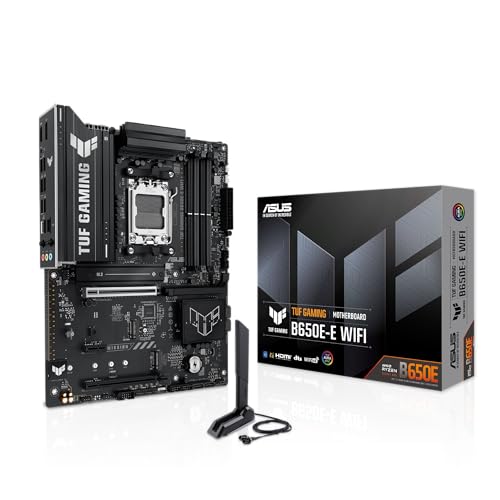
ASUS TUF GAMING B650E-E WIFI AMD AM5 ATX Motherboard
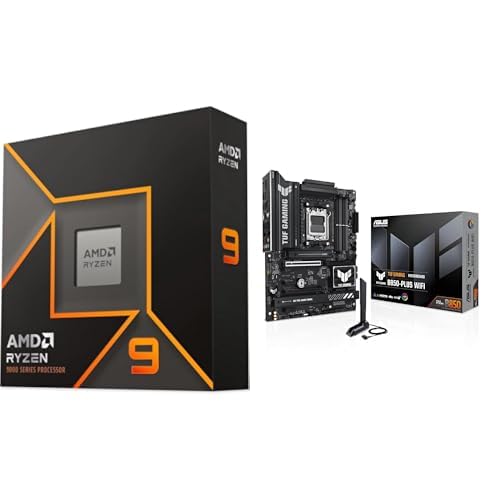
AMD Ryzen 5 7600X + TUF Gaming B850-PLUS WiFi Bundle
The Details Behind The Selections
The Ryzen 9 3950X is a strange fit for a budget article, but it earns a slot for shoppers reusing older AM4 boards. Sixteen cores and thirty-two threads make it a beast for video encoding, 3D rendering, and streaming while gaming, all from a single chip.
It runs hot, though, and you’ll need a liquid cooler with at least a 280mm radiator to keep it tame. Compared to the Ryzen 9 3900XT later in this list, you trade a few dollars for a much wider multitasking margin.
Practical Pluses
- Sixteen cores handle background tasks while your game runs.
- Unlocked multiplier invites manual tuning once you have cooling sorted.
- 72MB of game cache keeps data feeds close to the cores.
- Drops into many older AM4 boards with a BIOS update, saving on a new platform.
Worth Noting
- No cooler in the box, so factor a 280mm AIO (all-in-one liquid cooler) into the build.
- Top-end heat output means case airflow matters; the NZXT H5 Flow reviewed later pairs well.
Feature Snapshot
Who It Suits Best
Creators who game on the same rig and want a single CPU to carry editing, streaming, and high refresh rates without compromise.
Skip It When
The AMD Ryzen 5 4600G makes more sense if you’re building a starter rig with no dedicated GPU and a tight parts list.
The NZXT H5 Flow is a friendly face for first-timers. Its perforated front panel acts as a giant dust filter, pulling air straight through to the front fans. Two 120mm fans are already mounted, so your build boots with a working airflow path.
It looks tidy too, with a tempered glass side panel that lets you show off your parts. Where the Meshify 2 Compact below leans stealth and quiet, the H5 Flow leans bright and breathable, with a dedicated angled GPU fan for graphics card cooling.
Positive Takeaways
- Front and top perforated panels give strong filtered airflow.
- Two 120mm fans included, cutting down on extra shopping.
- Tempered glass side panel shows off the build without extra effort.
- Cable management channels keep interior routing clean.
Trade Offs
- White finish shows dust faster than darker cases, so monthly wipe-downs are wise.
- Compact frame may squeeze owners with very long triple-slot GPUs.
Made For
First-time builders who want a clean-looking case that doesn’t punish them for mediocre cable work.
Consider Something Else When
The Fractal Design Meshify 2 Compact is a better fit if you run a long GPU and want the front USB-C port already built in.
The 3900XT sits in a sweet middle spot. It delivers 12 cores and 24 threads without the thermal demands of the 16-core 3950X above. For a budget build that needs to handle both games and side work, it punches above its tier.
It drops into the same AM4 socket, so you can reuse existing boards and memory if you’re upgrading. The trade-off is similar: no cooler included, and a 280mm liquid cooler is the realistic floor for sustained loads.
The Practical Payoff
- Twelve cores keep streaming software and game clients from fighting for resources.
- Unlocked multiplier gives you room to chase higher boost clocks.
- AM4 compatibility widens your motherboard options on a budget.
Some Limits To Know
- Cooler not in the box, adding to total build cost.
- Pairing with slow DDR4 memory can bottleneck the chip’s potential.
Right Fit For
Gamers who also run creative software and want one chip that bridges both worlds.
A Better Fit Elsewhere
The AMD Ryzen 5 7600X bundle is the cleaner pick for new builds starting on the AM5 platform.
Fractal Design’s Meshify 2 Compact leans toward quiet, focused builds. The angular mesh front pulls in plenty of air without shouting about it, and the bolt-free tempered glass gives a clean look without a row of visible screws.
It accepts full-length GPUs up to 360mm, so longer cards from modern generations fit without drama. Where the NZXT H5 Flow above prioritizes bright airflow, the Meshify 2 prioritizes thermal discipline and tidy interior access.
Bright Spots
- Filtered mesh front feeds cool air straight to the GPU and CPU.
- Front USB-C port simplifies headset and storage hookups.
- Removable top panel grants clean interior access for upgrades.
- 360mm GPU clearance supports current-generation cards.
A Few Limitations
- Stealth aesthetic hides RGB, so glow fans look muted behind the mesh.
- Compact frame can feel tight during a first build, especially around the front I/O (input/output) cabling.
Best Suited To
Builders who want quiet airflow, long GPU support, and a case that disappears into a desk setup.
Look Elsewhere When
The NZXT H5 Flow is a smarter grab if you want pre-installed fans and a brighter overall look straight out of the box.
The Ryzen 7 2700 belongs to an older generation but still pulls weight in tight builds. Eight cores and sixteen threads cover most modern games, and the included Wraith Spire LED cooler means one less part to buy.
It runs on the older AM4 platform, which limits your upgrade path. For a true budget where every dollar counts, the bundled cooler and modest power draw make it a sensible starting point.
A Favorable Mix
- Eight cores handle modern games and daily multitasking.
- Wraith Spire LED cooler included, trimming the parts list.
- Unlocked for light tuning once you learn the platform.
Room For Improvement
- Older platform means weaker upgrade options down the line.
- Single-core performance trails newer chips in fast-paced shooters.
Who Will Love This
Shoppers with an existing AM4 board who need a cheap, modern-enough CPU swap for a starter PC.
Swap It Out When
The Intel Core i3-10100 fits better if you need a current-generation budget chip with newer platform support.
The Ryzen 5 4600G is the only chip on this list that lets you skip the graphics card entirely. Its integrated Radeon graphics handle 1080p esports titles smoothly, which makes it a gift for first-time builders on hard budgets.
The trade-off shows up the moment you try a modern AAA game. Where the Ryzen 9 3900XT above leans on a dedicated GPU, this one leans on a competent APU (accelerated processing unit) that keeps the total bill down.
What Stands Out
- Integrated graphics eliminate the need for a separate GPU at the entry tier.
- Wraith Stealth cooler included, so the build starts quietly.
- AM4 socket fits a wide range of affordable motherboards.
- Unlocked for safe, light tuning if you want extra headroom later.
Honest Caveats
- Struggles in newer AAA games, so a discrete GPU is the inevitable next step.
- Limited PCIe lanes (expansion slots for GPUs and storage) compared to higher-tier Ryzen chips.
Perfect Match For
First-time builders who want a working PC today and a clear upgrade path with a future GPU swap.
Where Another Pick Suits Better
The AMD Ryzen 5 7600X bundle is the smarter call for a brand-new AM5 build ready for several GPU generations.
The Core i5-4690K belongs to the LGA 1150 era, and it lives here mostly for owners reviving older machines. Four cores, four threads, and a fully unlocked multiplier made it a legend for early overclocking hobbyists.
It’s slow by modern standards, but if your motherboard and memory are already paid for, it lets you stretch an existing build a little further. Don’t expect it to keep up with a current-generation GPU.
Where It Excels
- Unlocked multiplier lets experienced users squeeze extra clock speed from existing cooling.
- HD Graphics 4600 covers basic display output without a GPU.
Points To Note
- Only four threads bottleneck modern multithreaded games.
- LGA 1150 platform has no realistic upgrade beyond this chip.
Who Should Grab It
Shops reviving older PCs for light gaming or a child’s first computer where parts are mostly on hand.
Reach For A Different Pick When
The Intel Core i3-10100 makes more sense for new builds, even at the budget tier, thanks to its current-generation platform.
The i3-10100 is one of the cleanest budget gaming chips still in circulation. Four cores, eight threads, and a 4.3 GHz boost clock handle esports and 1080p games without drama. A stock cooler ships in the box, so the parts list stays short.
It locks you to the 400-series chipset, which means a specific motherboard. For a strict-budget rig, that’s a worthwhile trade. The Ryzen 5 4600G above skips the GPU entirely, while this one expects you to bring your own.
A Few Highlights
- Four cores with hyper-threading (running two instruction threads per core) feel snappy in daily use.
- Stock cooler included, dropping a real chunk from the build total.
- 65W TDP (thermal design power) keeps case airflow requirements modest.
Practical Considerations
- Needs a discrete GPU for any meaningful gaming workload.
- Limited to 400-series motherboards, narrowing the used market.
Built With In Mind
Tight-budget shoppers who want a modern, current-platform chip for an esports-focused 1080p rig.
Not Your Match When
The AMD Ryzen 5 4600G is the right pick if you’d rather skip the GPU at the entry stage entirely.
The TUF B650E-E is the foundation for a forward-looking build. It runs AMD’s AM5 socket, which means access to current and future Ryzen chips, plus DDR5 memory and PCIe 5.0 readiness for the next GPU generation.
Wi-Fi 6E and 2.5Gb Ethernet come baked in, so you don’t need a separate adapter. Where the AMD-focused cases earlier talked about airflow, this board talks about longevity, with BIOS FlashBack for recovery and Aura Sync for lighting.
The Good Stuff
- AM5 socket gives multi-year CPU upgrade headroom.
- PCIe 5.0 x16 slot supports next-generation GPUs.
- Three M.2 slots cover NVMe storage (fast solid-state drives) without expansion cards.
- Wi-Fi 6E and 2.5Gb Ethernet cover modern networking out of the box.
Where It May Fall Short
- DDR5 memory adds to the parts bill versus older DDR4 builds.
- ATX size demands a mid-tower case, so the NZXT H5 Flow pairs cleanly here.
Key Product Details
The Right Fit
Builders planning a new AM5 PC today and wanting a board that won’t feel dated in three years.
Another Choice May Suit
The AMD Ryzen 5 7600X bundle includes a board and is easier for first-timers who want fewer decisions to make.
This bundle solves the hardest part of a budget build: matching a CPU to a compatible motherboard. The Ryzen 5 7600X brings six modern Zen 4 cores, and the included TUF Gaming board handles DDR5 memory and PCIe 5.0 GPUs.
It costs more upfront than an older AM4 build, but you save yourself the compatibility cross-check. Compared to the older Ryzen 7 2700 above, you trade nostalgia for several years of platform headroom.
Good Reasons To Consider
- CPU and board arrive confirmed compatible, removing guesswork.
Worth Bearing In Mind
- CPU cooler not included, so a separate tower or AIO is required.
- Bundles occasionally shift contents, so confirm board model before purchase.
Feature Snapshot
Whose Shelf It Belongs On
First-time builders starting fresh on the AM5 platform who want a CPU and board picked out together.
Where A Sibling Pick Shines
The AMD Ryzen 5 4600G is the better call for ultra-tight budgets where skipping the GPU is part of the plan.
What Matters Most Before Choosing Cheap Gaming PC Builds
A cheap build only stays cheap if the parts don’t bottleneck each other. CPU core count, motherboard socket, and case airflow each pull the build in a different direction, and the right balance depends entirely on what you play and what you already own.
Matching the CPU to Your Games
Most modern games lean on four to six strong cores, with single-core speed (how fast a single core can crunch instructions) often mattering more than raw core count. The Ryzen 5 7600X and i3-10100 deliver exactly that, while the Ryzen 9 3950X and 3900XT add cores for streamers and editors. If your library is mostly esports titles, the cheaper chips keep up without complaint.
For builders who plan to add a discrete GPU later, integrated graphics on the Ryzen 5 4600G buy you real time. The trade-off is the eventual need to upgrade, since integrated graphics hit a ceiling in demanding AAA games.
Socket and Platform Longevity
The motherboard socket decides how long you can swap CPUs without replacing the board. AM4 supports older chips like the Ryzen 7 2700, while AM5 is where future Ryzen generations will land. For a build you want to keep for several years, the B650E-E board and the 7600X bundle are the safer platform bet.
Older sockets like LGA 1150 still work for refurb-style projects, but they cap your upgrade ceiling immediately. If the rig is meant to grow with you, the modern socket wins.
Case Airflow and Build Comfort
A case that breathes well protects every part inside it. Perforated front panels on the NZXT H5 Flow and the mesh front on the Meshify 2 Compact both push cool air directly at the GPU and CPU. The honest read is that any mid-tower with two front fans will handle a budget build, but the included fans save you money.
Cable management, side panel access, and front USB-C matter more than people expect during a first build. The cases above all balance those touches reasonably well.
Smart Choices Across These Picks
Pitfalls Shoppers Hit
First-time builders often overspend on the CPU and skimp on the case, ending up with hot air trapped around a great chip. Another common slip is buying a modern AM5 CPU and an older AM4 motherboard by accident, since the names look similar. Always cross-check the socket before checkout.
Skipping the cooler is another quiet budget killer. Some chips ship with one, others don’t, and the difference can swallow what you saved on the chip itself.
What The Higher Tier Buys
Stepping up from the i3-10100 to the Ryzen 9 3900XT adds cores and threads, which means smoother background tasks and stronger streaming performance. The case tier change from a basic shell to the H5 Flow or Meshify 2 Compact buys airflow, included fans, and longer GPU support. These upgrades pay off most for owners planning to keep the system three years or more.
For a one-year starter rig, the lower tiers honestly hold up. The honest read is to match the upgrade to the time horizon, not the spec sheet.
Frequently Asked Questions
What makes a gaming PC build cheap without feeling weak?
Balancing the parts so no single component bottlenecks another. A modern six-core CPU, a current-generation mid-range GPU, and 16GB of DDR4 or DDR5 memory cover most modern games at 1080p. The cheap builds above all follow that rule.
Do I need a dedicated graphics card for a gaming build?
For modern AAA games, yes. The Ryzen 5 4600G on this list uses integrated graphics and handles esports and older titles, but heavier games still want a real GPU.
Is AM4 still worth using in 2026?
Yes, for budget builds where you already own compatible memory and a board. New builds get more mileage from AM5 boards like the ASUS TUF B650E-E reviewed above.
How much cooling do budget gaming CPUs need?
The Ryzen 7 2700 and Ryzen 5 4600G ship with capable stock coolers. Higher-core chips like the 3950X and 3900XT expect a 280mm AIO or a strong tower cooler to stay cool under load.
What’s the easiest case for a first build?
Cases with included fans, good cable routing channels, and tool-free side panels ease the process. Both the NZXT H5 Flow and the Meshify 2 Compact reviewed above meet that bar.
Closing Remarks
A smart cheap gaming PC build starts with the parts that get used every day: a CPU that fits your games, a board that won’t trap you on a dead platform, and a case that breathes. The picks above map a clear path from starter integrated graphics through high-core productivity monsters, and the choice depends on whether you value platform longevity, raw core count, or sheer budget-friendliness most. Pick the tier that matches how long you plan to keep the rig, and the rest of the build usually follows.


