


A reliable gaming mouse doesn’t have to drain your wallet, and the same goes for the pad beneath it. Plenty of affordable peripherals hold their own against flagship gear, especially once you match the right shape, sensor, and surface to how you actually play. The picks below mix mice and pads across common gaming needs, so you can build out a budget setup without second-guessing every line item.
The Main Contenders

Corsair MM300 Anti-Fray Cloth Gaming Mouse Pad (Extended)

Corsair MM300 Anti-Fray Cloth Gaming Mouse Pad (Medium)

Legion Gaming XL Cloth Mouse Pad (Black)

FRTEC Batman Edition Gaming Mouse (Wired)

Razer Firefly Hard V2 RGB Gaming Mousepad

Razer Goliathus Extended Chroma Gaming Mouse Pad

co2CREA Hard Case for Logitech G602 G604

Mchoi Hard Carrying Case for Logitech G305
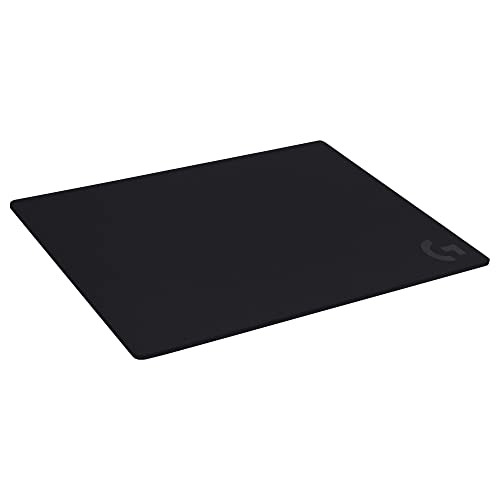
Logitech G740 Large Thick Gaming Mouse Pad
The Strengths Of Each Pick
The extended MM300 turns a corner of your desk into a dedicated play surface, sliding easily under both keyboard and mouse without crowding your monitor stand. Its textile weave, which is the tightly woven fabric top that grips mouse feet evenly, is tuned for the slow, deliberate swipes common in tactical shooters and MOBAs. Players who park their mouse at low DPI (dots per inch, the unit that controls how far the cursor travels per inch of hand movement) for sweeping aim arcs will appreciate the room to stretch out without lifting.
Compared to the smaller MM300 medium covered later, this extended version trades desk footprint for uninterrupted motion, so it really shines for anyone running a 60% or tenkeyless keyboard. Stitched edges keep the textile from peeling after months of daily wrist brushes, a small detail that pays off over time.
Everyday Perks
- Anti-fray stitched edges help the pad survive years of wrist friction and daily carry
- Textile weave balances control and glide for medium-to-low DPI aiming
- Extended footprint keeps both keyboard and mouse on a single consistent surface
- Works with optical and laser sensors, so no need to match pad to mouse brand
Trade-Offs Worth Knowing
- Cloth surface drinks in spills, so drinks should stay well clear during late-night sessions
- Without RGB, it offers no ambient glow for battlestation photos
- Owners commonly note the pad benefits from a flat weight or books for a day to fully flatten after shipping
Feature Snapshot
Who It Suits Best
Tactical and competitive players on a tight budget who run lower DPI and want one pad to cover both keyboard and mouse.
Consider Something Else When
Setup space is tight, in which case the compact MM300 medium is a better fit.
The medium MM300 keeps the same textile feel as the extended version, just sized for tighter desks and shorter mouse travel. Anyone running a high-DPI setup, where small wrist flicks cover large amounts of screen, will find the medium footprint plenty without eating up real estate. It’s a sensible choice for apartment gaming nooks or shared desks where every inch counts.
The same stitched-edge build that protects the extended model shows up here, so the corners don’t curl after a year of heavy use. For a budget pad, that’s a real quality-of-life win.
Points In Its Favor
- Same low-friction textile surface as the larger MM300 at a friendlier footprint
- Anti-fray stitching keeps edges tidy through months of daily play
- Comfortable for claw and fingertip grippers who don’t need wide mouse sweeps
Points To Keep In Mind
- Limited travel space, so low-DPI players will run out of pad quickly during wide swipes
- Plain cloth finish, no RGB or visual flair to anchor a battlestation
Right Fit For
High-DPI players and small-desk setups who care about precision over sweeping room.
Reach For A Different Pick When
A wider field of motion is the priority, in which case the extended MM300 or Legion XL covers more ground.
The Legion XL claims a broad stretch of desk, up to roughly 15.7 by 35.4 inches depending on layout, so full-size mechanical keyboards, a mouse, and even a stream deck can share one continuous surface. The water-repellent top layer shrugs off the occasional energy drink splash, a real bonus during ranked grinds. Lenovo also braids the edge to keep fraying in check, which is the kind of detail that separates a one-year pad from a five-year one.
Pair it with a wireless mouse that occasionally needs lifting to recenter, and the extra surface pays off in fewer missed flicks.
Where It Excels
- Water-repellent finish adds real spill protection versus plain cloth mats
- Wide XL footprint suits full-size keyboards and 360-degree mouse movement
- Rolls up for transport to LAN events or shared gaming spaces
Worth Bearing In Mind
- Some listings indicate multiple size variants, so double-check dimensions before ordering
- Cloth weave still picks up dust over time, and a lint roller helps keep tracking consistent
Key Attributes
Made For
Full-size keyboard owners who want spill protection and a single seamless surface for keyboard and mouse.
Not Your Match When
Desk space is narrow or you want integrated lighting, in which case the Razer Goliathus Extended Chroma is the better pick.
FRTEC’s Batman edition leans into character-driven design, with yellow LED lighting and a wired setup that simply plugs in and starts working. The optical sensor (a tracking system that reads surface texture with a small light source, far more common in budget mice than older laser tech) handles everyday aim duties fine, and the adjustable DPI lets you tune sensitivity to match a particular game on the fly. Configurable side buttons round it out for MOBAs or MMOs that lean on extra inputs.
It won’t replace a flagship esports mouse, but as a fun, themed first peripheral, the DC styling gives a desk some personality without breaking a budget.
What Earns Its Place
- Adjustable DPI lets you retune sensitivity per game without extra software
- Wired USB connection sidesteps battery and lag worries
- Seven-button layout with configurable side buttons suits MOBAs and MMO shortcuts
Honest Caveats
- Ambidextrous shell is functional, but the shape may not suit very large hands
- Limited tuning software compared to larger brands, so power users may feel constrained
Who Will Love This
Casual players, gift shoppers, and DC fans who want a fun, plug-and-play mouse that doesn’t ask for setup time.
Look Elsewhere When
You need a precision-focused esports mouse, in which case stepping up to a flagship sensor option is the better move.
Hard pads split off from cloth mats on feel: the Firefly V2 delivers a slick, low-resistance surface that rewards fast flicks and clean micro-adjustments. Razer’s micro-textured finish gives optical and laser sensors a consistent read, important for players who push their DPI high and rely on tiny corrections during long tracking shots. The Chroma RGB ring around the edge ties the pad into the broader Razer lighting ecosystem if you already own other Chroma gear.
It’s a clear step up in vibe from a basic cloth pad, though the rigid build trades some wrist comfort for that precision.
The Value In It
- Micro-textured hard surface suits high-DPI tracking and fast flick aim
- Chroma RGB syncs with other Razer peripherals for a unified desk look
- Low-friction coating lets mouse feet glide without drag
Possible Compromises
- Rigid surface offers no wrist cushioning, so long sessions can feel harsh
- Hard pads amplify desk imperfections like ridges under the mat
Feature Overview
Best Suited To
High-DPI players and Razer Chroma fans who want a hard tracking surface with synchronized lighting.
Another Choice May Suit
Wrist comfort is a bigger concern than glide, in which case the Logitech G740’s thick cushioned cloth is a friendlier pick.
The Goliathus Extended Chroma is the cloth counterpart to the Firefly V2, trading the hard finish for a softer micro-textured weave that gives a bit more tactile feedback during controlled micro-movements. Its extended footprint covers keyboard and mouse in one sweep, and the Chroma RGB border adds a perimeter glow without flooding the room with light. The Gears of War 5 edition variant leans into themed styling, which suits fans who want their setup to feel like part of the game world.
It’s a sensible middle ground for players who want cloth control with a bit of visual personality.
What Stands Out
- Soft micro-textured cloth gives more tactile feedback for precision aiming
- Chroma RGB ring syncs across Razer devices and supported titles
- Natural-foam rubber base keeps the mat planted during aggressive swipes
Where It Is Less Suited
- Soft cloth picks up dust, so a quick brush helps keep tracking consistent
- Extended size can overpower smaller workstations or shared desks
Perfect Match For
Low-DPI battlestation builders who want RGB lighting plus a soft cloth tracking surface in one extended mat.
Swap It Out When
Spill resistance matters more than RGB, in which case the water-repellent Legion XL is a stronger match.
Not every budget pickup is a mouse or pad, and the co2CREA case proves it. Built from EVA (ethylene-vinyl acetate, a tough but lightweight foam-rubber commonly used in protective cases), the shell guards Logitech G602 and G604 mice against drops, dust, and the occasional backpack tumble. Anyone hauling a wireless gaming mouse to LAN parties, dorm rooms, or coworking setups will appreciate the dedicated molded slot that keeps the mouse from sliding around mid-transit.
It’s also handy as a long-term storage shell, keeping the mouse safe in a drawer between upgrades.
Benefits That Matter
- Molded EVA shell absorbs bumps and resists water splashes
- Dedicated shape for G602 and G604 mice keeps the body snug and rattle-free
- Compact footprint slips into a backpack or carry-on without bulk
Practical Considerations
- Case only, so the mouse and USB receiver are sold separately
- Fit is model-specific, so double-check your exact mouse variant before ordering
Whose Shelf It Belongs On
Travel-heavy Logitech G602 and G604 owners who want a safer carry option for LAN weekends or shared spaces.
Where A Sibling Pick Shines
You game primarily with a G305, in which case the smaller Mchoi hard case is the better fit.
The Mchoi case is the G305 owner’s answer to the co2CREA shell above, sized down for Logitech’s compact Lightspeed wireless mouse. It uses the same EVA foam construction for shock absorption and a splash-resistant exterior, plus a teal finish that stands out in a gear bag. The molded interior keeps the G305 from rattling, and the slim profile makes it easy to slip into a laptop sleeve or backpack.
For G305 fans who treat their mouse like a daily carry item, this case is a small, worthwhile add-on.
Useful Strengths
- EVA hard shell cushions the mouse against drops and pressure
- Waterproof exterior layer adds confidence in rain or accidental drink spills
- Compact form keeps the case portable for travel and storage
Some Limits To Know
- Mouse and accessories are not included, so factor that into the total cost
- Custom-fit shell means it won’t accommodate larger Logitech models
Built With In Mind
Logitech G305 owners who travel, commute, or simply want a safer way to store their wireless mouse between sessions.
Skip It When
Your mouse of choice is a G602 or G604, since the co2CREA case fits those larger models instead.
The G740 leans into comfort, with a 5 mm cushioned surface that smooths out the uneven ridges of older desks and gives the wrist a softer landing. That moderate resistance on the cloth top is intentional: it gives the mouse feet just enough grip to start and stop without overshooting, which matters most in low-DPI aim styles. The 18.1 by 23.6 inch footprint covers the mouse area generously while leaving room for a TKL or full-size keyboard beside it.
It’s a good fit for marathon sessions where wrist fatigue is the bigger enemy.
The Practical Payoff
- 5 mm cushioning softens desk edges and reduces wrist pressure over long sessions
- Moderate cloth friction supports controlled starts and stops in low-DPI play
- Stable base helps the pad stay put during aggressive aiming motions
Factors To Consider
- Thick padding adds a slight slope that some palm-grip players take a session to adjust to
- Cloth surface still benefits from regular dusting to keep sensor tracking crisp
Quick Facts
Who Should Grab It
Long-session gamers and palm-grip players who want extra wrist cushioning without giving up cloth control.
A Better Fit Elsewhere
Hard glide beats cushion in your priorities, in which case the Razer Firefly V2 is a stronger match.
What To Weigh Before Choosing Budget Gaming Peripherals
A budget peripheral earns its keep when it matches the way you actually play. Start with form factor, because the right pad size removes aim obstacles no software tweak can fix. Low-DPI players who sweep their arm across the desk need an extended or XL mat, while high-DPI players using wrist flicks get plenty from a medium or standard pad.
Surface material is the next big lever. Cloth gives tactile feedback and forgiving stops, which helps with control in slower aiming styles. Hard pads, like the Firefly V2, deliver slicker glide and consistent sensor reads that high-DPI players often prefer, though they pass desk bumps straight to the wrist. Match the surface to the grip style, and your aim will feel more natural within a few sessions.
Mice matter too, even on a budget. Sensor accuracy, adjustable DPI, and a shell shape that fits your hand size have more impact on comfort than RGB styling. Travel cases like the co2CREA and Mchoi picks add real value for wireless mouse owners, since a cracked shell or lost USB receiver can sideline a favorite mouse in seconds.
Things Worth Knowing Before You Click
Common Shopping Slip Ups
Skipping size checks is the easiest mistake to make, especially with extended pads, where an XL mat can swallow a small desk whole. Measure your play area first, and remember that an extra-wide mat still needs room for a monitor stand or speakers. Ignoring surface feel is the other common trap, since cloth and hard pads feel completely different under the same mouse, and a quick test with a friend’s setup can save a return trip.
Where The Extra Money Goes
Stepping up from a basic pad to a premium one usually means better stitching, more consistent surface texture, and added spill or RGB features that survive years of use. Higher-end mice tend to offer better sensors, lighter shells, and longer battery life, which competitive players feel immediately. The honest read is that the upgrade pays off most when you already know your preferred grip, DPI, and desk layout, so a budget pick today and a flagship later is often the smartest route.


