


Building a gaming rig usually means splurging on the tower, the monitor, and the peripherals, with the desk ending up as whatever fits the leftover cash. That trade-off leaves plenty of people fighting a wobbly tabletop during a ranked match. The picks below focus on frames that stay planted when you lean in, surfaces that actually fit a dual-monitor layout, and storage that keeps the cable mess out of sight. Whether your battlestation lives in a spare bedroom or the corner of a shared apartment, one of these should match the way you actually play.
The Picks In Brief

JJS 48″ Home Office Gaming Computer Desk R-Shaped (Black/Red)

SIAGO Brown 60×28 in Standing Desk (Double Frame)

EUREKA ERGONOMIC Gaming Desk 60 Inch with RGB LED Lights

Desktronic HomeOne Standing Desk 54×28 (Dual Motor)
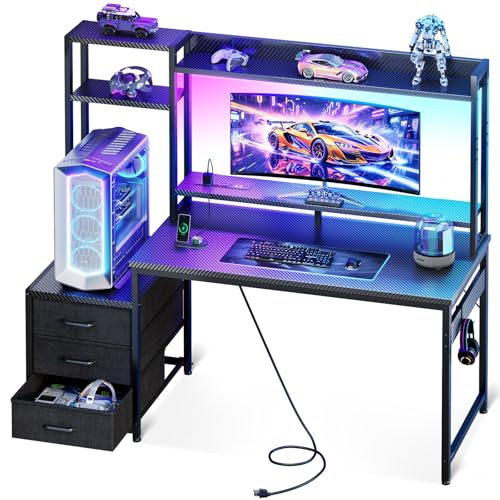
Casaottima 48 Inch Gaming Desk with Shelves, Hutch & Drawers

BON AUGURE Farmhouse Computer Desk 54 Inch (Rustic Oak)

Desktronic HomePro Standing Desk 54×28 (Dual Motor)

IBF 47″ Computer Desk, Home Office Work Writing (Rustic Brown)

Aquzee Computer Desk with Shelves 47″ x 23.6″
Why These Options Stand Out
The JJS desk leans hard into the gaming aesthetic without making the rest of the room feel like a LAN party. The 48-inch top fits a single 27-inch monitor plus a laptop or a second smaller screen, leaving space for a full-size keyboard and mouse pad without crowding your elbows. A built-in cup holder and headset hook keep the small stuff off the playing surface, which matters more than people expect during a long session.
Setup tends to be the deciding factor at this price tier, and JJS keeps it simple with a 30-minute assembly window and no drawer rails to wrestle with. The R-shaped frame (a leg design that angles outward for added side support) holds up to 110 lbs and includes four leveling feet to compensate for uneven floors. In apartments with older hardwood, those feet tend to be the difference between a planted desk and one that creeps sideways when you slam a key.
The Practical Payoff
- Cup holder, headset hook, and included mouse pad add real day-one value
- R-shaped legs resist wobble better than straight-leg budget desks
- 110 lb weight capacity covers most mid-tower gaming setups
- Adjustable feet protect floors and stabilize on uneven surfaces
- Black-and-red finish reads as gaming without overwhelming the room
Points To Note
- No dedicated cable management, so routing may require aftermarket clips
- Smaller 48-inch surface can feel tight with three monitors
Made For
Casual gamers setting up a first battlestation in a bedroom or dorm who want gaming-specific touches without overspending.
Skip It When
You run a triple-monitor racing sim setup; the wider 60-inch EUREKA ERGONOMIC Gaming Desk will give you the elbow room to actually enjoy it.
Most cheap gaming desks treat height adjustment as a future-you problem. The SIAGO flips that script by offering a full electric sit-stand frame at a budget-tier price, which is the kind of thing your lower back will appreciate after a double shift of work and ranked matches. The 60-by-28 surface is deep enough to push a monitor arm back without losing keyboard space, and the brown finish blends into a home office better than neon accents.
Where the SIAGO really earns its keep is the frame. The 2.5mm steel base (steel thickness measured in millimeters, where higher numbers mean sturdier construction) and double-beam design support up to 220 lbs, so loading it with a full tower, dual monitors, and a heavy speaker pair won’t make the motor complain. Owners commonly report that the desk stays planted during transitions, which is the honest test of any height-adjustable frame.
Positive Takeaways
- 1-inch thick top stays rigid even when you lean on the edge during a clutch round
- 220 lb capacity covers full towers plus dual-monitor arms
- 60-inch width leaves breathing room for streaming gear
- Electric adjustment means no manual cranking between matches
Some Limits To Know
- Heavier frame means a longer initial setup than flat-pack competitors
- No built-in cable tray, so you’ll likely add a third-party channel under the back edge
- Brown woodgrain may not match a blacked-out RGB build
Key Product Details
Right Fit For
Hybrid workers who game in the same chair and want to alternate between sitting and standing without buying a separate converter.
Consider Something Else When
You need USB charging built into the frame; the Desktronic HomeOne Standing Desk integrates USB and USB-C ports directly into the desktop.
If your stream overlay and your keyboard both live in the RGB ecosystem, the EUREKA ERGONOMIC desk makes a strong case for matching the rest of the setup. The 60-inch surface gives dual monitors room to breathe alongside a mic arm, a capture card, and whatever other accessories your content workflow demands. The Z-shaped metal frame (legs that angle outward in a Z pattern for better lateral stability) keeps things planted when you flick the mouse at high sensitivity.
The integrated LED strip is the kind of feature that reads as gimmicky until you actually use it. Under-monitor bias lighting (a soft glow behind the monitor that reduces eye strain in dim rooms) cuts the harsh contrast between screen and wall, and the colors sync with most major RGB ecosystems. For streamers, that’s free production value without buying a separate light strip.
Real Benefits
- 60-inch surface handles dual-monitor streaming layouts comfortably
- Z-shaped frame stays solid during fast mouse movements
- LED strip doubles as bias lighting for late-night sessions
- Leveling feet adapt to uneven floors and apartment quirks
Trade-Offs To Consider
- RGB lighting adds a small assembly step and a power cable to manage
- Wider top requires more clearance behind your chair for tilt-back
Best Suited To
Streamers and content creators who want their desk to feel like part of the broadcast rather than just a stand for the monitor.
Not Your Match When
You need enclosed storage for a busy accessory drawer; the Casaottima 48 Inch Gaming Desk includes three drawers plus a hutch for that exact scenario.
The HomeOne is the kind of desk that quietly does its job and never makes the evening news. Built in Europe with a reinforced steel frame and dual synchronized motors, it raises and lowers without the shimmy that single-motor units tend to develop over time. At 264.6 lbs of capacity, the frame treats your full tower and monitor arm as a non-event.
Where it pulls ahead of most budget gaming desks is the control panel. The integrated touchscreen stores three memory presets, so switching from seated gaming to standing work is a single tap. Built-in USB and USB-C charging ports mean fewer cables snaking across the floor to reach a wall outlet. For people whose phone lives next to the keyboard, that’s a small daily win that adds up.
Notable Gains
- 264.6 lb lift capacity handles heavy multi-monitor rigs
- Touchscreen with three memory presets removes manual adjustments
- USB and USB-C ports cut down on power-strip clutter
- European build standards suggest tighter quality control
A Few Limitations
- 54-inch top is narrower than the 60-inch EUREKA option
- Premium positioning may stretch the “cheap” part of the budget
- European manufacturing can mean longer restock windows
Feature Snapshot
Who Will Love This
Remote workers who game in the same space and want a polished, quiet height-adjustable frame that won’t look out of place on a video call.
Look Elsewhere When
Your gaming rig includes a heavy full-tower liquid-cooled build; the Desktronic HomePro Standing Desk offers a higher 352.7 lb capacity for exactly that load.
Most cheap gaming desks are an open slab and a prayer. The Casaottima breaks that pattern with a real storage setup: an overhead hutch, multi-tier display shelves, three drawers, and an 11.6-inch elevated PC shelf that puts your tower on display rather than hiding it on the floor. For anyone whose battlestation has become part of the room’s decor, that arrangement makes the desk feel like furniture, not just gear staging.
The raised PC shelf also serves an ergonomic purpose (designed to reduce strain by improving posture and equipment positioning). Lifting the tower off the floor keeps intake fans away from carpet dust, which tends to extend component life. The monitor stand positions your screen closer to eye level than a flat top would, which helps if you don’t yet own a separate monitor arm.
Standout Benefits
- Three drawers keep controllers, cables, and small accessories out of sight
- 11.6-inch elevated PC shelf showcases full-tower cases
- Overhead hutch adds display space without expanding the footprint
- Built-in monitor stand improves neck alignment during long sessions
Honest Caveats
- More components mean a longer assembly than simpler desks
- Hutch limits where you can mount a monitor arm with a tall clamp
- LED light adds another cable to route during setup
Technical Reference
Built With In Mind
Gamers who treat their setup as a showcase and want every controller, headset, and collectible to have a designated spot on or above the desk.
A Better Fit Elsewhere
You need to keep costs to an absolute minimum and don’t need built-in storage; the IBF 47″ Computer Desk delivers a sturdy surface at a tighter budget.
The BON AUGURE is the pick for anyone whose gaming space doubles as a living room or a shared study. The rustic oak top and black metal X-frame legs (cross-braced supports that form an X shape for extra stability) read as modern farmhouse rather than gaming bunker, which means it survives a partner’s design veto. At 54 inches wide, the surface still leaves room for a single large monitor, a laptop, and a proper mouse area.
The wood-and-metal combination is more than cosmetic. The X-frame distributes weight across both sides, and the surface supports monitors, laptops, and standard office gear without complaint. In a household where the desk has to look intentional in any lighting, that woodgrain top does the heavy lifting without drawing attention to itself.
Notable Upsides
- Farmhouse aesthetic works in living rooms and shared spaces
- 54-inch top handles a monitor plus laptop with room to spare
- Wood-and-metal construction feels sturdier than the price suggests
- Versatile for gaming, work, and homework transitions
Things To Weigh Up
- No dedicated gaming features like headset hooks or cup holders
- Rustic finish may clash with RGB-heavy accessory setups
Whose Shelf It Belongs On
Shoppers furnishing a multi-use room who want a desk that won’t look out of place when guests are over.
Reach For A Different Pick When
RGB and gaming-specific ergonomics matter more than decor; the EUREKA ERGONOMIC Gaming Desk with built-in LED lighting leans further into the battlestation side.
The HomePro is the HomeOne’s older, stronger sibling. Where the HomeOne handles 264.6 lbs, this frame lifts up to 352.7 lbs at a rate of 2 inches per second, which is fast enough to feel responsive rather than medical. For gamers running a full-tower liquid-cooled build plus a heavy ultrawide, that extra capacity is the difference between “fine” and “permanently worried.”
The control layout mirrors the HomeOne: a touchscreen with three memory presets and integrated USB and USB-C charging. The European build carries the same wobble-free reputation, which matters most when the desk is at full standing height. Transitioning between seated gaming and standing work tends to feel quieter and more planted than on cheaper single-motor units.
The Upside
- 352.7 lb capacity handles the heaviest gaming setups with headroom to spare
- 2 inches-per-second lift speed keeps transitions snappy
- Wobble-free design at full height builds confidence during typing
- Same touchscreen and port layout as the HomeOne for familiar controls
Where It May Fall Short
- Higher capacity and motor speed come at a noticeable price step up
- 54-inch top won’t suit a triple-monitor layout as comfortably as a 60-inch desk
Quick Technical Notes
Perfect Match For
Power users whose gaming PC alone weighs as much as a small refrigerator and who refuse to baby the lift mechanism.
Swap It Out When
Your rig is mid-tower and your budget is tighter; the Desktronic HomeOne Standing Desk covers the same feature set at a lower capacity and lower cost.
The IBF is the desk you buy when the gaming dream meets a small bedroom reality. At 47 inches long, it fits a single monitor, a laptop, and a keyboard without eating the entire wall. The rustic brown finish and industrial metal legs give it a grown-up look that holds up in a studio apartment or a shared room where the desk pulls double duty for homework.
Underneath the work surface, an open storage bay holds a mid-tower or a console without forcing you to drag the tower out every time you need to reach a cable. The build quality leans toward sturdy rather than flashy, which is the right call at this footprint. For younger gamers moving into their first apartment, this is the kind of desk that ages well into a remote-work setup later.
The Case For It
- 47-inch footprint fits narrow walls and tight bedroom corners
- Open storage bay keeps a mid-tower off the floor and ventilated
- Rustic brown finish works in adult spaces, not just teen bedrooms
- Industrial metal legs handle daily keyboard pounding without complaint
Details To Watch
- 47 inches can feel cramped with anything beyond a single 27-inch monitor
- No integrated cable management, so add-on clips become essential
Who Should Grab It
First-time setup owners furnishing a smaller space who value a narrow footprint and a grown-up finish over RGB flair.
Where A Sibling Pick Shines
You want a matching hutch for books and decor above the surface; the Aquzee Computer Desk with Shelves adds a 47-inch open hutch in the same width class.
The Aquzee rounds out the list as a no-fuss daily driver. The 47-by-23.6 surface handles a standard monitor, keyboard, and mouse setup with space left for a notebook and a coffee. What separates it from a basic flat-pack is the hutch: three open shelves above the desk that hold books, plants, or a small speaker pair within arm’s reach.
For students, hybrid learners, and casual gamers who want their desk to feel organized without paying for a full storage system, this hits the right balance. The hutch adds vertical storage without expanding the floor footprint, which matters in dorm rooms and small bedrooms. Cleaning tends to be straightforward since the open shelves don’t trap dust the way closed cabinets do.
A Strong Showing
- Three open shelves add vertical storage without taking floor space
- 47-inch width fits dorm rooms and small bedrooms comfortably
- Open shelves keep plants, books, and decor within easy reach
- Wide work surface handles a monitor plus notebook for school
Practical Considerations
- No dedicated gaming touches like a headset hook or cup holder
- Open shelves collect dust and need occasional wiping
Who It Suits Best
Students and casual gamers who need one desk for homework, gaming, and a small library of books or collectibles.
Not Your Match When
You want a dedicated monitor stand that lifts the screen to natural eye level; the Casaottima 48 Inch Gaming Desk integrates that feature into its hutch design.
What Actually Matters When Shopping For Cheap Desks For Gaming
Surface Size And Monitor Layout
The biggest mistake shoppers make at this price tier is buying for the rig they have today instead of the rig they’ll have in six months. A 48-inch top works for a single 27-inch monitor, but the moment you add a second screen or a microphone arm, elbow room disappears. Measure your planned monitor footprint, add six inches of clearance on each side, and use that as the minimum width. The 60-inch options like the EUREKA ERGONOMIC and SIAGO give breathing room that cheaper 47-inch desks simply can’t.
Frame Strength And Real-World Stability
A desk that wobbles every time you slam a key turns gaming into a frustration exercise. Look for reinforced leg designs (R-shaped, Z-shaped, or X-braced), leveling feet to handle uneven floors, and a weight capacity that exceeds your actual rig by at least 30 percent. Owners commonly report that the leveling feet matter more than the marketing weight ratings, especially in older apartments with sloping hardwood.
Storage And Cable Management
Cable mess is the silent killer of any battlestation. Built-in cable trays, grommets (pre-cut holes in the desktop for routing cables), and storage shelves keep power bricks and adapters off the floor where they collect dust. If the desk you like doesn’t include cable management, plan to add a third-party tray or adhesive channel before the first session, not after.
Sit-Stand Versatility If You Work And Play In The Same Spot
A standing desk costs more upfront, but for anyone who games in the same chair they work in, the health payoff over a few years is real. The dual-motor standing desks from Desktronic and SIAGO keep the frame stable at full height, which is where cheaper single-motor units tend to develop sway. If your back complains after long sessions, this is the upgrade that pays for itself.
Smart Considerations Across These Desks
Where Shoppers Go Wrong
The cheapest desk on the list often isn’t the cheapest desk to own. Shoppers fixate on the sticker price and ignore that a 47-inch flat-pack with no cable management ends up costing another $30 in trays, clips, and a monitor arm just to function. Skipping the accessories math is how a “budget” desk becomes a $250 desk with a $90 frame.
When Paying More Pays Off
A heavier frame, a thicker top, and a dual-motor lift system don’t just feel nicer. They tend to outlast their budget counterparts by years, especially under the daily abuse of a competitive gaming schedule. If your PC setup is already in the four-figure range, putting it on a desk that costs 20 percent more is the kind of upgrade that compounds quietly. The Desktronic HomePro, the SIAGO, and the Casaottima all sit in that “spend a little more, replace it much later” zone.
Frequently Asked Questions
What size desk do you need for gaming?
For a single 27-inch monitor, a 47 to 48-inch desk works comfortably. Dual monitors or an ultrawide pushes you toward 54 to 60 inches so you don’t lose elbow room during long sessions.
Are cheap gaming desks sturdy enough for a full tower?
Most budget frames support 100 to 220 lbs, which covers a mid-tower easily. A heavy full-tower liquid-cooled build benefits from a reinforced frame like the Desktronic HomePro at 352.7 lbs capacity.
Is a standing desk worth it for gaming?
For mixed use between work and play, yes. Dual-motor models from SIAGO and Desktronic stay stable at full height, and the sit-stand habit tends to reduce the lower-back fatigue that comes from marathon sessions.
Do gaming desks need RGB lighting?
No, but integrated LED strips like on the EUREKA ERGONOMIC model double as bias lighting, which reduces eye strain in dim rooms even if you ignore the color-sync features.
How long does assembly usually take?
Most flat-pack options on this list take 30 to 90 minutes with a single person. Standing desks with heavier frames run longer, and any hutch-equipped model like the Casaottima adds another 30 to 60 minutes on top of the base assembly.
Bottom Line
A cheap gaming desk should match how you actually play, not just clear the minimum bar for fitting your monitor. Match the width to your screen layout, the frame to your rig’s weight, and the storage to your cable reality, and the rest takes care of itself. The picks above cover the most common combinations of those three, so the right one is usually whichever line item matches your honest answer to “how much gear am I actually going to put on this thing.”


