


You don’t need to spend a fortune to get a solid 27-inch gaming monitor. Plenty of sub-$300 panels now pack high refresh rates, adaptive sync, and IPS or VA panels sharp enough for daily work and weekend lobbies. The challenge is sorting the real values from the spec sheet padding.
This roundup focuses on monitors that pair a 27-inch screen with gaming-grade motion handling without pushing into premium territory. Whether you’re building a first battlestation, replacing an aging office display, or adding a second panel, the picks below cover the price-to-performance sweet spot.
The Choices Worth Comparing
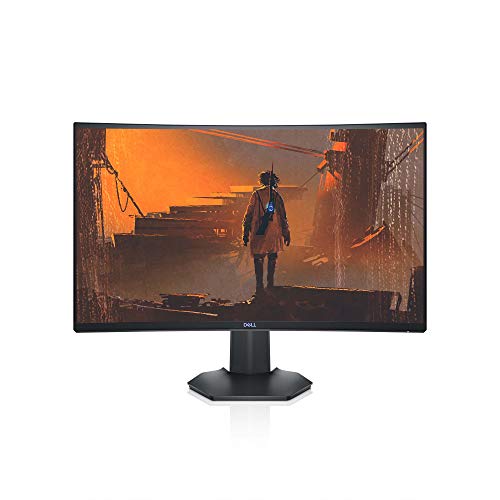
Dell S2721HGF 144Hz Curved Gaming Monitor

msi MAG 274CF X24 240Hz Gaming Monitor
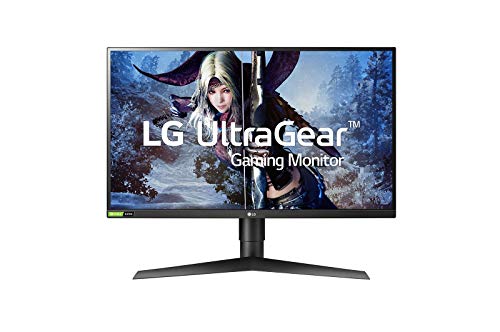
LG 27GL850-B UltraGear QHD Nano IPS Monitor

acer KB272 Hbi Full HD Gaming Monitor

Sceptre C275B-1858RN 165Hz Curved Monitor

INNOCN 2780s QD-OLED 280Hz Monitor
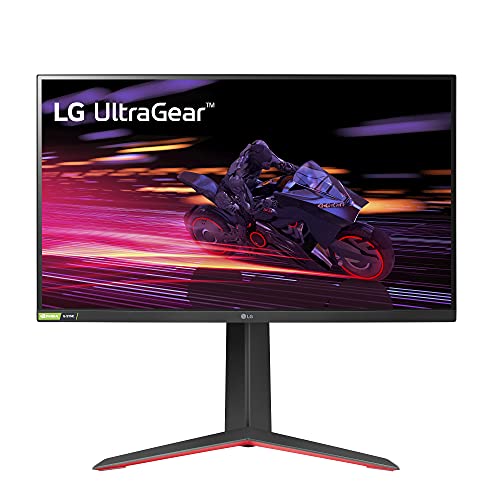
LG 27GP750-B UltraGear 240Hz IPS Monitor

ViewSonic VA2756A-MHD 120Hz IPS Monitor

Alienware AW2720HF 240Hz IPS Monitor
Meet The Standout Selections
Dell’s S2721HGF kicks off this list with a curved VA panel that wraps the action around your field of view. The 1500R curvature, a measurement describing how aggressively the screen bends (lower numbers mean a tighter curve), pulls the edges closer to your peripheral vision, which makes RPGs and open-world games feel more enveloping than a flat 27-inch panel typically delivers.
For anyone upgrading from a 60Hz office display, the 144Hz refresh rate is the headline jump. Scrolling through menus, dragging windows, and tracking moving targets all feel noticeably smoother. A height- and tilt-adjustable stand means you can dial in neck-friendly positioning for long sessions, and the rear-mounted joystick for OSD (on-screen display) navigation beats fumbling with hidden buttons.
What Stands Out
- 144Hz refresh rate paired with 1ms MPRT response time (a motion-clarity metric where lower numbers reduce visible blur) keeps fast-paced action readable
- Nvidia G-SYNC Compatible certification plus AMD FreeSync Premium support minimizes screen tearing and stutter
- 1500R curve creates a more immersive single-player experience than flat alternatives
- Height and tilt adjustability helps you find a comfortable posture during long gaming or work sessions
- Rear joystick and shortcut buttons make OSD navigation faster than older button-only designs
Points To Keep In Mind
- 1080p resolution on a 27-inch screen means pixel density is lower than QHD competitors like the LG 27GL850-B
- VA panels typically show narrower viewing angles than IPS, so colors may shift at the edges of the screen
Made For
Single-player gamers who want an immersive curved experience and don’t need QHD sharpness for competitive shooters.
Consider Something Else When
You want crisper text and more desktop real estate, in which case the LG 27GL850-B delivers QHD resolution on a Nano IPS panel.
The msi MAG 274CF X24 targets competitive players who measure success in milliseconds. Its 240Hz refresh rate, meaning the screen redraws the image up to 240 times per second, gives you substantially more visual information per second than the 144Hz Dell above, which can translate to smoother tracking in fast-paced shooters and a tangible edge when flicking between targets.
The 0.5ms GtG (gray-to-gray) response time rating is among the lowest in this price bracket. Paired with HDR readiness, which prepares the panel to display high-dynamic-range content with better contrast between bright and dark areas, the monitor handles both competitive titles and atmospheric single-player games. HDMI and VGA ports cover older consoles and legacy PCs, while VESA mount compatibility helps you free up desk space with a third-party arm.
Reasons It Performs
- 240Hz refresh rate delivers ultra-smooth motion for competitive FPS, racing, and fighting games
- 0.5ms GtG response time minimizes ghosting behind fast-moving objects
- AMD FreeSync Premium support reduces tearing and stuttering when paired with compatible GPUs
- HDR-ready input signal handling means the panel can accept HDR content for enhanced contrast
Honest Caveats
- Tilt-only ergonomics, so you’ll need a VESA arm or monitor riser for height adjustment
- To fully exploit 240Hz, your GPU needs to push frame rates that high, which requires a mid-to-high-tier graphics card
- Owners commonly report that the included stand feels lightweight for the panel’s size
Technical Highlights
Right Fit For
Competitive FPS and fighting game players who already own a GPU capable of pushing 200+ frames per second.
Swap It Out When
You value color accuracy and viewing angles more than raw speed, in which case the LG 27GP750-B offers IPS quality with the same 240Hz ceiling.
LG’s 27GL850-B is the resolution upgrade in this roundup. The 2560 x 1440 QHD panel, which packs roughly 77% more pixels than a 1080p screen, makes text sharper, game environments more detailed, and productivity apps less cramped. For anyone who splits time between gaming and photo editing or content work, the extra pixels pull real weight.
Nano IPS technology is LG’s term for an IPS panel enhanced with nanoparticles that filter light for richer, more accurate color. The result is wider color gamut coverage and better viewing angles than standard IPS. Nvidia G-SYNC compatibility rounds out the package, syncing the monitor’s refresh to your GPU’s frame output for tear-free visuals.
The Practical Payoff
- QHD 2560 x 1440 resolution delivers noticeably sharper text and more detailed game worlds than 1080p
- Nano IPS panel produces wide color gamut and consistent colors from off-angle viewing positions
- Nvidia G-SYNC Compatible certification reduces screen tearing with GeForce graphics cards
- 1ms response time keeps motion crisp during fast camera movements
Trade Offs
- Higher resolution demands more GPU horsepower to maintain high frame rates in modern games
- Typically sits at a higher price tier than 1080p alternatives in this roundup
Who It Suits Best
Shoppers who want sharper text, better colors, and don’t mind paying a little extra for a meaningful step up in clarity.
Look Elsewhere When
You mostly play fast-paced competitive titles at the highest possible frame rates, where the INNOCN 2780s delivers 280Hz speed in a different league.
The acer KB272 Hbi sits firmly in budget territory while still delivering the basics that matter for casual gaming. The 100Hz refresh rate is a noticeable step up from standard 60Hz office monitors, and the 1ms VRB (Visual Response Boost) response time helps reduce perceived blur during motion-heavy moments.
What makes this Acer panel appealing for mixed-use setups is its zero-frame design, meaning the bezel (the plastic border around the screen) is minimized, which makes the monitor look cleaner in a multi-monitor arrangement. Low Blue Light filtering helps reduce eye strain during long workdays, and both HDMI and VGA inputs cover modern laptops and older desktops alike.
The Upside
- 100Hz refresh rate provides smoother scrolling and casual gaming than typical 60Hz office displays
- AMD FreeSync support keeps visuals stable when frame rates fluctuate
- Zero-frame bezel design looks clean in dual-monitor setups
- Low Blue Light mode reduces eye fatigue during extended work sessions
- VGA and HDMI ports support both legacy and current devices
Less Ideal Details
- Tilt-only stand, so you may want a third-party monitor riser for proper height alignment
- 1080p resolution on a 27-inch screen means text isn’t as sharp as QHD options like the LG 27GL850-B
Best Suited To
Budget-focused shoppers who need a single display for both work documents and casual evening gaming sessions.
A Better Fit Elsewhere
You want higher refresh for more competitive play, in which case the Sceptre C275B-1858RN adds a 165Hz ceiling and a curved panel for similar money.
Sceptre has carved out a niche in the budget curved monitor space, and the C275B-1858RN shows why. The 1800R curve is gentler than the Dell S2721HGF’s 1500R, which means the bend is less aggressive and the panel feels more like a flat screen with subtle wraparound. The 165Hz refresh rate via DisplayPort and 144Hz over HDMI gives you flexibility depending on your graphics card output.
Built-in speakers are a nice convenience for casual use, though serious gaming and media consumption will benefit from dedicated headphones or external speakers. The edge-less design means the bezels are thin on three sides, which gives the monitor a modern appearance and works well if you ever decide to add a second panel.
Features That Help
- 165Hz refresh rate via DisplayPort delivers smooth motion at a budget-friendly cost
- 1800R curved screen adds subtle immersion without overwhelming desk space
- AMD FreeSync Premium reduces stutter and tearing during frame rate fluctuations
- Built-in speakers eliminate the need for separate audio for casual sessions
- Edge-less bezel design looks clean in single or multi-monitor configurations
A Few Limitations
- Refresh rate caps at 144Hz when using HDMI, so DisplayPort is necessary for the full 165Hz
- Built-in speakers deliver basic audio quality, fine for system sounds but not for immersive gaming
Who Will Love This
Budget-conscious gamers who want a curved panel with high refresh but don’t need professional-grade color accuracy.
Another Choice May Suit
You prefer a tighter 1500R curve and a more established brand name, where the Dell S2721HGF offers similar immersion with stronger build pedigree.
The INNOCN 2780s is the most ambitious monitor in this roundup. QD-OLED technology, which combines quantum-dot color enhancement with OLED’s self-emissive pixels, delivers the deep blacks and per-pixel contrast that traditional LCD panels can’t match. Each pixel turns on and off independently, so dark scenes show true black instead of the grayish glow you see on IPS or VA screens.
The 280Hz refresh rate is the highest here, and 0.03ms response time is essentially instant by LCD standards. For HDR400 content (a baseline HDR tier requiring 400 nits peak brightness), the monitor produces vibrant highlights and richer shadows. The height, pivot, and tilt adjustable stand means you can orient the screen vertically for coding or streaming workflows.
What Works In Its Favor
- QD-OLED panel produces true blacks and exceptional contrast for atmospheric games and movies
- 280Hz refresh rate is the fastest in this roundup, ideal for competitive esports play
- 0.03ms response time eliminates motion blur at the pixel level
- QHD 2560 x 1440 resolution balances sharpness with GPU-friendly performance demands
- Height, pivot, and tilt adjustments support both gaming and productivity orientations
Practical Considerations
- QD-OLED panels can be susceptible to burn-in (permanent image retention from static elements like HUDs) with extended static content display, so use built-in panel refresh features regularly
- Higher-tier pricing reflects the premium panel technology compared to standard IPS and VA options
Quick Facts
Perfect Match For
Enthusiasts who want OLED contrast and 280Hz speed, and who plan to use the monitor’s panel care features to protect against burn-in.
Skip It When
You primarily display static content like spreadsheets or trading dashboards for hours daily, in which case the LG 27GL850-B’s IPS panel is a safer long-term choice.
The LG 27GP750-B combines the speed of the msi MAG 274CF X24 with the color benefits of an IPS panel. Where VA panels like the Dell S2721HGF can look slightly washed out at the edges, IPS technology holds color consistency across wider viewing angles, which matters if you ever game with friends crowded around the screen or use the monitor for color-sensitive work.
Nvidia G-SYNC compatibility ensures smooth frame delivery with GeForce graphics cards, while AMD FreeSync Premium covers Radeon GPUs. The 1ms GtG response time and 240Hz refresh rate make this a serious contender for esports titles, and the thin bezel design keeps the focus on the screen content rather than the frame.
The Good Stuff
- 240Hz IPS panel delivers both competitive speed and accurate color reproduction
- Nvidia G-SYNC Compatible plus AMD FreeSync Premium covers both major GPU brands
- 1ms GtG response time keeps motion clean during rapid camera movements
- Height, tilt, and pivot adjustments provide ergonomic flexibility for varied setups
- Thin bezel design looks modern and works well in multi-monitor configurations
Room For Improvement
- 1080p resolution is the limiting factor if you want sharper text for productivity work
- IPS glow, a faint brightness bleed in dark scenes from the backlight, can be visible in dimly lit rooms
Built With In Mind
Competitive gamers who want IPS color quality without giving up 240Hz motion handling.
Reach For A Different Pick When
You want a curved screen and don’t need IPS viewing angles, where the Dell S2721HGF delivers a similar feature set with added immersion.
The ViewSonic VA2756A-MHD is purpose-built for the hybrid reality many people now live: a single screen that handles spreadsheets by day and gaming by night. The 120Hz IPS panel delivers smoother-than-60Hz motion for both work and play, while the matte anti-glare coating reduces reflections from overhead lighting or windows.
Connectivity is a standout here. HDMI, DisplayPort, and VGA inputs mean you can connect a modern laptop, a desktop PC, and an older device simultaneously without swapping cables. The thin bezels on three sides give the monitor a clean look, and built-in speakers cover basic audio needs for video calls or casual content viewing.
Positive Points
- 120Hz refresh rate improves both productivity scrolling and casual gaming experiences
- IPS panel with anti-glare coating holds up well in bright home office environments
- Triple-input design (HDMI, DisplayPort, VGA) supports modern and legacy devices simultaneously
- Eye care features reduce strain during long workdays
Things To Weigh
- 120Hz is modest by gaming standards, so competitive players may want the LG 27GP750-B instead
- 1ms response time is a marketing spec and may not match the motion clarity of higher-tier panels in fast scenes
Core Details
Whose Shelf It Belongs On
Remote workers and students who need one monitor for daytime productivity and evening gaming without paying for separate displays.
Where A Sibling Pick Shines
You primarily want gaming performance and don’t need legacy VGA support, where the LG 27GP750-B doubles the refresh rate on a similar IPS panel.
Alienware’s AW2720HF closes out this roundup with the brand’s signature Lunar Light design and serious gaming credentials. The 240Hz IPS panel is a rare combination: most 240Hz screens at this tier use VA or TN panels, but Alienware prioritized IPS color accuracy alongside high refresh. The result works for both color-conscious content creators and competitive players.
The 1ms response time is notable because it’s a genuine GtG measurement on an IPS panel, where response times have traditionally been slower. AMD FreeSync support synchronizes the display with Radeon GPUs, and the rear-mounted joystick and shortcut buttons make OSD navigation intuitive. The aesthetic won’t appeal to everyone, but Alienware fans will recognize the design language immediately.
Notable Upsides
- 240Hz refresh rate on an IPS panel combines speed with color accuracy for content creators who game
- 1ms GtG response time is genuinely fast for IPS technology
- AMD FreeSync synchronizes the display with compatible Radeon graphics cards
- Distinctive Lunar Light design appeals to Alienware ecosystem enthusiasts
- Convenient right-side monitor controls with joystick navigation are easy to reach
Minor Gripes
- Premium Alienware branding typically commands a higher price than equivalently spec’d competitors
- 1080p resolution may feel limiting for productivity tasks where QHD shines
Key Product Details
Who Should Grab It
Alienware loyalists and gamers who want a premium 240Hz IPS experience with the brand’s distinctive aesthetic.
Not Your Match When
You’re after the best value per dollar and don’t need the Alienware design language, where the LG 27GP750-B delivers similar specs at typically lower cost.
What To Look For Before You Buy
Refresh Rate and Response Time
Refresh rate, measured in hertz (Hz), tells you how many times per second the screen redraws. For casual gaming, 75Hz to 100Hz feels noticeably smoother than 60Hz. For competitive shooters, 144Hz and above make tracking moving targets easier on your eyes. Response time, usually listed in milliseconds, measures how quickly a pixel changes color; lower numbers reduce motion blur behind fast-moving objects.
The trade-off: higher refresh rates cost more, and your GPU needs to push matching frame rates to actually benefit. A 240Hz monitor with a GPU that outputs 80fps wastes the panel’s potential.
Panel Type and Resolution
IPS panels offer the best color accuracy and viewing angles, making them ideal for content work and shared viewing. VA panels deliver deeper contrast and are common in curved screens, though viewing angles are narrower. OLED and QD-OLED panels provide true blacks and per-pixel contrast but carry burn-in considerations with static content.
Resolution matters for sharpness. 1080p on a 27-inch screen is serviceable for gaming but shows visible pixels in text. QHD (2560 x 1440) strikes a balance between sharpness and GPU demands, while 4K requires serious graphics horsepower for high-frame-rate gaming.
Adaptive Sync Support
Adaptive sync, including AMD FreeSync and Nvidia G-SYNC, synchronizes your monitor’s refresh rate with your GPU’s frame output. The result is tear-free, stutter-free visuals. Most modern monitors support both standards, but verify your specific GPU brand and the monitor’s compatibility list before purchasing.
Connectivity and Ergonomics
Check the ports: HDMI 2.0 supports 144Hz at 1080p, while HDMI 2.1 is required for 4K at 120Hz. DisplayPort typically offers the highest bandwidth for PC gaming. Ergonomic adjustments (height, tilt, pivot, swivel) affect comfort during long sessions. VESA mount compatibility lets you use third-party monitor arms for desk flexibility.
What Most Shoppers Overlook
Assuming Higher Hz Always Wins
A 240Hz monitor only delivers its full benefit when your GPU can push 200+ frames per second. A mid-tier graphics card paired with a 240Hz display often produces the same experience as a 144Hz monitor with matched output. For most gamers, 144Hz represents the sweet spot where motion clarity improves dramatically without requiring flagship GPU investment.
Ignoring Stand Ergonomics
Tilt-only stands limit how you position the screen, which can cause neck strain during long sessions. A height-adjustable stand or VESA-compatible mounting arm costs extra upfront but pays back in comfort and posture support over years of daily use.
When Spending More Actually Pays Off
Stepping up to QHD resolution (like the LG 27GL850-B) or QD-OLED technology (like the INNOCN 2780s) brings real, visible improvements: sharper text, deeper blacks, and richer colors. The upgrade is most worthwhile if you spend significant time on content creation, photo editing, or atmospheric single-player games where visual fidelity matters. For pure competitive performance at the lowest cost, a 1080p 144Hz or 165Hz panel delivers most of the gaming benefit without the premium.
Frequently Asked Questions
Is 1080p enough for a 27-inch gaming monitor?
At typical desk distances, 1080p on a 27-inch screen is adequate for fast-paced gaming where motion clarity matters more than pixel density. For productivity, photo editing, or visually rich single-player games, QHD (2560 x 1440) is a meaningful upgrade in sharpness and screen real estate.
Do I need G-SYNC or FreeSync for gaming?
Adaptive sync eliminates screen tearing and stuttering without the input lag of traditional V-Sync. Most gamers notice the improvement immediately. Confirm your GPU brand matches the monitor’s supported standard, though many modern monitors support both.
What’s the difference between VA and IPS panels?
VA panels typically offer higher contrast and deeper blacks, making them common in curved gaming monitors. IPS panels provide wider viewing angles and more accurate colors, which benefits content work and shared viewing. For pure gaming, both work well; choose based on whether you prioritize contrast (VA) or color consistency (IPS).
Can a cheap 27-inch gaming monitor work for console gaming?
Yes, most 1080p monitors with HDMI inputs work fine with current-generation consoles. Check the monitor’s maximum refresh rate over HDMI, since some panels offer higher rates only through DisplayPort. For PS5 and Xbox Series X at 120Hz, look for HDMI 2.0 or higher.
How important is response time for casual gaming?
For most casual and single-player games, a 1ms to 5ms response time is perfectly adequate. Competitive FPS players benefit more from faster response times because they reduce ghosting in fast camera movements. The difference is noticeable but not dramatic for slower-paced genres.
Bottom Line
The right monitor depends on what you play and what you already own. Budget-focused shoppers get genuine value from the acer KB272 Hbi or Sceptre C275B-1858RN. Competitive players benefit from the 240Hz ceiling on the msi MAG 274CF X24, LG 27GP750-B, or Alienware AW2720HF. The INNOCN 2780s delivers OLED contrast and 280Hz speed for enthusiasts who want the most premium experience in this price range. Match the panel to your GPU and your gaming priorities, and any of these nine options will serve you well.


