


You don’t need a flagship mouse to enjoy fast, responsive play, especially when starting out or sticking to a budget. The trick is knowing which corners were cut on purpose and which ones will actually bug you during a long ranked session. This roundup breaks down nine solid options, plus a few accessories that earn their spot, so you can match a mouse (or pad, or case) to how you actually play.
The Lineup, Simplified
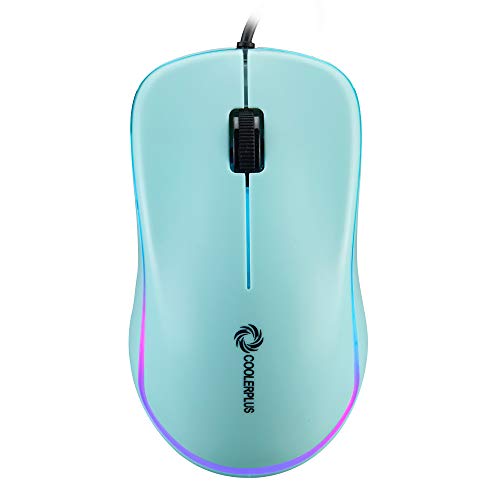
COOLERPLUS FC112 USB Optical Wired Mouse 1000DPI (Black)

Razer Gigantus V2 Cloth Gaming Mouse Pad (3XL), Thick

co2CREA Hard Case for Logitech G602 G604 Gaming Mouse
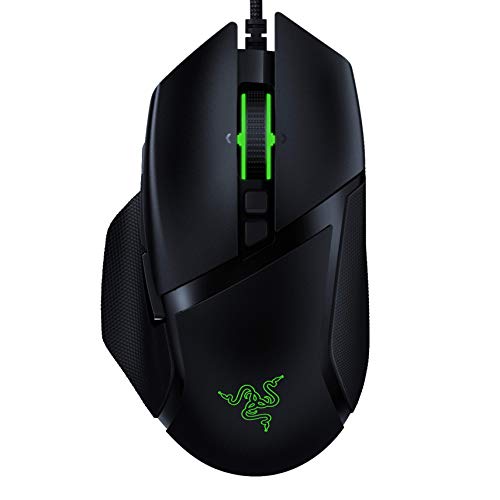
Razer Basilisk v2 Wired Gaming Mouse, 20K DPI (Classic Black)

Logitech G G840 XL Gaming Mousepad, Shroud Edition

Glorious Model O Wired Gaming Mouse 67g Honeycomb, Matte White

Razer DeathAdder V2 Gaming Mouse, 20K DPI (Classic Black)

Redragon M612 Wireless RGB Optical Gaming Mouse 8000 DPI

Razer Viper Mini Ultralight Gaming Mouse 8500 DPI, Classic Black
The Picks, Examined More Closely
The COOLERPLUS FC112 is a no-drama wired mouse that earns its spot here as a starter piece, the kind you hand to a younger sibling or keep as a backup when your main mouse gives up. Its 1000 DPI sensor (DPI, or dots per inch, measures how far the cursor moves per inch of hand movement) is on the slow side for twitchy competitive play, but it tracks cleanly on a basic desk or mouse pad. You get the standard three buttons plus a rubber scroll wheel, which is comfortable for long browsing or document editing sessions.
For students moving between classes or remote workers who just need something that clicks and scrolls, this is a straightforward, plug-and-play option. It works with Windows PCs, laptops, and notebooks without any extra software. The honest read is that serious competitive players will want more speed and precision, but for everything else, it’s a budget-sensible tool.
Positive Points
- 1000 DPI tracking handles daily office and study tasks without overshooting on screen.
- Three-button layout with a rubber scroll wheel keeps navigation predictable and quiet.
- Plug-and-play USB works with Windows PCs, laptops, and notebooks out of the box.
- Lightweight wired shell won’t drag in a bag, making it a sensible travel spare.
Some Limits To Know
- 1000 DPI tops out well below what fast-paced FPS games demand.
- The corded design means cable drag on smaller desks without a bungee or clip.
- Lacks extra thumb buttons, so MMO or productivity hotkeys aren’t an option here.
Key Advantages
Who Will Love This
Students, casual office workers, and anyone needing a reliable backup mouse for everyday computing.
Where Another Pick Suits Better
The Razer Viper Mini suits competitive FPS players who want optical switches and far higher DPI in a similarly affordable wired shell.
The Razer Gigantus V2 3XL is what happens when “gaming pad” stops meaning a small rectangle and starts meaning “covers the desk.” A textured micro-weave cloth surface gives the sensor consistent readings, whether you’re running a 400 DPI sniper setup or pushing past 12,000 on a high-end optical. Owners commonly report the cloth balance is on the speed side, which is great for sweeping flicks in Valorant or Apex but worth knowing for stickier control preferences.
If you play at low sensitivity and your mouse hand travels across half the desk, this pad pulls its weight in a way smaller pads never can. The thick base keeps it from curling at the edges, and the 3XL footprint comfortably fits a tenkeyless keyboard plus all the mouse room you’ll ever need. The trade-off is that it dominates desk real estate, so compact setups may feel cramped underneath.
Strengths Worth Knowing
- Textured micro-weave cloth balances speed and stopping control across sensor types.
- 3XL size gives a full keyboard plus massive mouse area without edge-clipping.
- Thick base resists curling and lays flat on most desks after unboxing.
- Works equally well with budget and flagship sensors, so the pad outlasts any mouse.
Points To Note
- Its size may be overkill for tight desks and might overwhelm a single-monitor setup.
- Cloth pads collect skin oils over time, so a quick wipe-down every few weeks helps longevity.
- Speed-biased surface may feel slippery if you prefer a heavy-control glide.
Made For
Low-sensitivity players who sweep wide and want a single pad that anchors the whole battlestation.
Consider Something Else When
The Logitech G G840 XL is a tighter alternative if you want a slightly more controlled cloth feel with a similar keyboard-plus-mouse footprint.
This co2CREA case isn’t a mouse at all, but anyone hauling a Logitech G602 or G604 to LAN parties or between home and office will appreciate it. The shell is built from EVA (a firm, rubber-like foam that absorbs shock without much weight), which gives it a balance of rigidity and bounce that protects against the everyday drops and bumps of a packed backpack. The interior is sized to fit those specific Logitech shapes, so the mouse doesn’t rattle around in transit.
You also get some resistance to dust and water splashes, which matters if you’re gaming in shared spaces or commuting through unpredictable weather. The catch is that it’s a case only, meaning the mouse, USB dongle, and AA batteries all stay separate. For a stationary desk setup, this is overkill, but for anyone carrying a wireless gaming mouse to a friend’s house or a tournament, it’s a sensible safeguard.
A Strong Showing
- Shockproof EVA shell guards against drops, dents, and compression in a backpack.
- Water-resistant exterior handles rain and accidental splashes on the go.
- Snug custom fit for G602 and G604 keeps the mouse from shifting during travel.
- Compact size slides easily into a laptop bag alongside other gear.
Honest Caveats
- Hard-shell form factor adds bulk compared to a soft pouch sleeve.
- Doesn’t have room for a charging cable, dongle, or spare batteries.
- Only fits the G602 and G604, so it won’t work for other Logitech mice.
Whose Shelf It Belongs On
Logitech G602 or G604 owners who travel, attend LANs, or toss their mouse into a shared family backpack.
Look Elsewhere When
You don’t own a G602 or G604, in which case the Redragon M612 brings genuine wireless gaming value instead of a case you can’t use.
The Razer Basilisk v2 is the kind of mouse that pays off when you actually use its customization, not when it sits on a shelf showing off RGB. Eleven programmable buttons are mapped through Razer Synapse 3, so MMO players can bind a full ability bar to thumb-side keys and keep their left hand free. The 20K DPI optical sensor tracks with high precision, and dedicated DPI buttons let you swap sensitivity on the fly between sniping and general movement.
Compared to the COOLERPLUS FC112, this is a real leap: optical switches (which use a light beam to register clicks instead of physical contact) register presses faster than traditional mechanical ones, and the Razer Speedflex cable reduces drag to feel almost wireless. The Chroma RGB lighting syncs with other Razer gear if you’re already in that ecosystem. The trade-off is the price, which sits well above basic office mice, and the software dependency for getting the most out of those eleven buttons.
Useful Touches
- Eleven programmable buttons cover MMO ability bars and complex macros.
- Optical switches register clicks faster than traditional mechanical designs.
- Speedflex cable drags less than standard braided cords on most desks.
- Adjustable scroll wheel resistance lets you switch between tactile and free-spin modes.
Worth Bearing In Mind
- Requires Razer Synapse 3 to unlock button remapping and DPI customization.
- The feature depth can overwhelm users who only need a simple three-button mouse.
- Wired connection may feel limiting if you prefer a clean, cable-free desk.
Feature Snapshot
Best Suited To
MMO and tactical shooter players who want a customizable, button-rich wired mouse without jumping to a flagship price.
Skip It When
You mostly play fast FPS games and want a lighter, smaller shell, in which case the Razer Viper Mini fits better.
The Logitech G G840 XL is the kind of pad that quietly disappears into your setup and lets you forget about it for years. At roughly 15.7 by 35.4 inches, it gives a tenkeyless or even full-size keyboard room to sit alongside a generous mouse area, with consistent height across the whole surface. The cloth top is tuned for balanced tracking, so the cursor behaves the same whether you’re parking your palm on the left edge or flicking across to the right.
The Shroud edition adds an exclusive design treatment that, in our view, suits fans of the pro player more than it changes actual performance. The pad performs identically to the standard G840 in terms of glide and tracking. Where it earns its keep is in cutting down on edge-catching when you slap your mouse sideways at 800 DPI, and in protecting the desk from keyboard scratches. The honest read is that you’re paying a small premium for the design, but you still get the same proven surface underneath.
Positive Takeaways
- Generous 15.7 x 35.4 inch surface fits a full-size keyboard and mouse comfortably.
- Performance-tuned cloth delivers consistent tracking across the entire pad.
- Stable base keeps the pad flat even after months of heavy use.
- Shroud edition design adds a collector-style touch without changing feel.
Where It May Fall Short
- Cloth surface still picks up dust and grime, so periodic cleaning is wise.
- Shroud edition typically costs slightly more than the standard G840 release.
- May overwhelm minimalist desks where a smaller pad would breathe better.
The Right Fit
Hybrid keyboard-plus-mouse setups, low-DPI players, and Shroud fans who want a design-forward pad that performs.
Reach For A Different Pick When
The Razer Gigantus V2 3XL suits gamers who want an even larger footprint and a slightly speedier glide.
The Glorious Model O’s claim to fame is weight, or rather the lack of it, tipping the scales at about 67 grams thanks to a honeycomb shell that lets air (and a little RGB glow) shine through. That low mass matters when you play FPS games and find yourself lifting the mouse between flicks, since a lighter shell stays controlled during fast transitions. The Pixart 3360 sensor is a respected mid-to-high tier unit that tracks cleanly across common DPI ranges.
Compared to the Razer Basilisk v2, this is a more stripped-down experience: fewer buttons, ambidextrous shape (works equally for left- and right-handed grips), and an ultra-flexible paracord-style cable that feels almost wireless off the desk. Omron switches (a widely used, durable mechanical switch brand) deliver satisfying clicks rated for millions of presses. The trade-off is the open shell, which lets dust and crumbs collect inside if you snack at your desk, and the matte coating that may feel slick to hands that sweat during long sessions.
The Case For It
- 67-gram weight reduces arm fatigue during long FPS sessions.
- Ambidextrous shape works for both right- and left-handed grip styles.
- Pixart 3360 sensor delivers reliable tracking across most DPI settings.
- Flexible cable glides cleanly without a separate bungee or cord holder.
Trade-Offs To Consider
- Honeycomb shell can collect dust and debris, so periodic cleaning helps.
- Matte finish may feel slippery for gamers with sweaty hands.
- Fewer programmable buttons than the Razer Basilisk v2 for MMO use.
Core Details
Who Should Grab It
FPS players with medium to large hands who want a featherlight ambidextrous mouse for fast, lifting-heavy aim.
Where Another Pick Suits Better
The Razer DeathAdder V2 is the right call if you prefer an ergonomic palm-grip shape over the Model O’s symmetric shell.
The Razer DeathAdder V2 leans hard into comfort, with an ergonomic right-handed shape that fills the palm and supports long sessions better than most lightweight FPS shells. The 20K DPI Focus+ optical sensor is the same one you’ll find in the pricier Basilisk v2, so tracking accuracy isn’t a compromise. Rubberized side grips keep your fingers planted even when the match runs into hour three, and the optical switches handle the click register without the double-click drift that plagues older mechanical designs.
Eight programmable buttons is fewer than the Basilisk v2’s eleven, but enough for most non-MMO play styles. The Speedflex cable glides smoothly on a standard desk, and Chroma RGB ties the look into a Razer-heavy setup. Compared to the Glorious Model O, this is the heavier, more planted option that suits palm-grip players who want their hand to relax into the shape rather than hover and lift.
What Stands Out
- Ergonomic right-handed shape supports the palm for long, comfortable sessions.
- Rubberized side grips keep your fingers planted during intense moments.
- 20K DPI sensor matches the more expensive Basilisk v2 for tracking accuracy.
- Optical switches are rated for 70 million clicks, beating many mechanical rivals.
Factors To Consider
- Right-handed ergonomic shape doesn’t suit left-handed users.
- Heavier than ultralight FPS mice, so lifting-heavy aimers may want the Model O instead.
- Software setup through Razer Synapse 3 is required to customize the eight buttons.
Right Fit For
Palm-grip players and anyone who plays multi-hour ranked sessions and values comfort over ultralight weight.
A Better Fit Elsewhere
The Glorious Model O suits claw-grip and lift-heavy aimers who want a lighter, ambidextrous shell.
The Redragon M612 is the closest thing to a budget “do-it-all” mouse on this list, packing real wireless connectivity into a price tag that won’t sting. You get three connection modes (2.4GHz dongle, Bluetooth, and wired) so the same mouse can hop between a gaming rig, a laptop, and a tablet without re-pairing. The 8000 DPI optical sensor covers comfortable ranges for both sniping and general desktop use, and remappable keys let you tune the layout through software.
The honest read is that wireless on a budget means real trade-offs, and the M612 leans on its flexibility rather than pure sensor precision compared to the Razer DeathAdder V2. Owners commonly report solid battery life but not flagship-level tracking accuracy at extreme DPI settings. RGB lighting is a fun touch for the price, and the ergonomic shape suits medium hands well. If you want wireless freedom without the premium price, this is the most accessible path on the list.
Notable Gains
- Triple-mode wireless (2.4GHz, Bluetooth, wired) adapts to multiple devices.
- Remappable keys add flexibility for productivity and casual gaming.
- 8000 DPI covers comfortable ranges for both desktop and FPS use.
- RGB lighting adds visual flair at a low cost.
Things To Weigh
- Sensor accuracy at high DPI doesn’t match flagship optical units.
- Wireless modes need occasional charging or battery swaps depending on use.
- Software setup is needed to remap keys, which adds a small learning curve.
Quick Facts
Perfect Match For
Budget-conscious multi-device users who want wireless flexibility for casual gaming and daily productivity.
Not Your Match When
You play competitive FPS at high DPI and want flagship-grade sensor precision, in which case the Razer Viper Mini fits better.
The Razer Viper Mini is the entry point into Razer’s ultralight philosophy, and it lands in a sweet spot for small-handed players or anyone who wants a tight, flick-friendly shell. At roughly 61 grams, it’s one of the lightest mice on this list, and the smaller footprint suits claw and fingertip grips that would cramp on a full-size ergonomic shape like the DeathAdder V2. The 8500 DPI optical sensor handles competitive play without issue, and Razer optical switches give the clicks a crisp, almost instant response.
The Chroma RGB underglow is a nice visual touch without adding weight, and the Speedflex cable keeps drag low on the desk. Six programmable buttons is enough for FPS and MOBA players, though MMO players will want something with more thumb-side keys like the Basilisk v2. The honest caveat is that the small size genuinely suits smaller hands best, so if you have large palms, you’ll likely find the Model O or DeathAdder V2 more comfortable.
Where It Helps
- 61-gram weight stays out of the way during fast lifting and flicking.
- Compact shell fits small hands and claw or fingertip grip styles.
- Razer optical switches register clicks faster than mechanical alternatives.
- Speedflex cable reduces drag without a separate bungee.
Possible Compromises
- Small footprint may cramp players with large hands or palm grips.
- Only six programmable buttons, so MMO-heavy users may want more inputs.
- Light shell can skate during aggressive desk slams if your pad has low friction.
Who It Suits Best
Small-handed competitive players and claw-grip FPS fans who want a true ultralight mouse without stepping up to a flagship.
Another Choice May Suit
The Razer DeathAdder V2 is the better pick for palm-grip players who want a more planted, ergonomic feel.
What To Look For Before Choosing a Budget Gaming Mouse
Sensor accuracy and DPI range matter more than people think. DPI, or dots per inch, tells you how far the cursor moves per inch of hand travel, but higher isn’t always better. Most players land between 400 and 1600 DPI for FPS games, and a mouse that tracks cleanly at those values beats one that brags about 20,000 DPI but stutters at low settings. The Razer Basilisk v2, DeathAdder V2, and Viper Mini all use optical sensors that handle low-DPI precision well, which is why they’re a step up from the COOLERPLUS FC112 for actual play.
Switch type changes how a mouse feels and ages. Optical switches (used in the Razer trio and supported in many newer designs) use a light beam to register clicks, which avoids the double-click drift that plagues older mechanical switches over time. Mechanical Omron switches (like those in the Glorious Model O) still feel great and last millions of clicks, but expect a longer-term maintenance window. For most budget shoppers, the deciding factor is the feel of the click rather than the underlying tech.
Connection type sets your daily routine. Wired mice like the Razer Basilisk v2, DeathAdder V2, Viper Mini, and Glorious Model O never run out of battery, but the cable can drag on smaller desks. Wireless options like the Redragon M612 free you from cables entirely, but you’ll charge or swap batteries depending on use. A Speedflex or paracord-style cable softens the wired trade-off considerably.
Shape and grip style decide long-term comfort. The DeathAdder V2 fits palm grips, the Viper Mini fits claw and fingertip grips, the Model O is ambidextrous for both, and the Redragon M612 sits in the middle of the pack. Trying a shape in person, or at least knowing your grip style, prevents the most common budget regret: a mouse that feels fine for an hour and painful after three.
Size and desk real estate complete the picture. A small mouse pairs well with a smaller pad, while a wide sweeping setup benefits from a 3XL pad like the Razer Gigantus V2 or the Logitech G840 XL. Matching the mouse footprint to your pad and desk space keeps the whole setup consistent and avoids edge-clipping during flicks.
Key Considerations Across These Picks
Mistakes Worth Dodging
The most common budget mistake is chasing raw DPI numbers instead of tracking quality at the settings you’ll actually use. A 20,000 DPI sensor that stutters at 800 DPI loses to a clean 8500 DPI sensor every time. Another trap is ignoring the pad, since even a great sensor feels inconsistent on a worn-out or too-small surface. The Razer Gigantus V2 3XL and Logitech G840 XL solve this for low-sensitivity players, but only if you actually have the desk space to spread out. Finally, skipping grip and shape research leads to the classic “fine for a week, painful by month two” outcome, which is why the DeathAdder V2, Viper Mini, and Model O each serve a distinct hand-and-grip profile.
Where The Extra Money Goes
Stepping up from a basic wired mouse to a mid-tier gaming mouse buys you three real things: better sensors that hold up at low DPI, optical or higher-rated mechanical switches that resist double-click drift over years, and lighter or more ergonomic shells that reduce fatigue. The Razer Basilisk v2’s eleven programmable buttons and the DeathAdder V2’s palm-grip comfort are good examples of upgrades that pay off across many game genres, not just one. The Redragon M612 shows where budget wireless makes sense for multi-device users, even if flagship-level sensor precision isn’t part of the deal. The honest upgrade rule: pay more when a specific feature matches your grip, genre, or desk setup. Pay less when a basic wired mouse already covers how you play.
Frequently Asked Questions
Is a wired or wireless gaming mouse better on a budget?
Wired mice generally give you more sensor and switch quality for the same money, which is why most options on this list are wired. Wireless options like the Redragon M612 are worth it if you switch between devices or hate cable clutter, but expect small trade-offs in sensor precision at the lowest price tiers.
What DPI do most gamers actually use?
Most FPS players land between 400 and 1600 DPI, with 800 being a common middle ground. Higher DPI settings (like 8000 or 20,000) are useful for high-resolution multi-monitor setups, but raw numbers above 4000 rarely matter for actual gameplay. Tracking quality at the DPI you’ll use matters more than the maximum spec.
How long do budget gaming mice typically last?
Optical switches in the Razer mice here are rated for around 70 million clicks, and Omron switches in the Glorious Model O handle millions of presses before any double-click drift. Wired mice in this price range often last three to five years of regular use, with the pad and cable typically wearing out before the sensor does.
Do I need a special mouse pad for a gaming mouse?
Most optical sensors track well on any flat, non-reflective surface, so a basic pad works fine. Larger pads like the Razer Gigantus V2 3XL and Logitech G840 XL help if you play at low sensitivity and sweep wide, but they’re not required. A clean, consistent surface matters more than a premium pad for everyday use.
Are ultralight mice actually better?
Ultralight shells (like the Razer Viper Mini at 61 grams or the Glorious Model O at 67 grams) genuinely help if you play FPS games and lift the mouse between flicks, since less mass means faster transitions. They can feel slippery or cheap to some players, though, so the comfort factor is real. If you use a palm grip and play long sessions, the heavier DeathAdder V2 may feel more planted.
Bottom Line
The right budget wireless mouse for gaming depends on what you already know about your grip, your sensitivity, and the games you play most. A clean-tracking sensor, comfortable shape, and durable switches will outlast any spec-sheet headline, and a pad that matches your play space ties the whole setup together. Pick the one that fits your hand and your desk, and the rest tends to take care of itself.


