


A mechanical keyboard used to feel like a treat, something you’d upgrade to only after building the rest of your rig. That era is gone. The current crop of affordable mechanical boards offers genuine hot-swap sockets, gasket-mounted cases, and pre-lubed switches that hold their own against older flagship models. The trick is knowing which corners each board cuts and which ones you can actually live with.
If you’re hunting for a budget mechanical keyboard for gaming, you’ve probably already noticed how crowded this shelf has become. The list below covers ten realistic options at varying price points, from entry-level wired boards you can toss in a backpack to wireless tri-mode boards with multi-device pairing. The goal is simple: match your real setup, not chase the shiniest spec sheet.
The Essentials At A Glance

YUNZII B87 TKL Wireless Mechanical Keyboard (Blue Heart, Milk Switch)

EPOMAKER x LEOBOG Hi75 Wired Aluminum Alloy Mechanical Keyboard (White Green)
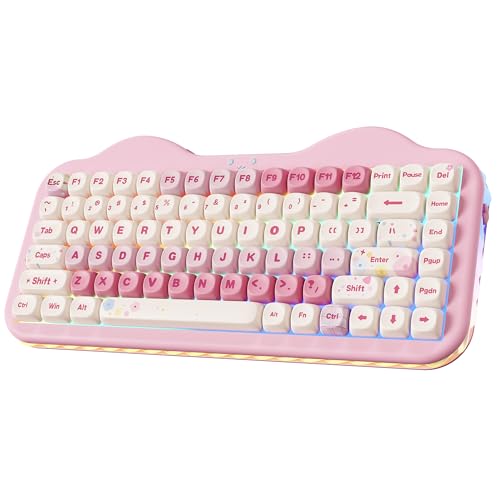
YUNZII C75 Cute 75% Wireless Mechanical Keyboard (Pink, Candy Switch)

Aula F75 Wireless Mechanical Keyboard (Reaper Switches)
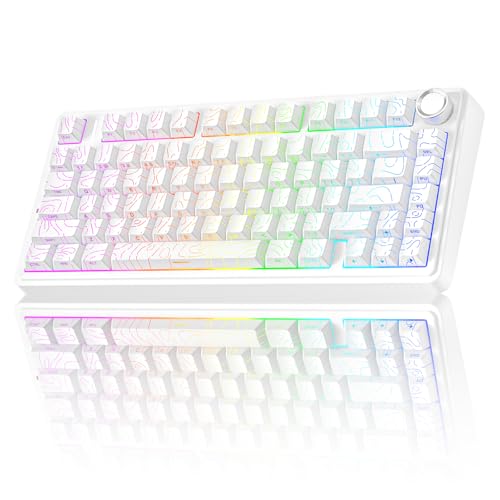
AULA F75 Pro Wireless Mechanical Keyboard with Knob (Line White)

RK ROYAL KLUDGE RK918 Wired Mechanical Keyboard (Blue Switch, White)

COSTOM WK87 75% TKL Wireless Mechanical Gaming Keyboard (Black)

MOTOSPEED GK82 RGB Mechanical Gaming Keyboard (Blue Switch)
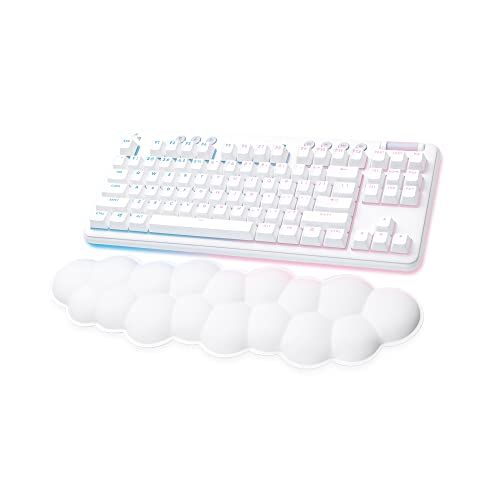
Logitech G715 Wireless Mechanical Gaming Keyboard (White Mist)

Redragon K552P Mechanical Gaming Keyboard TKL (RGB, Black)
A Breakdown Of The Leading Choices
The YUNZII B87 leans into personality without abandoning function. The tenkeyless layout (meaning it omits the numeric keypad for a smaller footprint) saves serious desk real estate, and the wireless connection keeps cable clutter down during long streaming sessions. Bear-patterned dye-sublimation PBT keycaps (a printing method that drives pigment deep into the plastic for fade-resistant legends) give the board real character compared with the plain black slabs dominating the budget tier.
Compared with the EPOMAKER x LEOBOG Hi75 in slot two, the B87 skips hot-swap sockets and a metal chassis, so it isn’t the board you buy to tinker with internals. It is the board you buy to enjoy every day without thinking about it. Most casual gamers will appreciate the included soft-touch wrist rest right out of the box.
Reasons It Performs
- Wireless freedom cleans up the desk and reduces strain during marathon sessions
- PBT keycaps resist the shine that builds up on cheaper ABS plastic after a few months
- Compact TKL form factor leaves more room for wide mouse sweeps in FPS games
- Included wrist rest saves you from buying a separate accessory on day one
Things To Consider
- Lacks hot-swap support, so swapping switches means soldering or buying a new board
- The playful bear keycap design may clash with a serious, minimalist battlestation aesthetic
Who It Suits Best
First-time mechanical keyboard owners who want wireless convenience, distinctive keycap art, and a comfortable typing feel without diving into custom internals.
Look Elsewhere When
The Logitech G715 is a smarter choice for streamers and brand-conscious shoppers who want proven wireless reliability and a cleaner aesthetic.
The EPOMAKER x LEOBOG Hi75 swaps the wireless flexibility of slot one’s YUNZII B87 for a denser, more rigid build. The aluminum alloy frame gives every keypress a satisfying, planted feel, and the south-facing RGB LEDs (LEDs mounted on the bottom of the switch so the light shines through the legend cleanly) keep the lighting crisp across every row. A dedicated mode-switching knob is a small but useful touch for adjusting volume or backlight without alt-tabbing.
Wired-only design means zero battery anxiety during tournaments or long co-op sessions. For anyone planning to swap switches and keycaps over time, the hot-swap socket handles standard 3-pin and 5-pin switches without soldering. Most players moving up from a basic membrane keyboard will notice the difference on the first night.
A Favorable Mix
- Aluminum frame stays planted on the desk during intense click-heavy games
- Hot-swap sockets make experimenting with different switch types genuinely simple
- Pre-lubed Nimbus switches feel smooth out of the box, no break-in needed
- 75% layout with the knob keeps function keys accessible without wasting space
Trade Offs
- Wired-only connection limits placement options if you prefer a clean wireless desk
- The knob cannot wake a sleeping PC, which catches a few users off guard at first
- FN layer takes some adjustment since Mac and Windows modes share certain shortcuts
Feature Snapshot
Right Fit For
Wired-purist gamers and budding keyboard tinkerers who want a premium-feeling aluminum frame and hot-swap flexibility at a price that won’t sting.
A Better Fit Elsewhere
The Aula F75 is the smarter grab for users who specifically need wireless freedom and a long-lasting 4000mAh battery for multi-device setups.
The YUNZII C75 doubles down on the playful direction of the B87, this time wrapped in a pink colorway with “Candy” switches. The 75% layout is one of the most practical form factors in this category, giving you function keys and arrows without eating desk space. Wireless connectivity plus a creamy typing sound profile makes it a strong fit for a bedroom or dorm setup.
Unlike the metal-shelled EPOMAKER Hi75 in slot two, the C75 goes light and cute, prioritizing visual charm over chassis rigidity. The trade-off shows up if you hammer keys aggressively, but for everyday gaming and writing, the feel is genuinely soft. Students and casual gamers will get more out of this board than competitive FPS players chasing speed.
Real-World Strengths
- Pink colorway and themed keycaps brighten up an otherwise neutral workspace
- Wireless mode keeps the desk looking clean for photo-ready setups
- 75% layout preserves arrow keys, which many compact boards drop
- Creamy acoustic profile is friendly in shared rooms
Worth Noting
- Plastic chassis flexes more than the aluminum Hi75 under heavy keystrokes
- The Candy switch feel won’t satisfy typists who prefer crisp tactile bumps
Made For
Style-conscious students, small-desk owners, and casual gamers who want wireless freedom and a softer typing sound over hardcore competitive performance.
Consider Something Else When
The COSTOM WK87 is the smarter match for buyers who want a sturdier gasket feel, a much larger 5000mAh battery, and a more grown-up black aesthetic.
The Aula F75 is the budget board that genuinely blurs the line with mid-range competitors. Tri-mode connectivity (Bluetooth 5.0, 2.4GHz wireless, and USB-C wired) means you can pair it with a laptop, tablet, and gaming PC simultaneously, switching between them with a shortcut. The 4000mAh battery is large enough for most users to charge weekly rather than daily.
Hot-swap support and 75% layout give it strong utility, while Reaper switches aim for a smooth, quiet feel. Compared with the cheaper YUNZII C75 in slot three, this one feels more grown-up and versatile. It is the safest pick on the list for households that share one keyboard between devices.
What Works In Its Favor
- Three connection modes cover laptops, phones, tablets, and consoles
- 4000mAh battery comfortably handles a full workweek of moderate use
- Hot-swap PCB (the printed circuit board that holds the switches) invites easy customization later
- RGB backlighting adds personality without being overwhelming in dark rooms
Some Limits To Know
- Reaper switches are linear, so typists wanting a tactile bump should plan to swap
- Software for keymapping is functional but not as polished as bigger-brand options
Key Specs
Best Suited To
Multi-device households, students juggling a laptop and a desktop, and remote workers who want a single keyboard for both work and play.
Skip It When
The YUNZII B87 in slot one is a friendlier first mechanical for buyers who prioritize unique keycap art and a simpler wireless-only experience.
The AULA F75 Pro is the grown-up sibling of the Aula F75 in slot four. It keeps the same tri-mode connectivity and 75% layout, then layers on a side-printed PBT keycap set, a rotary control knob, and pre-lubed switches for a quieter, more refined feel. Side-printed legends leave the front of each cap clean, which suits minimalist desk setups.
For content creators who fiddle with timeline scrubbing in video editing software, the knob earns its place immediately. The Pro also recharges via the same USB-C cable most laptops use, so packing one less charger for travel is a real benefit. It is genuinely versatile across gaming, writing, and editing work without committing to a full-size board.
Practical Pluses
- Rotary knob streamlines volume, zoom, and timeline scrubbing without keyboard shortcuts
- Side-printed PBT keycaps keep the front of each cap uncluttered for a clean look
- Pre-lubed switches produce a softer sound than many budget boards in this tier
- Tri-mode connection supports the same multi-device workflow as the standard F75
Room For Improvement
- Side-printed legends can be slower to read at a glance for new users
- Costs more than the standard F75 with mostly cosmetic and feel upgrades
Whose Shelf It Belongs On
Content creators, video editors, and writers who want wireless flexibility, a tactile knob, and quiet pre-lubed switches in one compact board.
Not Your Match When
The Redragon K552P in slot ten is the smarter grab for budget shoppers who prioritize a proven wired tank-style build over wireless convenience.
The RK918 goes in a completely different direction from the compact 75% boards dominating the rest of this list. It is a full-size 108-key layout with round, typewriter-style keycaps and a large surrounding LED side lamp for ambient glow. Blue clicky switches (switches that produce a loud, tactile click with each press) make every keypress unmistakable, which some writers love and some roommates don’t.
Where the AULA F75 Pro in slot five keeps things quiet and modern, the RK918 leans fully into retro character. N-key rollover (the ability to register every keypress simultaneously, no matter how many keys you mash at once) handles fast combo-heavy inputs in MMOs and fighting games. For anyone who wants a writing keyboard that looks like it came out of a 1920s newsroom, this is a fun detour from the modern minimalism trend.
Useful Strengths
- Full-size 108-key layout includes a dedicated numpad, which spreadsheet users appreciate
- Typewriter-style round keycaps bring real visual personality to a desk
- Blue clicky switches give loud, satisfying feedback that helps reinforce typing rhythm
- Wide OS compatibility covers Windows, macOS, and Linux for diverse workflows
Points To Note
- Clicky blue switches are too loud for shared offices or late-night apartment living
- The chunky retro design occupies more desk space than any 75% board on this list
Quick Facts
Who Should Grab It
Writers, novelists, and home-office users who want a tactile clicky feel, full numpad access, and a vintage look in one desk-friendly package.
Another Choice May Suit
The MOTOSPEED GK82 in slot eight is the better fit for buyers who prefer tactile blue feedback in a much smaller 82-key aluminum-base chassis.
The COSTOM WK87 is the wireless board for users who hate charging cables. The 5000mAh battery is among the largest in this price tier, and the gasket-mounted structure (a design where the PCB “floats” on soft gaskets inside the case for a softer, less harsh typing feel) gives every keypress a dampened, cushioned feel that punches above the cost. POM linear switches (a switch type using a polyoxymethylene stem for an exceptionally smooth keypress) come pre-lubed from the factory.
Compared with the Aula F75 in slot four, the WK87 leans harder into the “creamy” acoustic profile. The 75% TKL layout (a hybrid layout that drops the numpad but keeps the function row and arrows) is the same, but the gasket mount and larger battery are where this board justifies any price difference. The five-layer sound-absorbing padding also makes it noticeably quieter than typical budget mechanicals.
Practical Advantages
- 5000mAh battery can stretch to a full week or more between charges
- Gasket mount absorbs typing noise for a softer acoustic profile
- Pre-lubed POM linear switches feel smooth without any break-in period
- Tri-mode connection supports 2.4GHz, Bluetooth 5.1, and USB-C wired
Less Ideal Details
- Larger battery adds slight heft compared with slimmer wireless boards
- Gasket mount gives a softer feel that some fast-paced gamers may find mushy
Built With In Mind
Cable-free desk enthusiasts and quiet-typing fans who want a long battery life, gasket-mounted feel, and creamy acoustics in a compact 75% chassis.
Swap It Out When
The AULA F75 Pro in slot five is a smarter choice for users who specifically want a rotary control knob for editing and volume control.
The MOTOSPEED GK82 delivers the rare combination of an aluminum base, hot-swap sockets, and noise-absorbing foam at a price most budget shoppers can stomach. The 82-key layout sits between a TKL and a 75%, giving you a function row without the full numpad. Blue switches are soft tactile rather than loud clicky, which makes this board a better fit for shared spaces than the RK918 in slot six.
Wired-only operation means zero battery anxiety, and the included 2.4GHz wireless receiver (per the source data) gives you some flexibility when you need it. Most users will appreciate the upgraded socket design, which makes future switch swaps more reliable than cheaper hot-swap PCBs tend to be. For LAN parties and travel, the compact size slips easily into a backpack.
Everyday Advantages
- Aluminum base keeps the board planted during intense gameplay
- Noise-absorbing foam inside the case dampens the typical mechanical clatter
- Hot-swap socket supports future switch experimentation without soldering
- 82-key compact layout balances function row access and desk footprint
A Few Limitations
- Wired-primary design means a cable is always in play at the desk
- Brand awareness is lower than bigger names, so resale or community support is thinner
Perfect Match For
LAN party regulars, apartment gamers, and quiet-typing enthusiasts who want a sturdy aluminum base, hot-swap flexibility, and reduced acoustic footprint.
Reach For A Different Pick When
The COSTOM WK87 in slot seven is the better match for buyers who want full wireless freedom and a much larger 5000mAh battery instead of wired reliability.
The Logitech G715 sits at the polished end of this budget list. The White Mist finish and cloud-shaped palm rest are unmistakably Logitech, and the wireless reliability backed by a major brand tends to outshine smaller names in real-world ownership. TKL layout keeps the desk open, and adjustable height helps you find a comfortable typing angle for long sessions.
Compared with the Aula F75 in slot four, the G715 trades hot-swap tinkering for a smoother out-of-box experience. If you want a keyboard that simply works with minimal fuss and a refined look for streaming or office settings, this is the more grown-up choice. Most users will appreciate the included palm rest, which doesn’t always come bundled with budget boards.
The Helpful Details
- Wireless reliability from a major brand reduces connection dropouts in long sessions
- Cloud-shaped palm rest reduces wrist fatigue during marathon gameplay
- TKL layout maximizes mouse space without sacrificing the function row
- Adjustable height supports different chair and desk setups
Practical Considerations
- Sits at the higher end of the budget tier, so the value math is tighter
- Lacks hot-swap sockets, so internal customization is limited
Feature Card
Who Will Love This
Style-first streamers, office-to-gaming hybrid users, and shoppers who value brand-name wireless reliability over hot-swap tinkering.
Where Another Pick Suits Better
The EPOMAKER x LEOBOG Hi75 in slot two is the smarter call for users who want an aluminum chassis and hot-swap support at a lower price.
The Redragon K552P has earned its reputation as the budget workhorse of the mechanical keyboard world. The metal frame and spill-resistant design hold up to the kind of daily abuse that would finish off flimsier boards. Hot-swappable red switches (linear switches that press straight down with no bump or click) come standard, so you can swap in your preferred switch type down the line without any soldering iron.
Wired-only design keeps the price accessible and removes any battery concerns for serious gaming sessions. Where the Logitech G715 in slot nine leans polished, the K552P leans dependable. For first-time mechanical keyboard shoppers and LAN party regulars, this board is hard to argue with on raw value.
Good Reasons To Consider
- Proven metal-frame build withstands years of regular gaming use
- Hot-swappable red switches let you change feel without buying a new board
- Spill-resistant design forgives the occasional drink mishap
- Compact TKL layout opens up more room for sweeping mouse movements
Where It May Fall Short
- Wired-only connection won’t suit users moving toward a cable-free desk
- Linear red switches lack the tactile feedback that some typists prefer
The Right Fit
First-time mechanical shoppers, LAN party regulars, and budget-focused gamers who want a proven, durable wired board that just keeps working.
Skip It When
The Aula F75 in slot four is the smarter grab for shoppers who specifically want wireless freedom and a 4000mAh battery to roam between devices.
What To Weigh Before Picking A Budget Mechanical Keyboard
Switch type is the single biggest call. Linear switches press straight down with no bump, tactile switches add a small bump mid-press for feedback, and clicky switches pair that bump with an audible click. For gaming, linear is often the default. For typing-heavy workdays, tactile tends to feel more rewarding.
Layout matters more than most first-time shoppers expect. A full-size 108-key board covers spreadsheet work but eats desk space. TKL keeps function keys and drops the numpad. 75% trims further but usually preserves arrows. Match the layout to the actual space on your desk and the games you play.
Connectivity changes the daily feel. Wired boards mean zero charging and lower input lag, useful for competitive play. Tri-mode wireless boards (Bluetooth, 2.4GHz, and USB-C) pair with multiple devices and free up cable clutter, but you will eventually charge them. Hot-swap sockets add long-term flexibility, letting you swap switches without soldering.
Build materials and acoustic layers are the quiet differences. Aluminum frames feel planted, while gasket mounts (a design where the PCB floats on soft gaskets inside the case) and foam padding produce a softer, creamier sound. ABS keycaps tend to shine after months of use; PBT keycaps resist that shine. For shared rooms, foam and PBT are worth chasing.
Key Considerations Across These Picks
Pitfalls Shoppers Hit
A common slip-up is buying on switch color alone. “Blue” means clicky on most boards, but switch feel varies by brand and factory lube. Reading a real description of the switch profile saves a return trip. Another trap is ignoring keycap material. ABS plastic looks fine at first, then develops a greasy shine within months for heavy typists. Reaching for PBT where possible avoids that.
Overlooking layout compatibility is a quiet mistake. Some 75% boards drop the function row or arrow keys, which can break muscle memory from your previous keyboard. The picks on this list preserve arrows, but double-check the keymap before committing. Software support is the third one to watch. Smaller brands sometimes ship with sparse configuration tools, which limits how much you can rebind keys or program macros later.
What The Higher Tier Buys
Stepping up the price ladder generally brings three things. First, a sturdier chassis, often aluminum or gasket-mounted, that feels planted and sounds cleaner. Second, larger batteries in wireless boards, often stretching to a week or more between charges. Third, more refined factory lubing on switches, which reduces scratchy keystrokes and ping sounds.
The upgrade is genuinely worth it if you type or game for hours daily and notice the small differences in feel and noise. For casual play and weekend sessions, the budget tier covers the essentials without missing much. The honest read is to spend on the build and switch feel, not on RGB extras you will turn off after a week.
Frequently Asked Questions
What is a hot-swappable mechanical keyboard? A hot-swappable keyboard lets you remove and replace switches without soldering, so you can experiment with different switch types or replace a broken switch on your own. Most picks on this list support either 3-pin or 5-pin switches.
Are budget mechanical keyboards good for gaming? For most players, yes. The mechanical feel, faster response than typical rubber-dome boards, and durable construction help budget boards punch well above their cost. Competitive players chasing the lowest input lag may still prefer wired boards over wireless.
What is the difference between TKL and 75% layouts? TKL (tenkeyless) drops the numpad but keeps the function row, arrow keys, and a navigation cluster. 75% trims the navigation cluster and sometimes merges keys, so the board sits narrower on the desk while still preserving arrows and a function row.
How long do budget mechanical keyboards last? Most budget mechanical keyboards are rated for tens of millions of keystrokes per switch, and PBT keycaps tend to outlast ABS ones. With reasonable care, you can expect years of daily use before any major issues surface.
Is wireless gaming input lag a real concern? Modern 2.4GHz wireless keyboards have largely closed the gap with wired boards, so casual and even mid-competitive players will not notice. Bluetooth connections can add slight latency, which is why most wireless gaming boards include a dedicated 2.4GHz receiver.
Closing Remarks
A budget mechanical keyboard for gaming doesn’t mean settling anymore. The ten boards above span every layout, switch feel, and connectivity option a typical player actually needs, from a $30 wired workhorse to a $150 wireless flagship. The trick is matching the board to the way you actually use your desk, not to the shiniest RGB profile. Pick the layout and switch type that fit your games and your room, and you will end up with a keyboard that outlasts the next two or three budget GPU cycles.


