


Most people chasing their first serious gaming display don’t need 4K or a 240Hz panel. A solid 1080p screen with at least 144Hz, adaptive sync, and a decent panel delivers a dramatic jump over a stock office monitor, and the cost stays friendly. This roundup covers nine screens built for that exact role, from slim productivity hybrids to curved panels built for fast-paced shooters. You will find options for tight desks, large battlestations, esports practice, and casual play, all without overshooting the budget ceiling.
An Overview Of The Picks

HP 24mh FHD Monitor with 23.8-Inch IPS Display (1080p)
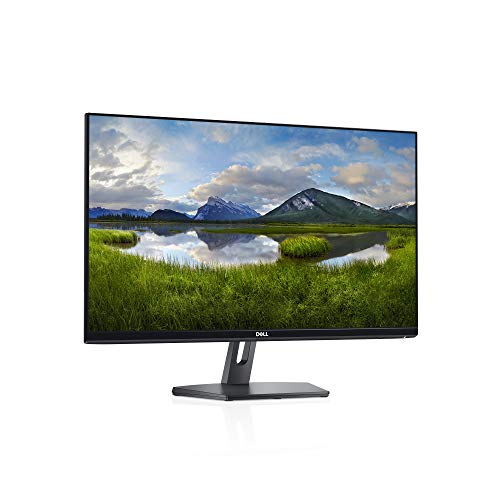
Dell SE2419Hx 23.8″ IPS Full HD Monitor

ASUS TUF Gaming VG27VH1B 27″ Curved Monitor 165Hz

MSI MAG 274CF X24 27-inch 240Hz Gaming Monitor
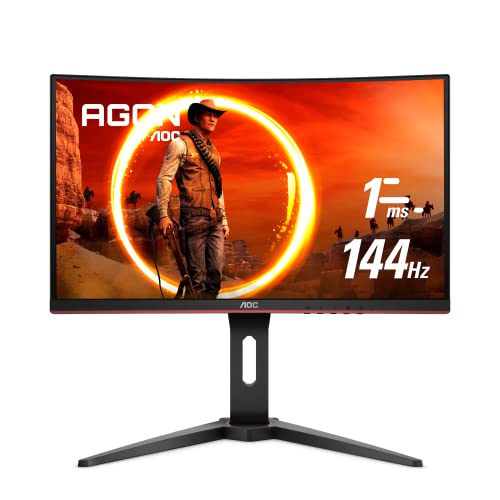
AOC C24G1 24″ Curved Frameless Gaming Monitor 144Hz

BenQ Mobiuz EX2510 24.5″ 144Hz IPS Gaming Monitor

Sceptre Curved 27″ FHD 1080p Gaming Monitor 165Hz
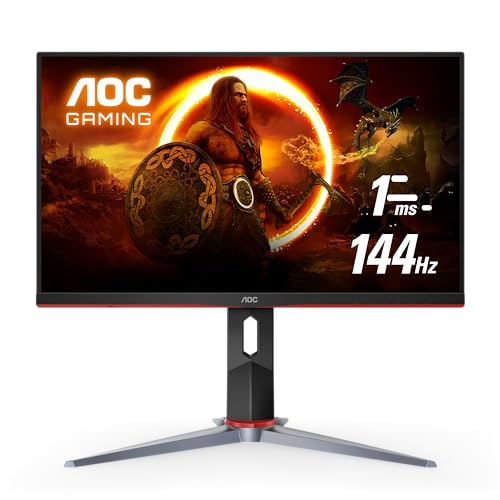
AOC 24G2 24″ Frameless Gaming IPS Monitor 144Hz

BenQ MOBIUZ EX2510S 25″ 165Hz IPS Gaming Monitor
Why These Options Stand Out
The HP 24mh sits in an interesting middle ground: it looks and feels like a productivity panel, but the IPS (In-Plane Switching) screen and thin bezels make it surprisingly capable for casual gaming and streaming after work. For a shared desk that doubles as a homework station and a weekend game room, that flexibility saves you from owning two displays.
Height and tilt adjustment is the unsung feature here, since most budget panels lock you into a fixed stance. VESA mounting (a standardized hole pattern on the back that fits aftermarket arms and wall mounts) gives you room to grow if you ever swap in a monitor arm.
The Value In It
- IPS panel keeps colors and viewing angles consistent when friends crowd around for split-screen.
- Height adjustment is rare at this tier, and it spares your neck during long study sessions.
- Built-in speakers clear the desk of a separate soundbar for light use.
- DisplayPort and HDMI inputs cover both newer GPUs and older laptops without adapters.
Things To Consider
- Refresh rate sits at a modest level, so fast-paced esports will feel softer than on a 144Hz panel.
- Built-in speakers handle dialogue fine but lack the body for action games or music.
Who It Suits Best
Students, remote workers, and parents building a hybrid work-and-play station get the most from this panel’s flexibility.
Where Another Pick Suits Better
For pure competitive shooters, the MSI MAG 274CF X24 will feel dramatically more responsive.
The Dell SE2419Hx is the screen you buy when gaming is a side activity, not the main event. Its thin-bezel IPS panel and compact base maximize desk space, which matters in small home offices or shared bedrooms where every inch counts.
Setup is genuinely plug-and-play for most laptops and desktops. You may find the basic stand limits ergonomic adjustments, but for everyday browsing, homework, and the occasional RPG or indie game, the picture quality holds up well against more expensive alternatives.
A Few Highlights
- Compact base frees up room for a keyboard, notebook, and a coffee cup.
- IPS viewing angles keep the image clean even when the screen tilts back.
- Plain, business-friendly design blends into shared spaces without screaming “gamer.”
Points To Note
- Stand only tilts, so taller users may need to stack it on a riser for proper posture.
- Refresh rate is conservative, which limits how smooth fast action looks.
- No built-in speakers mean you’ll want headphones or external audio.
Key Specs
Made For
Home offices, dorm rooms, and family computers where casual gaming is just one of many daily tasks.
Skip It When
You mostly play twitch shooters, in which case the AOC 24G2 will deliver the speed you’re missing.
Step up from the HP 24mh and you land somewhere far more cinematic. The ASUS TUF Gaming VG27VH1B stretches a 27-inch curved panel across your vision, paired with a 165Hz refresh rate that handles modern shooters without the smeared look cheaper screens produce.
For someone who plays mostly single-player adventures, RPGs, or story-driven games, the 1500R curve pulls the edges of the screen closer, deepening the sense of being inside the world. ELMB (Extreme Low Motion Blur), a backlight-strobing tech that sharpens fast motion, helps during quick camera turns.
Real-World Strengths
- 165Hz refresh rate (with 144Hz support) gives noticeably smoother aim than 60Hz panels.
- FreeSync Premium (a sync standard that matches the display’s refresh to your GPU’s frame output) reduces tearing in games without stutter.
- Curved 27-inch format feels more cinematic for RPGs and driving sims.
Worth Noting
- 1080p spread across 27 inches means individual pixels are slightly more visible up close.
- VA-style contrast (deep blacks versus bright whites) is great for dark scenes but can wash at extreme angles.
Best Suited To
Players who want immersion in story-driven games and a larger field of view for racing or flight sims.
Consider Something Else When
You sit close to a smaller screen or prefer pixel density, in which case the AOC 24G2’s 24-inch IPS panel will look sharper.
The MSI MAG 274CF X24 is the speed specialist in this lineup. A 240Hz refresh rate paired with a 0.5ms response time (GtG, or gray-to-gray, a measure of how fast a pixel can change shade) targets exactly the kind of player who notices when an enemy flicks across the screen. HDR (High Dynamic Range) Ready support means it can accept HDR signals for expanded contrast, even if the panel doesn’t deliver true HDR brightness.
For competitive Valorant, CS2, or Apex players running a modern mid-range GPU that can actually push frame rates that high, this display opens up the headroom a 144Hz screen leaves on the table. The curve is gentle enough that documents and spreadsheets still look natural when work calls.
Practical Advantages
- 240Hz ceiling lets serious players see motion clarity a 144Hz panel cannot match.
- FreeSync Premium support keeps the image tear-free when frame rates fluctuate.
- 0.5ms response time minimizes the ghosting trail behind fast-moving objects.
Trade Offs
- To fully benefit, your GPU needs to push well over 144 frames per second, which most budget builds cannot sustain.
- HDR Ready is not the same as full HDR brightness, so don’t expect OLED-level contrast.
Feature Snapshot
Who Will Love This
Esports-minded players with a capable graphics card who want every frame advantage they can get at 1080p.
Reach For A Different Pick When
Your rig struggles to exceed 100fps, because the BenQ Mobiuz EX2510 will feel more balanced for mixed use.
The AOC C24G1 was one of the first monitors to make a curved gaming screen feel affordable, and it still holds up as a gateway pick. The 1500R curve wraps your peripheral vision without making text look stretched, which helps if you alternate between gaming and homework on the same screen.
For a first-time gaming setup or a shared family computer that occasionally hosts Fortnite nights, the combination of 144Hz, FreeSync, and a height-adjustable stand is a generous feature set at this level. Owners commonly appreciate that the stand actually moves up and down, unlike the fixed posts on most competing models.
Useful Strengths
- Height adjustment saves your neck during long sessions.
- Curved 24-inch format suits smaller desks better than 27-inch alternatives.
- FreeSync support smooths out frame drops in less optimized games.
Minor Gripes
- VA panel viewing angles (how far you can move before colors shift) are narrower than IPS, so off-center seating shifts color tone.
- Stand footprint is larger than the Dell SE2419Hx’s compact base.
Perfect Match For
First-time gaming buyers who want a taste of curved immersion without overspending on a 27-inch panel.
Another Choice May Suit
For sharper text and better angles at a similar budget, the AOC 24G2 swaps the VA curve for an IPS flat panel.
The BenQ Mobiuz EX2510 is a screen for people who notice picture quality but don’t want a pro-tier price tag. The IPS panel, HDRi processing (BenQ’s version of HDR that adjusts brightness and tone per scene), and built-in speakers target a buyer who plays a little of everything, from cinematic RPGs to weekend films.
It earns its keep in a living-room-adjacent battlestation where you might stream a show, host a co-op session, and then settle in for a long single-player run, all on the same display.
Notable Gains
- HDRi smartly boosts contrast without crushing shadow detail in dimly lit scenes.
- IPS panel keeps colors accurate even when you recline on the couch to play.
- Built-in speakers free you from a desk-only setup.
Room For Improvement
- 144Hz ceiling is plenty for most games but trails the 240Hz MSI MAG 274CF X24.
- 24.5-inch size sits in an awkward middle ground if you’re choosing between compact and immersive.
Feature Card
Right Fit For
Living-room gamers and content bingers who want one screen that does movies and games well.
Look Elsewhere When
Your priority is the absolute highest refresh rate, because the MSI MAG 274CF X24 doubles down on speed.
The Sceptre C275B-1858RN proves that a 27-inch curved panel with a 165Hz refresh rate does not have to command a premium. For someone upgrading from a 60Hz office screen, the difference feels enormous: menus glide, camera pans stay smooth, and the curve pulls the edges into view.
It’s a smart match for a parent or partner setting up a console-and-PC-friendly screen on a tighter budget, especially in a den or shared bedroom where a larger display beats a smaller sharper one.
Everyday Advantages
- 27-inch curved screen delivers an immersive feel without the highest-tier price.
- Built-in speakers reduce clutter for casual console play.
- FreeSync Premium support keeps the image clean across varied frame rates.
Honest Caveats
- Color accuracy out of the box tends to favor punchy over neutral, so calibration helps for photo work.
- Stand ergonomics are basic, so you may want a VESA arm for proper height.
Who Should Grab It
Budget-focused shoppers who want a big curved screen for mixed gaming and streaming sessions.
Where A Sibling Pick Shines
For a more refined color profile, the BenQ MOBIUZ EX2510S is the smarter choice.
The AOC 24G2 has earned a quiet reputation as one of the best all-rounders in budget gaming. The IPS panel delivers strong color, 144Hz keeps motion smooth, and the height-adjustable stand beats nearly every competitor at this level. AOC’s three-year zero dead-pixel guarantee (a warranty promising a replacement if any pixel permanently dies) adds real peace of mind.
It suits a wide range of players: ranked grinders who care about clarity, students who stream on the same screen, and casual creatives who edit the occasional video. Where the AOC C24G1 leans into curve and VA contrast, this one goes the other direction: flat, accurate, and predictable.
Everyday Perks
- IPS panel produces vibrant, consistent color for both games and content work.
- 144Hz refresh and FreeSync Premium keep motion sharp without tearing.
- Three-year zero dead-pixel policy reduces the risk of an early replacement.
Softer Spots
- Black levels are not as deep as VA panels, so dark-room contrast looks a bit flat.
- Red-and-black styling may not blend into minimalist setups.
Feature Rundown
Built With In Mind
Competitive casual players who want a versatile, color-accurate panel for gaming and side creative work.
Swap It Out When
You want the deepest blacks and a curve, in which case the AOC C24G1 is the more atmospheric pick.
The BenQ MOBIUZ EX2510S takes everything the original EX2510 did and polishes it. A 165Hz refresh rate, 99% sRGB coverage (sRGB is the standard color space used for most web and game content; higher coverage means more accurate color), and BenQ’s eye-care technologies (features that reduce blue light and flicker) make this the most refined pick in the roundup.
It’s the screen for someone who wants a budget panel that doesn’t feel like one. For content creators, designers, and anyone who notices color drift between devices, the difference shows up immediately in photo edits and illustrated work.
Where It Excels
- 99% sRGB coverage supports accurate color for photo and video projects.
- 165Hz refresh rate delivers smoother play than the older 144Hz EX2510.
- Eye-care tech reduces fatigue during long editing or gaming sessions.
Points To Keep In Mind
- Cost sits above most other 1080p options, even if the feature set justifies it.
- Smaller 25-inch size trades immersion for pixel sharpness.
Whose Shelf It Belongs On
Color-conscious creators and detail-oriented gamers who want a single premium-feeling 1080p display.
Not Your Match When
You want maximum immersion at minimum cost, where the Sceptre Curved 27″ panel makes more sense.
Factors To Consider When Choosing Budget Gaming Monitor 1080p
Refresh Rate And Response Time
A higher refresh rate, measured in hertz (Hz), means the screen redraws more often per second, which translates to smoother motion and lower input lag. Most modern budget panels land at 144Hz or 165Hz, which is a meaningful step up from the 60Hz of a typical office display. Response time, usually listed in milliseconds and measured as MPRT (Moving Picture Response Time) or GtG (Gray-to-Gray), indicates how quickly pixels can change color, and lower numbers reduce the visible smearing behind fast motion. For most genres, 144Hz with a 1ms response hits the sweet spot without overspending.
Panel Type And Color
IPS, VA, and TN (Twisted Nematic) panels each have trade-offs. IPS offers the best color and viewing angles, VA delivers deeper contrast for atmospheric games, and TN prioritizes speed at the cost of color quality. For a mixed-use setup that includes content creation, IPS is usually the safest bet. If you play mostly dark, cinematic titles, a VA panel’s contrast advantage may matter more to you.
Adaptive Sync Support
FreeSync and G-Sync (two competing standards that match the display’s refresh rate to your GPU’s frame output) reduce screen tearing and stuttering by syncing the monitor to your graphics card’s output. AMD FreeSync Premium is the most common at this price tier, and it works with both AMD and many NVIDIA GPUs. Without adaptive sync, fast frame-rate changes can cause visible tearing, especially in demanding games.
Size, Curve, And Desk Fit
A 24-inch screen suits shallow desks and tight spaces, while 27-inch panels add immersion for RPGs and shooters. Curved screens (typically labeled with an “R” rating like 1500R, where lower numbers mean a tighter curve) wrap the edges of the image closer to your peripheral vision, which feels more cinematic but can look distorted during office work. Measure your desk depth before committing to a 27-inch curved display, since the curve reads best at a closer viewing distance.
What Separates These Picks In Practice
Pitfalls Shoppers Hit
Chasing the highest refresh rate without checking GPU output leaves money on the table. A 240Hz screen looks identical to a 144Hz one when your graphics card pushes 90 frames per second. Ignoring panel type is another common slip, since TN screens still appear in this category and their washed-out colors disappoint buyers expecting IPS-quality images. Finally, skipping stand ergonomics forces awkward neck angles during long sessions, so prioritize height adjustment when you can.
The Upgrade Payoff
Higher-tier models justify their cost through better color accuracy, sturdier stands, longer warranties, and refined features like HDR processing. The jump from a 60Hz office panel to any 144Hz display is dramatic, but the gap between a solid 144Hz IPS and a 240Hz HDR-enabled screen is subtler. Spend up when color, eye comfort, or warranty length matters to you, and stay with the budget tier when raw speed and screen size are the only priorities.
Frequently Asked Questions
Is 1080p still good for gaming in 2026?
Yes, especially on 24-inch and 25-inch panels where pixel density stays sharp. 1080p also demands far less from your graphics card, letting you push higher frame rates without expensive GPU upgrades.
What refresh rate should I look for in a budget gaming monitor?
144Hz is the modern baseline for budget gaming, and the jump from 60Hz is immediately noticeable. 165Hz offers a small additional improvement, while 240Hz only matters if your GPU can sustain frame rates that high.
Do I need FreeSync or G-Sync on a 1080p monitor?
Adaptive sync is one of the most valuable features at this price, since it eliminates screen tearing without the input lag of V-Sync. FreeSync Premium is widely supported and works with most modern GPUs, so it’s worth prioritizing.
Are curved 1080p monitors worth it?
Curved panels add immersion for gaming and reduce eye strain across wide screens, but they can look distorted for office work. A 1500R or 1800R curve is mild enough for everyday use, while tighter curves feel more cinematic for games.
Can I use a budget gaming monitor for work and content creation?
IPS panels in this category handle spreadsheets, documents, and even light photo editing well. For color-critical work, look for high sRGB coverage and consider calibrating the display, since most budget screens ship with slightly cool color temperatures.
Wrap Up
Any of these nine monitors will dramatically improve your gaming experience over a stock office screen, and the right one comes down to how you actually play. Casual and hybrid users will appreciate the HP 24mh or BenQ Mobiuz EX2510, while competitive players should put the MSI MAG 274CF X24 at the top of their shortlist. Match the screen to your rig, your desk, and the games you play most, and the rest tends to fall into place.


