


Whether you’re building a first battle station in a small bedroom or upgrading from a crusty office keyboard that double-types your DMs, budget mechanical keyboards have come a long way. The picks below lean into wireless freedom, gasket-mount typing feel, and customization options that used to cost three times as much, so you can find something that matches your desk space, your switch preference, and how loud your housemates can handle.
Your Options, Compared

YUNZII B87 TKL Wireless Mechanical Keyboard (Blue Heart)
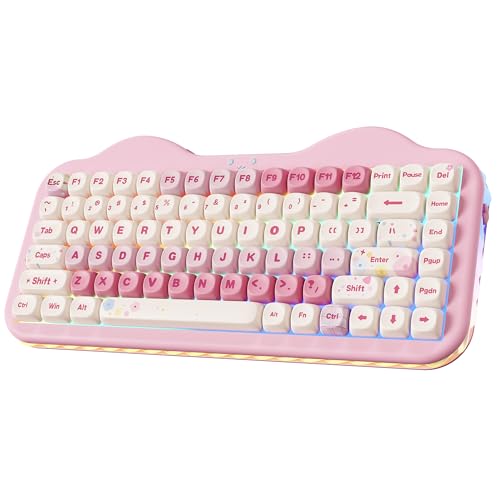
YUNZII C75 Cute 75% Wireless Mechanical Keyboard (Pink)

MechLands MCHOSE K99 96% Wireless Mechanical Keyboard

Aula F75 Wireless Mechanical Keyboard (Reaper Switches)
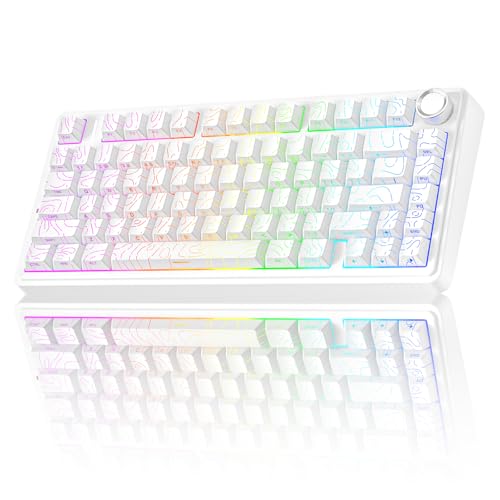
AULA F75 Pro Wireless Mechanical Keyboard with Knob

COSTOM WK87 75% TKL Wireless Mechanical Gaming Keyboard

MOTOSPEED GK82 RGB Wired Mechanical Gaming Keyboard
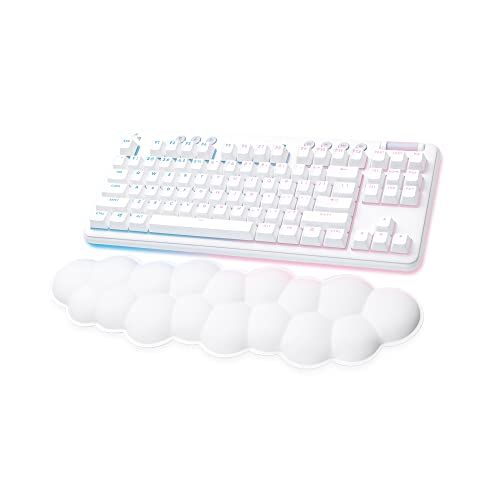
Logitech G715 Wireless Mechanical Gaming Keyboard

Redragon K552P Mechanical Gaming Keyboard TKL (Black)

Razer Cynosa Chroma Gaming Keyboard
The Details Behind The Selections
The YUNZII B87 leans into personality without sacrificing function, pairing an 80% layout (a TKL-style arrangement that drops the numpad for desk space) with bear-patterned PBT keycaps. PBT keycaps are made from a denser, more wear-resistant plastic than the cheaper ABS commonly used on budget boards, so the legends stay readable through years of use. The ABS frame keeps weight down for tossing into a laptop bag, and the included soft-touch wrist rest is genuinely useful during long session nights.
For first-time builders, this board is a comfortable entry point. You get the layout space savings of a TKL (tenkeyless, meaning no numpad) without the learning curve of a 75% or 96% layout, and the Milk Switches feel softer and quieter than typical clicky options. If you tend to game past midnight with someone sleeping nearby, the Milk Switch is worth the look.
Strong Points
- Soft-touch wrist rest included, no extra cost or add-on hunt
- PBT keycaps resist shine and fading over time
- 80% TKL layout is friendlier for newcomers than denser 75% alternatives
- Milk Switches deliver a quieter, less clicky typing experience for shared rooms
Things To Consider
- The bear-pattern keycap design is polarizing; you either love it or you don’t
- ABS frame is light, which helps portability but feels less rigid than aluminum builds
Quick Facts
Who It Suits Best
Newcomers building their first gaming setup who want wireless freedom and a softer, quieter typing feel.
Where Another Pick Suits Better
Shoppers wanting a louder, more tactile feel with a sturdier frame should look at the Redragon K552P instead.
The C75 earns its place on this list on aesthetic alone, but the build is no slouch either. The 75% layout squeezes a function row and arrow keys into a tight footprint, ideal for cluttered desks where every inch of mouse glide matters. Creamy-sounding switches and a pink chassis with playful accents give it a vibe that feels like a desk accessory, not just a tool.
Where the C75 wins is in setups where the keyboard is part of the visual story, like pastel battlestations, content creator desks, or shared spaces where neutral black hardware feels too serious. Compared to the B87 above, you trade some key real estate for a more compact arrow cluster and stronger personality.
Everyday Wins
- Compact 75% layout keeps arrow keys and function row without numpad bulk
- Tri-mode wireless (Bluetooth, 2.4GHz, USB-C) for easy device hopping
- Creamy typing sound profile that sounds great on camera and in voice chat
- Color-forward design that complements pastel and themed setups
Worth Noting
- The pink-and-candy styling is a specific taste; won’t blend with a black-and-red battlestation
- Smaller layout takes adjustment for spreadsheet-heavy users used to full-size boards
Made For
Creators and aesthetic-focused gamers who want a keyboard that doubles as desk decor.
Consider Something Else When
Hardcore competitive players prioritizing function-row macros over style should reach for the COSTOM WK87.
The MCHOSE K99 is the deep-cut pick for hobbyists who want gasket-mount typing feel without crossing into premium pricing. A gasket mount suspends the PCB (printed circuit board) and plate in soft foam strips rather than screwing them to the case, which absorbs vibration and gives a softer, less hollow sound on every keystroke. The 6000mAh battery is the headline number: this thing runs for days between charges, so battery anxiety stops being a thing.
The 96% layout keeps the numpad, arrow cluster, and function row in a tighter shell, useful for spreadsheet warriors and FPS players who want everything within reach. PBT keycaps in MDA or OEM profiles feel solid under the fingers, and the surround RGB light strip with 16.8 million colors adds genuine desk flair. Versus the C75 above, the K99 is a serious-tool upgrade, trading cute styling for raw spec density.
The Helpful Details
- 6000mAh battery delivers days of wireless use on a single charge
- Gasket mount with six-layer padding for a softer, less hollow typing sound
- Hot-swappable PCB (a feature that lets you pull and replace switches without soldering) so you can experiment with different switch types
- Dual-tone PBT keycaps available in MDA or OEM side-engraved profiles
- Surround RGB strip with 16.8 million color options for desk ambience
Trade Offs
- 96% layout is dense; you may find yourself hunting for the Insert or Home key at first
- Larger footprint than a TKL, so it demands more desk depth
Feature Snapshot
Best Suited To
Keyboard hobbyists and productivity gamers who want gasket-mount feel, hot-swap flexibility, and a multi-day battery.
Not Your Match When
Buyers who want a simpler plug-and-play experience without tweaking switches should consider the Logitech G715.
The Aula F75 hits a sweet spot that a lot of budget boards miss: a 75% layout, hot-swap switches, and a 4000mAh battery in a tidy 81-key shell. The Reaper Switches lean linear with a smooth bottom-out, so they feel fast for FPS play but stay controlled for typing. RGB backlighting gives the usual per-key color customization without drawing attention away from what matters.
For most people shopping under $100, this is the practical all-rounder. You can pair it with up to five devices over Bluetooth, 2.4GHz, or USB-C, which is helpful if you bounce between a gaming PC, a work laptop, and a tablet. Compared to the MCHOSE K99 above, the F75 trades the 96% layout density and bigger battery for a smaller, more desk-friendly footprint.
Reasons It Performs
- 75% layout with 81 keys balances function row, arrows, and compact size
- Hot-swap PCB lets you swap switches without soldering
- Tri-mode connection supports up to five paired devices
- Reaper linear switches feel smooth for both gaming and typing
Room For Improvement
- 4000mAh battery is solid but smaller than the MCHOSE K99’s 6000mAh
- Stock keycaps are functional, not standout; you may want to swap in a custom set later
At A Glance
Perfect Match For
Versatile users who game, work, and study on the same setup and need to hop between devices easily.
Look Elsewhere When
Shoppers who prefer a softer, deeper typing sound should consider the AULA F75 Pro with pre-lubed switches.
The F75 Pro takes the F75 formula and layers in the small refinements that experienced typists notice immediately. The dedicated rotary knob handles volume, scrubbing, or backlight brightness with a satisfying turn. Pre-lubed switches (factory-treated with lubricant to reduce scratchiness and noise) deliver that creamy, marbly typing sound that gets popular on r/MechanicalKeyboards, without you needing to crack the case open and lube switches yourself.
Side-printed PBT keycaps keep the legends visible at an angle and off the top surface, which gives the board a clean look when RGB is on. The tri-mode setup works with up to five devices, so the same keyboard covers your gaming PC, your work MacBook, and your living-room tablet. Versus the base F75 above, you’re paying for a knob, smoother switches, and side-printed caps.
Noteworthy Benefits
- Pre-lubed switches save you the hassle of a manual lubing session
- Side-printed PBT keycaps keep legends visible without cluttering the top
- Rotary knob adds tactile control for volume and backlight
- Multi-device pairing across Bluetooth, 2.4GHz, and USB-C
Points To Note
- The knob adds cost you may not need if you adjust volume through software
- Side-printed legends take getting used to if you’re swapping from a top-printed board
Right Fit For
Enthusiasts who want premium-feeling refinements like a knob and pre-lubed switches without jumping to a $200+ tier.
Swap It Out When
Shoppers who want a louder, more tactile click should consider the MOTOSPEED GK82 with its blue switches.
The COSTOM WK87 is built for people who forget to charge things. The 5000mAh battery pushes roughly 15 days of use with backlighting off and around 7 days with it on, so it survives long trips and forgetful weeks. The 75% TKL layout is the most popular form factor in custom boards right now, giving you a function row and arrow cluster in a footprint that still leaves mouse room.
Under the hood, the gasket mount with five layers of sound-absorbing padding softens each keystroke, and the 1.2mm single-key slotted FR4 PCB (a fiberglass-reinforced board that flexes slightly for a cushioned feel) adds a subtle bounce. POM linear switches (made from a self-lubricating plastic known for smooth travel) come pre-lubed and glide cleanly. The custom software lets you rebind keys and program macros without third-party apps. Compared to the Aula F75 above, the WK87 trades some softness for longer battery life.
The Good Stuff
- 5000mAh battery supports weeks of wireless use on a single charge
- Gasket mount with five layers of sound-absorbing padding for creamy acoustics
- Pre-lubed POM linear switches for smooth, consistent keystrokes
- Customizable software for keymapping, macros, and lighting
- 19 backlight modes and 1.6 million RGB color options
Honest Caveats
- Gaming software needs occasional updates; check compatibility before committing
- Linear switches may feel flat for typists who prefer a tactile bump
Built With In Mind
Travelers and marathon gamers who prioritize battery life and a creamy, low-noise typing feel.
A Better Fit Elsewhere
Shoppers wanting a louder, more clicky typing character should look at the MOTOSPEED GK82 with blue switches.
The MOTOSPEED GK82 takes a different route than most of this list. It’s a wired board, so you skip the battery anxiety and the occasional wireless hiccup entirely, and the aluminum base plate adds real heft that you can feel the moment you set it on the desk. The 82-key layout keeps the function row and arrows in a tight shell, leaving more space for mouse flicks in FPS titles.
Soft tactile blue switches give you that classic mechanical bump and click without going full loud. Owners commonly appreciate the upgraded hot-swap socket, which lets you swap in different switch types without soldering, and the noise-absorbing foam inside the case softens the acoustics a bit. Versus the wireless K99 above, the GK82 is the “less tech, more typing” alternative, more analog, more reliable, and lighter on your wallet.
Benefits That Matter
- Aluminum base plate adds weight and rigidity, no desk drift during play
- Hot-swap socket supports 3-pin and 5-pin switch swaps
- Wired connection means zero input lag or battery worries
- Soft tactile blue switches give a satisfying bump without being loud
Some Limits To Know
- Wired only, so cable management matters on a clean desk setup
- Blue switch clickiness can bother roommates or housemates in shared rooms
- Cleaning between keycaps takes more effort because of the aluminum weight when flipped
Whose Shelf It Belongs On
Wired-only loyalists and competitive players who want zero-lag input and a sturdy-feeling board.
Reach For A Different Pick When
Shoppers needing wireless freedom for couch or tablet use should consider the Aula F75 instead.
The Logitech G715 sits at the polished, mainstream end of the budget wireless segment. Part of Logitech’s Aurora Collection, the White Mist finish is softer and more design-forward than typical black-and-red gaming hardware, and the included cloud-shaped palm rest adds comfort during long sessions. The TKL layout drops the numpad while keeping a function row and arrows.
What you’re really paying for with the G715 is software polish. Logitech’s G Hub app handles lighting, key remapping, and macro recording cleanly across Windows and macOS, which removes the usual driver headaches. The wireless connection is stable and quick to pair. Compared to the more hobbyist-focused COSTOM WK87 above, the G715 is the “I just want it to work” alternative, with less tinkering and more day-one reliability.
Notable Gains
- Cloud-shaped palm rest included for long-session comfort
- Logitech G Hub software handles lighting and macros without fuss
- White Mist finish complements bright, airy desk setups
- Wireless TKL layout with stable Logitech connectivity
Potential Drawbacks
- Higher price than most boards in this list, so the budget framing is a stretch
- No hot-swap PCB, so switch swaps are not part of the experience
Who Should Grab It
Mainstream shoppers who want polished software support and a design-forward wireless TKL on a more flexible budget.
Another Choice May Suit
Hardcore tinkerers who want hot-swap switches and gasket-mount feel should reach for the MechLands MCHOSE K99.
The Redragon K552P is the board that built Redragon’s reputation in the budget mechanical space, and the “P” revision keeps the same winning formula: a metal frame, an 87-key TKL layout, and 18 RGB backlight modes. The hot-swappable red switches let you pull and replace switches with a simple puller (a small tool that grips and extracts the switch from the PCB) without a soldering iron, so you can experiment as you learn what you like.
N-key rollover (the ability to register every key press simultaneously, no matter how many you mash at once) keeps up with the most frantic key combos, and the metal frame gives the K552P a tank-like feel that punches above its price. Software support handles macro programming for MMO players. Versus the YUNZII B87 above, the K552P trades wireless freedom for a sturdier build and louder red-switch feedback.
What Helps Most
- Metal frame delivers serious rigidity for the price
- Hot-swappable red switches let you customize feel over time
- 18 backlight modes cover most aesthetic preferences
- N-key rollover for competitive play with no missed inputs
Worth Bearing In Mind
- Wired only, so no wireless freedom for couch or tablet use
- Red switches are linear and quiet, so you miss the tactile bump some typists want
Ideal User
First-time mechanical shoppers who want a sturdy, customizable wired board that grows with their skill level.
Skip It When
Shoppers who want a wireless setup for flexible seating should look at the Aula F75 instead.
The Razer Cynosa Chroma is the outlier on this list, and that’s the point. It’s a membrane keyboard (using a rubber-dome layer under each key rather than individual mechanical switches) instead of mechanical, which means the keys feel cushioned and quiet rather than clicky. For shared spaces like a family PC in the living room, a college dorm, or an open-plan office, that quietness is the headline feature.
You still get Razer’s Chroma RGB with 16.8 million colors and per-key customization, plus full macro support through Razer Synapse. Spill-resistant construction helps when coffee meets desk at 9 a.m. Versus the mechanical Redragon K552P above, the Cynosa trades typing feel and switch customization for a softer, family-room-friendly experience.
Positive Takeaways
- Membrane switches are quiet, ideal for shared rooms and offices
- Per-key Chroma RGB with 16.8 million colors and game integrations
- Spill-resistant design handles the occasional drink mishap
- Razer Synapse software handles macros and lighting with no fuss
Some Limits To Know
- Membrane feel lacks the tactile satisfaction mechanical switch fans prefer
- Not hot-swappable, so the typing feel is fixed from day one
Who Will Love This
Households and shared workspaces that need quiet, spill-safe typing without giving up RGB and macro support.
Where A Sibling Pick Shines
Competitive gamers who want the speed of mechanical switches should consider the Redragon K552P instead.
What To Weigh Before Choosing A Budget Gaming Keyboard
Layout And Desk Footprint
The biggest choice after price is layout. TKL (tenkeyless) drops the numpad for more mouse room, which most FPS players prefer. 75% squeezes a function row and arrows into a smaller shell, great for cluttered desks. 96% keeps the numpad but tightens everything else, ideal for spreadsheet-heavy work. Full-size is the safe default but eats the most space.
Switch Type And Sound
Linear switches feel smooth and quiet, tactile switches have a small bump you feel mid-press, and clicky switches add an audible click. Your room situation matters as much as preference: a clicky board in a shared apartment can sour housemate relationships fast. For late-night play, a linear or tactile board is the friendlier option.
Wireless And Battery
Tri-mode boards (Bluetooth, 2.4GHz, USB-C) are now the budget norm. Battery life varies wildly, from a few days on the Aula F75’s 4000mAh to weeks on the MCHOSE K99’s 6000mAh, so match the board to how often you remember to plug things in. Wired boards like the MOTOSPEED GK82 skip battery concerns entirely but tether you to the desk.
Build Extras
Gasket mounts, hot-swap PCBs, and pre-lubed switches used to live in the $200+ tier, and now several picks here have them. If you like to tinker, hot-swap is the single most useful feature, since it lets you swap switches without soldering and learn your own preferences over time.
Key Considerations Across These Picks
Common Shopping Slip Ups
The most common mistake is chasing RGB and missing the typing feel. A pretty board that feels scratchy under your fingers gets replaced within a year. Specs like switch type and keycap material matter more for daily satisfaction than the number of lighting modes. A second trap is ignoring layout fit; a 96% board on a small desk forces you to push the mouse off the edge, and that’s an annoyance you feel every session.
Where The Extra Money Goes
Stepping from a $30 board to a $90 board buys you real engineering: gasket mounts that soften the typing sound, pre-lubed switches that don’t need user maintenance, hot-swap PCBs that let you change your mind later, and larger batteries that survive a week of forgetfulness. If you type for hours every day, those refinements pay themselves back in comfort within a few months. For light, casual play, a value pick like the Redragon K552P is more than enough.
Frequently Asked Questions
Are budget gaming keyboards reliable for daily use?
Yes, most modern budget mechanicals use hot-swap sockets and rated switches designed for years of typing. Treat the keycaps well, keep liquids away from the open case, and a sub-$100 board can easily outlast a flagship from a few years back.
What is a hot-swap keyboard?
A hot-swap keyboard has a PCB (printed circuit board) with removable switch sockets instead of soldered switches, so you can pull and replace individual switches with a simple tool. This lets you experiment with different switch types without any soldering.
Do I need a numpad for gaming?
Not for most genres. FPS, MOBAs, and RPGs rarely need a numpad, and dropping it gives you more mouse room. If you play MMOs with numpad-bound abilities or work in spreadsheets daily, the 96% layouts like the MCHOSE K99 keep it without the full-size footprint.
Are membrane gaming keyboards worth it?
For shared spaces, yes. The Razer Cynosa Chroma delivers quiet, cushioned typing with full RGB and macro support. The trade-off is feel; mechanical switches give a more defined response, but membranes win on silence and spill resistance.
Bottom Line
The honest read is that 2026 is a great year to buy a budget gaming keyboard. Hot-swap switches, gasket mounts, and tri-mode wireless have all trickled down into the sub-$100 tier, so you no longer have to choose between price and refinement. Match the layout to your desk, the switch type to your room, and the battery to your habits, and you’ll end up with a board that outlasts your next two GPUs.


