


A wireless mechanical keyboard used to feel like a compromise: laggy signals, dead batteries mid-match, missing keys gamers actually need. That’s no longer the story. Today’s Bluetooth gaming keyboards pair low-latency wireless, hot-swappable switches, and tri-mode connectivity with layouts that range from tenkeyless to full numpad coverage, so your desk stays clean and your inputs stay sharp.
The shortlist below leans on spec sheets, switch types, and real-world use cases: daily gaming, work-from-home setups, couch play, and travel. Each pick fits a slightly different profile, so read the breakdowns before settling on the one that matches your desk.
How The Shortlist Stacks Up

MechLands Aula F99 PRO 96% Mechanical Gaming Keyboard

AULA F75 Wireless Mechanical Gaming Keyboard (Pink)

YUNZII C98 Cute Cake Wireless Mechanical Keyboard (Purple)

GravaStar Mercury K1 75% Wireless Mechanical Gaming Keyboard

GravaStar Mercury K1 Pro 75% Wireless Gaming Keyboard
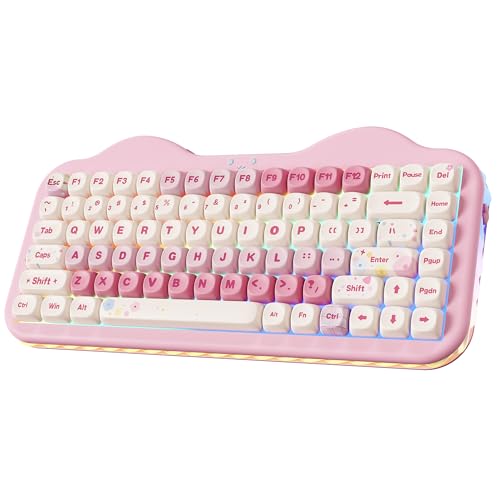
YUNZII C75 Cute 75% Wireless Mechanical Keyboard (Pink)
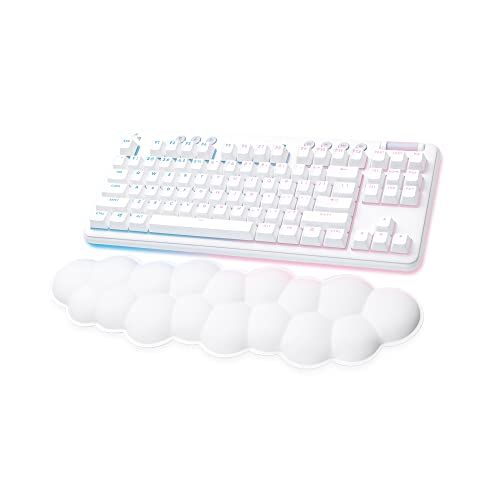
Logitech G715 Wireless Mechanical Gaming Keyboard
nuphy Kick75 Wireless Mechanical Keyboard with Knob
nuphy Air75 V3 Wireless Mechanical Keyboard
A Breakdown Of The Leading Choices
The MechLands Aula F99 PRO is built around a 96% layout, a slightly squeezed take on the full-size board that keeps the numpad, arrows, and function row while trimming the bulk. A rotary knob sits in the top corner, giving you a tactile way to scrub volume, cycle lighting, or jump between apps without alt-tabbing mid-match.
Connectivity is the headline here. Tri-mode support covers Bluetooth 5.0, a 2.4 GHz wireless dongle, and USB-C wired, so you can run a low-latency wireless session on a desktop and then jump the same board over to a laptop or tablet. For most desk setups, the gasket-style mounting and added knob make this feel like the most complete package on the shortlist.
Useful Strengths
- 96% layout preserves numpad and function keys without dominating desk real estate
- Tri-mode wireless covers Bluetooth, 2.4 GHz, and USB-C for flexible setups
- Rotary knob adds physical control for volume, lighting, and media scrubbing
- Gasket-mounted internals tend to soften bottom-out feel during long typing sessions
- Compact enough to leave room for wider mouse sweeps in competitive play
Honest Caveats
- Owners commonly report the rotary knob software requires some setup patience to remap
- 96% layout still needs a learning curve if you’re coming from a smaller tenkeyless board
Who It Suits Best
Gamers and power users who want full-size functionality without the 108-key footprint, especially those running a clean desk with a wide mousepad.
Consider Something Else When
The AULA F75 fits better if portability and multi-device pairing matter more than keeping a dedicated numpad within reach.
The AULA F75 is the friendlier, more approachable sibling to the F99 PRO above. Its 75% layout drops the numpad, freeing up desk space, and it ships with hot-swappable switches so you can swap to your own feel later without a soldering iron. The LEOBOG Strawberry Mint switches lean light and smooth, which suits fast-paced play and long typing alike.
Pairing up to five devices over Bluetooth 5.0, plus a 2.4 GHz dongle and a USB-C wired option, means the F75 can hop between a desktop, a work laptop, a tablet, and a phone in seconds. The 4000mAh battery is generous, and auto-sleep after 60 seconds of idle helps it stretch for days. For most people dipping into wireless mechanical for the first time, this hits the right notes.
The Upside
- Tri-mode connectivity pairs up to five devices, ideal for cross-platform work-and-play
- Hot-swap base supports 3-pin and 5-pin switch swaps without soldering
- Pre-lubed stabilizers and creamy switches deliver a clean, soft typing sound
- 16.8 million RGB colors with per-key programming through the wired driver
Worth Noting
- Macro programming only works in wired mode, which limits quick wireless remapping
- No numpad means spreadsheet-heavy work gets a little less convenient
Made For
First-time wireless mechanical buyers and multi-device households who want one keyboard to rule a desktop, laptop, and tablet.
Not Your Match When
The nuphy Air75 V3 makes more sense if your priority is the slimmest possible travel-friendly board, since it runs thinner than the F75.
The YUNZII C98 leans into a “cute cake” aesthetic without sacrificing function. It uses a 99-key 96% layout with a dedicated numpad, and the dye-sub PBT keycaps keep their finish over time far better than ABS. The Milk Switches ship smooth and quiet, a good fit if your gaming doubles as work in a shared space.
Where this board stands out is the visual personality. Colorful keycap art, an ergonomic profile, and a polished wireless experience make it a natural centerpiece for a setup where the keyboard is part of the room’s design, not hidden under a wrist rest. You still get tri-mode connectivity and the multi-device flexibility expected in this category.
A Favorable Mix
- 96% layout keeps a numpad for productivity and gaming macros
- Dye-sub PBT keycaps resist shine and fading with daily use
- Cake-themed keycap styling adds personality without sacrificing function
Soft Spots
- Styling may clash with minimalist or all-black desk setups
- Milk Switch sound profile favors quiet over the louder click some FPS players prefer
Right Fit For
Style-conscious gamers and home office users who want a numpad, a wireless setup, and a keyboard that looks the part on a curated desk.
A Better Fit Elsewhere
The MechLands Aula F99 PRO is the better call for a more neutral aesthetic with the same 96% layout and rotary knob.
The GravaStar Mercury K1 is the kind of board you spot across a room. Its aluminum alloy exoskeleton with a gradient finish and open-frame curves give it a futuristic, almost sci-fi look. Underneath the visual flair sits a 75% wireless mechanical layout with custom GravaStar x Kailh linear switches, which keep key travel smooth and consistent for fast-paced play.
Compared to the AULA F75 above, the K1 trades cake-themed keycaps for a more architectural, industrial mood. The aluminum frame adds weight and stability, so the keyboard stays planted during intense moments. RGB backlighting rounds out the package for those who run a darker setup and want the keys to do the talking after dusk.
The Value In It
- Aluminum exoskeleton adds real structural stability during gameplay
- Open-frame design doubles as a desk centerpiece with visual impact
- Custom GravaStar x Kailh linear switches target a smooth, consistent feel
Points To Note
- Heavier aluminum body reduces portability compared to plastic-cased alternatives
- Open-frame design may collect more dust around the switches over time
Best Suited To
Players who treat their keyboard as a visual centerpiece and want a board with presence on a minimalist or dark-themed desk.
Reach For A Different Pick When
The GravaStar Mercury K1 Pro is the smarter choice if you want hot-swap switches on top of the same aluminum design language.
The Mercury K1 Pro takes the K1 formula and adds hot-swap switch support, a meaningful upgrade for anyone who likes to tinker. The aluminum alloy skeleton and skeletal frame remain, so the board keeps the same cyberpunk-meets-mechanical-shop look, but you can now swap switches without touching a soldering iron.
This is the most “enthusiast-friendly” GravaStar in the lineup, and it sits naturally next to the AULA F75 on the shortlist. The F75 is a friendlier entry point with creamy pre-lubed switches, while the K1 Pro invites deeper customization. Tri-mode wireless, RGB backlighting, and that chunky metal build round out a board that wants to be the centerpiece of a serious setup.
Bright Spots
- Hot-swap support makes switch experimentation and repair far easier
- Premium aluminum exoskeleton feels planted and weighty on the desk
- Distinctive skeletal design works as a visual anchor for a styled rig
Trade Offs
- Higher cost than the non-Pro K1 may not justify the upgrade for casual users
- Heavier frame makes it less friendly for frequent travel or couch gaming
Perfect Match For
Customization-minded gamers who want a premium build, a striking look, and the freedom to swap switches as preferences evolve.
Skip It When
The AULA F75 is the better entry point for first-timers who don’t need hot-swap flexibility or the aluminum heft.
The YUNZII C75 is the smaller sibling to the C98, packing a 75% layout into a board that doesn’t demand much desk real estate. The Candy Switches lean toward a softer, lighter feel, and the keycap design keeps the cake-themed aesthetic the brand is known for, this time in pink.
This is a budget-conscious pick for someone new to mechanical keyboards who still wants wireless flexibility and a clean sound profile. It plays the same role as the AULA F75 in a setup, but with a more playful look and a smaller initial spend, which can be a meaningful factor if you’re not sure how often you’ll actually use the hot-swap or rotary features.
Features That Help
- Compact 75% layout frees up space for mouse movement in any game
- Candy Switches target a soft, approachable typing feel for newcomers
- Wireless and wired connectivity cover common daily setups
Small Caveats
- Fewer advanced features than the AULA F75 in the same general price tier
- Colorway is a strong stylistic choice that may not match every desk theme
Whose Shelf It Belongs On
First-time mechanical keyboard shoppers and casual gamers who want a charming, low-fuss wireless board that won’t crowd a small desk.
Another Choice May Suit
The AULA F75 is a stronger fit if you want hot-swap flexibility and a bigger 4000mAh battery in a similar size class.
The Logitech G715 sits in a different camp from the boutique boards above. It’s a tenkeyless wireless mechanical from Logitech’s Aurora Collection, finished in White Mist with a cloud-shaped palm rest that softens long sessions. Adjustable height and a low-profile aesthetic give it a refined desk presence.
Where it really earns its spot is ecosystem polish. Logitech’s wireless stack and onboard software are mature, the build quality is consistent, and the palm rest genuinely matters during marathon gaming or workdays. The G715 is the safe, refined choice on a list full of personality-forward boards.
Positive Takeaways
- Cloud-shaped palm rest eases wrist strain during long sessions
- Tenkeyless layout keeps the desk open while preserving arrow keys
- White Mist colorway fits bright, airy setups and clean desk themes
- Logitech wireless stack tends to be stable and easy to pair
Factors To Consider
- No 96% or full-size option if you rely on a dedicated numpad for work
- Less personality than the GravaStar or YUNZII boards for themed rigs
Who Should Grab It
Brand-loyal gamers and work-from-home players who value ergonomic comfort, a clean look, and reliable wireless performance over flashy custom features.
Look Elsewhere When
The nuphy Kick75 is a better pick if low-profile switches and a rotary knob for media control fit your daily workflow better.
The nuphy Kick75 takes the 75% layout in a low-profile direction. Blush Nano Switches sit shorter than traditional mechanical switches, so the top of the board sits closer to your fingertips and feels closer to a laptop keyboard in travel, but with the tactile snap of a mechanical. A rotary knob rounds out the top corner for quick media and lighting control.
Configuration is handled through the NuPhyIO web assistant, which is a friendlier setup path than traditional software installs for macro recording and lighting tweaks. Tri-mode connectivity covers Bluetooth, 2.4 GHz, and USB-C, and PBT keycaps handle daily typing and gaming without the shine that cheaper ABS caps tend to develop.
Benefits That Matter
- Low-profile switches reduce finger travel and wrist strain during long days
- Rotary knob gives physical control without alt-tabbing in busy workflows
- Hot-swap base lets you customize feel without a soldering iron
- PBT keycaps resist the gloss that ABS caps develop with heavy use
Possible Compromises
- Low-profile switches feel shallower than full-height mechanicals, which some purists dislike
- Web-based configurator can be limiting for users who prefer a full desktop app
Built With In Mind
Hybrid gaming-and-productivity users who bounce between code, design apps, and games and want a slim, comfortable board with physical control options.
Where A Sibling Pick Shines
The nuphy Air75 V3 suits you better if the thinnest possible gasket-mount profile for travel is the real priority over the knob and low-profile feel.
The nuphy Air75 V3 is the thinnest board on this shortlist, with a chassis that measures around 13.2mm. A gasket-mount design, which means small silicone pads cushion the plate inside the case, keeps typing smooth and quiet by absorbing vibration and dialing down the hollow echo you sometimes get on thin boards.
A multi-function knob up top handles volume, lighting, and custom macros, and tri-mode wireless covers Bluetooth, 2.4 GHz, and USB-C. If your keyboard lives in a laptop bag or follows you between home and a co-working space, the Air75 V3 is the most travel-friendly pick here without giving up the mechanical feel.
Practical Pluses
- Around 13.2mm thin, the slimmest option on this shortlist for travel and small desks
- Gasket mount softens vibration for a quieter, more refined typing sound
- Multi-function knob adds tactile control over volume and lighting
- Tri-mode wireless covers laptop, tablet, and desktop pairings
Less-Strong Areas
- Ultra-thin body flexes more under heavy-handed typing than chunkier boards
- Smaller footprint can feel cramped if you’re used to a 96% or full-size layout
The Right Fit
Mobile creators, students, and remote workers who need a slim wireless mechanical that slips into a bag without sacrificing the typing experience.
Swap It Out When
The nuphy Kick75 makes more sense if you want a slightly taller low-profile feel with a knob, and don’t need the thinnest possible chassis.
What To Weigh Before Choosing A Wireless Mechanical
Picking the right wireless mechanical keyboard starts with the layout. 75% boards like the AULA F75 and nuphy Air75 V3 save desk space and travel well, while 96% boards such as the MechLands F99 PRO and YUNZII C98 keep a dedicated numpad for spreadsheets and macros. Decide which keys you actually need before falling for any single design.
Switch Type And Feel
Linear switches, which press straight down without a tactile bump, suit smooth and quiet gaming. Tactile switches give a small bump you can feel, which helps with typing accuracy. Clicky switches add an audible click on top, but they can be loud in shared spaces. The GravaStar K1 ships with custom linear switches for fast play, while the AULA F75 leans creamy and smooth. For most first-time shoppers, a pre-lubed linear is the easiest starting point.
Connection Modes And Battery Life
Tri-mode connectivity, meaning Bluetooth, 2.4 GHz wireless, and USB-C wired, gives the most flexibility. Bluetooth pairs with phones and tablets, 2.4 GHz delivers the lowest latency for competitive play, and USB-C keeps the board alive when the battery runs dry. Boards with 4000mAh cells, like the AULA F75, typically stretch across multi-day use with auto-sleep modes to extend runtime.
Build, Software, And Customization
Aluminum frames like the GravaStar K1 Pro feel planted and premium, while plastic-cased boards travel lighter. Hot-swap switch sockets let you change switch types without soldering, a real plus for tinkerers. Software quality matters too: some boards rely on a wired connection for full macro programming, which is worth checking if you plan to remap regularly.
Key Considerations Across These Picks
Common Shopping Slip Ups
Buyers sometimes chase the thinnest profile and forget that low-profile switches feel shallower than traditional mechanicals. If you’ve never tried a low-profile board, the nuphy Air75 V3 or Kick75 may surprise you. Another common miss is ignoring macro software limits: certain boards, like the AULA F75, only expose full programming in wired mode, so wireless remapping is more limited than it first appears.
What The Higher Tier Buys
The premium tier on this list, mainly the GravaStar Mercury K1 Pro, brings aluminum construction, hot-swap switch support, and a more distinctive industrial design. You pay more for the heft, the customization headroom, and the visual statement. The upgrade makes sense for enthusiasts who’ll actually swap switches and want a centerpiece board, but casual players who just need a solid wireless feel can save by going with a more value-oriented pick.
Frequently Asked Questions
Are Bluetooth gaming keyboards fast enough for competitive play?
Modern Bluetooth 5.0 and 2.4 GHz wireless modes on these boards are widely reported as responsive enough for casual and most competitive gaming. For latency-sensitive esports, the 2.4 GHz mode or a USB-C wired connection is the safer pick.
What is a hot-swap keyboard?
A hot-swap keyboard lets you remove and replace switches without soldering, so you can change the feel or repair a single key easily. Boards like the AULA F75 and GravaStar K1 Pro support this, and it accepts both 3-pin and 5-pin switch styles on most of them.
How long do wireless gaming keyboards last on a charge?
Battery life depends heavily on RGB brightness and connection mode. The AULA F75’s 4000mAh battery is described as large for the class, and its auto-sleep after 60 seconds of idle helps stretch runtime across days of normal use.
Do I need a numpad for gaming?
Most competitive players skip the numpad for wider mouse movement, so 75% boards like the nuphy Air75 V3 are popular. A 96% board with a numpad, like the MechLands F99 PRO, makes more sense if you also do spreadsheet work or game with extensive macro setups.
Can one keyboard pair with multiple devices?
Yes, boards with multi-device Bluetooth support, like the AULA F75, can pair with several devices at once. You switch between them with a key combo, which is convenient for setups that bounce between a desktop, a laptop, and a tablet.
Bottom Line
A great wireless gaming keyboard comes down to matching layout, switch feel, and connection modes to your daily routine. The MechLands F99 PRO is the most complete option for full-feature gaming, the AULA F75 is the easy entry point for multi-device households, and the nuphy Air75 V3 is the board to grab if portability matters most. Pick the one that fits the way you actually use your desk, and the rest tends to follow.


