


The right wireless mouse quietly disappears into your hand, and the wrong one makes every ranked match feel heavier than it should. Picking a Bluetooth gaming mouse in 2026 means balancing sensor quality, weight, battery life, and shape against how you actually play, whether that’s long MOBAs at a desk or quick FPS sessions from a couch. This list covers nine options across budget, ultralight, and ambidextrous categories, with real specs and honest trade-offs so you can find the one that fits your grip and your wallet.
Your Options, Compared
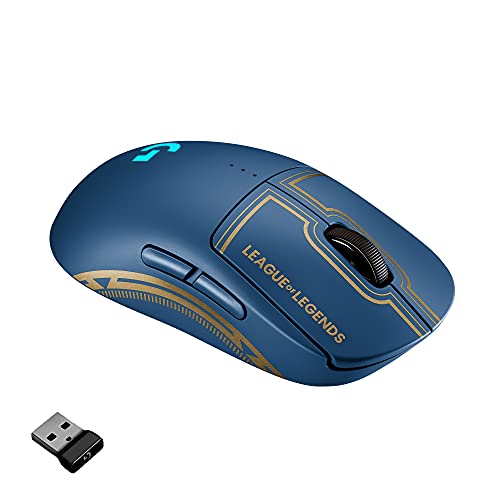
Logitech G Pro Wireless Gaming Mouse (LoL Edition)

Pulsar X2H Crazylight Wireless Mouse, Mini (Jet Black)

GravaStar Mercury M2 Wireless Gaming Mouse (Transparent Black)

Redragon M724 Wired Gaming Mouse, 42G Ultra-Light

Redragon M612AK PRO Wireless Anime Gaming Mouse
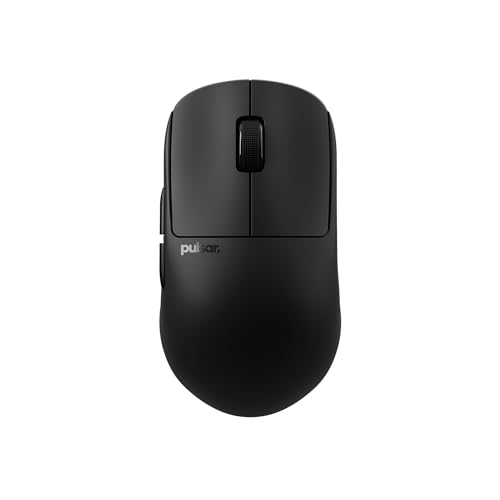
Pulsar X2H Crazylight Wireless Mouse, Medium (Jet Black)

Pulsar X2H Crazylight Gaming Mouse, Medium (Uyuni White)

Pulsar X2H Crazylight Wireless Mouse, Medium (BadSeed)

Pulsar X2H Crazylight Wireless Mouse, Mini (BadSeed)
The Details Behind The Selections
The Logitech G Pro Wireless in its League of Legends trim is the kind of mouse you forget you’re holding, which is the highest praise a competitive pick can earn. At roughly 80 grams with an endoskeleton shell, it sits light enough for a five-hour ranked grind without arm fatigue, yet dense enough to feel planted during pixel-perfect ability shots.
Where it really shines is the LIGHTSPEED wireless pipeline (Logitech’s sub-millisecond connection protocol) and the HERO 25K sensor, which tracks cleanly above 400 IPS, or inches per second, the speed metric sensor specs use for fast flicks. Tournament-tested pros shaped the ambidextrous shape, and removable side buttons let you strip it to a clean two-button build for true symmetry.
What Pays Off
- Sub-millisecond wireless response, no perceptible lag versus wired
- Removable side buttons allow 0 to 4 extra inputs, supporting ambidextrous and left-handed play
- LIGHTSYNC RGB adds team-themed flair without meaningfully cutting the rated 48-hour battery
- Endoskeleton chassis keeps weight under 80 grams while surviving tournament travel
- HERO 25K sensor holds tracking accuracy past 400 IPS with no smoothing or acceleration artifacts
Trade Offs To Consider
- The symmetrical shape is best for claw and fingertip grips; palm-grippers with large hands may want a fuller shell
- Charging via the included cable rather than a replaceable battery means downtime mid-session
Key Specs
Right Fit For
MOBA mains and competitive players who log long ranked sessions and want a tournament-validated ambidextrous shape.
Look Elsewhere When
You want an ultralight sub-50g shell: the Pulsar X2H Crazylight Mini at 37g drops weight further for pure flick play.
Pulsar’s X2H Crazylight Mini is what you hand to a friend who insists ultralight mice are a gimmick. At roughly 37 grams it genuinely feels like a hollowed-out shell, and the XS-1 sensor inside pushes up to 32,000 DPI with 750 IPS tracking for fast flicks across wide mousepads.
The Mini sizing targets claw and fingertip grippers with smaller hands, and the 8K polling rate (how often the mouse reports its position per second, measured in hertz) keeps cursor movement smooth at high refresh displays. Compared to the Logitech G Pro at 80g, this is a totally different category of feel, more twitch, less planted.
Notable Gains
- 37g chassis removes wrist drag during extended FPS matches
- XS-1 sensor tracks up to 32,000 DPI and 750 IPS, so flicking across a 4K ultrawide stays clean
- 8K Hz polling rate is overkill for most, but the headroom matters at 360 Hz monitors
Honest Caveats
- The Mini shell is too short for palm-grippers with large hands
- Optical switches register clicks slightly faster than mechanical, which can feel mushy at first
- Glossy plastic finish shows fingerprint smudges faster than matte alternatives
Feature Snapshot
Made For
Small-handed claw and fingertip grippers who play fast-paced FPS titles and want the lightest wireless option in this list.
Skip It When
You prefer a fuller palm grip: the Pulsar X2H Crazylight Medium in Jet Black stretches the same chassis to fit larger hands.
GravaStar’s Mercury M2 leans hard into a sci-fi aesthetic, with a hollowed-out shell that lets RGB light spill through internal struts. Underneath the visual flair sits a PAW3395DM sensor pushing 26,000 DPI, which is more than most setups will ever need, paired with a 1K Hz polling rate for clean, everyday tracking.
At roughly 79 grams it sits heavier than the Pulsar Mini but lighter than most ambidextrous shells, and the 1K Hz polling rate is standard rather than bleeding-edge. The transparent black finish turns the mouse into a small piece of desk art, though owners commonly report that the glossy surface picks up dust faster than matte alternatives.
Noteworthy Benefits
- 26,000 DPI sensor gives massive headroom for high-sensitivity play across ultrawide monitors
- Hollowed-out shell exposes internal lighting, a strong match for showpiece RGB setups
- Five programmable buttons cover MMO and productivity hotkeys without overwhelming the chassis
Points To Note
- 79g is heavier than dedicated ultralight options, you may feel arm fatigue on marathon sessions
- Glossy transparent finish requires regular wiping to stay clean under desk lighting
Best Suited To
Gamers who treat their battlestation as a visual setup and want a sensor with extra DPI headroom for high-resolution displays.
Another Choice May Suit
You prioritize raw weight savings: the Pulsar X2H Crazylight Mini shaves over 40 grams off the Mercury M2 while keeping a wireless connection.
The Redragon M724 trades wireless freedom for a sub-45g wired chassis at a noticeably tighter budget, and that trade reads as a genuine value play for desktop-bound players. The five preset DPI levels step from 1200 up to 12,400, and the companion software unlocks custom steps anywhere from 200 to 12,400 DPI.
Five programmable buttons sit along an ergonomic shell that fits both claw and relaxed palm grips, and the wired design sidesteps the battery anxiety that haunts ultralight wireless rivals. The cord is light enough to avoid drag on a bungee, though owners commonly note that the included cable could be more flexible.
The Upside
- 42g wired build undercuts most ultralight wireless mice on cost while staying competitive on weight
- Five reprogrammable buttons plus software-level DPI tuning cover a wide range of genres
- Wired connection removes charging cycles entirely, plug-and-play for static desks
Practical Considerations
- Wired cable may drag without a bungee, a small accessory cost to factor in
- Maximum 12,400 DPI is lower than several wireless picks in this roundup, fine for most but limiting on ultrawides
At A Glance
Who Will Love This
Budget-conscious competitive players and anyone building a permanent desk setup who doesn’t need wireless.
Reach For A Different Pick When
You want to ditch the cable entirely: the Redragon M612AK PRO adds Bluetooth and 2.4GHz wireless with a themed shell for only modest extra cost.
The M612AK PRO is the wireless sibling to Redragon’s M-line, dressed in anime character art that turns the mouse into a small piece of personality on your desk. It offers 8,000 DPI, tri-mode connectivity over Bluetooth, 2.4GHz wireless, and a wired option, so you can match the connection to the situation without re-pairing.
Remappable keys and DPI switching make the M612AK PRO a flexible everyday gaming mouse, and the shell art lets it double as a conversation piece in shared spaces. Compared to the M724, you add wireless freedom and themed styling at the cost of a heavier chassis and lower max DPI.
The Case For It
- Tri-mode wireless covers laptops, desktops, and travel without dongle juggling
- 8,000 DPI covers most competitive needs at a more casual price point
- Anime character art adds a personal style element to standard battlestation builds
Soft Spots
- Heavier chassis than the M724 wired model, so ultralight fans will feel the difference
- Themed graphics can clash with minimalist or muted-color setups
Perfect Match For
Gamers who bounce between devices and want a mouse that reflects their personal aesthetic without sacrificing tri-mode flexibility.
Swap It Out When
You want lighter weight and a more neutral look: the Pulsar X2H Crazylight Medium in Jet Black trims the grams and skips the graphics.
The Medium X2H Crazylight is the practical middle child of Pulsar’s lineup, stretching the 43g shell to fit palm grippers without bloating the weight. The same XS-1 sensor and 8K polling rate carry over from the Mini, so flick tracking stays consistent across the size range.
You get a more relaxed fit for longer sessions where claw grip would cramp, and the matte black finish avoids the fingerprint magnet effect that glossy shells tend to have. Where the Mini targets twitch play, the Medium feels more like a daily driver, equally at home in work apps and ranked matches.
What Helps Most
- Medium shell accommodates palm grip and larger hands without the Mini’s cramped rear hump
- 43g weight stays in ultralight territory while offering better hand fill for relaxed sessions
- 8K Hz polling rate keeps high-refresh monitor users at the front of the input curve
Worth Noting
- Optical switches feel slightly different from mechanical clicks, an adjustment if you’re switching from a traditional mouse
Feature Card
Right Fit For
Palm and relaxed claw grippers who want a featherweight shell they can use across gaming and productivity without a second mouse.
Where Another Pick Suits Better
You want the absolute lightest frame: the Pulsar X2H Crazylight Mini drops to 37g for fingertip-grip play.
The Uyuni White finish is what sets this X2H apart from the standard Jet Black: a soft, almost ceramic-looking surface that pairs naturally with light wood desks and minimalist setups. The internals stay identical to the rest of the Medium range, including the 43g chassis and XS-1 sensor with 32,000 DPI headroom.
White shells demand more care in daily use, since smudges and dust show against the lighter surface, but the visual payoff for clean desk enthusiasts is significant. The same 8K polling rate carries over, so you give up nothing on performance for the color swap.
The Helpful Details
- Clean Uyuni White finish suits minimalist and light-wood desk builds
- 43g weight and Medium size cover palm grip without a weight penalty
- XS-1 sensor headroom gives flexibility across competitive and creative use
Some Limits To Know
- White finish shows oils and dust faster than darker options, so it benefits from regular wipe-downs
Who Should Grab It
Style-led gamers who favor clean, neutral desk builds and don’t mind the extra wipe-downs a light shell requires.
Consider Something Else When
You want a darker, low-maintenance finish: the Jet Black X2H Medium hides fingerprints while offering the same internals.
The BadSeed colorway wraps the X2H Medium in a graphic-heavy patterned shell that reads as a collector’s edition rather than a stock option. Underneath the art sits the same 43g shell and XS-1 sensor family you’ve seen across the rest of the Pulsar lineup, so performance is consistent.
Patterned shells age well visually because the art masks smudges that would show on a flat color, a small ownership bonus if you skip regular cleaning. Compared to the Uyuni White, the BadSeed is more forgiving on upkeep while still standing out on the desk.
Where It Delivers
- BadSeed pattern hides fingerprints better than flat matte or glossy finishes
- Medium 43g chassis works for palm grip without wireless weight penalty
- 8K Hz polling rate keeps competitive play responsive at high refresh rates
Points To Keep In Mind
- Bold pattern may clash with muted or single-color desk themes
- Same chassis and sensor as the Jet Black variant, so this pick is primarily a style choice
Built With In Mind
Collectors and personality-driven gamers who want a patterned shell that earns its place through visual character.
Not Your Match When
You prefer a clean monochrome look: the Uyuni White covers the minimalist side of the same Pulsar family.
The Mini BadSeed combines the lightest chassis in the Pulsar lineup at roughly 37 grams with the graphic-heavy patterned shell from the Medium BadSeed. It’s the most niche option in the roundup, aimed at small-handed fingertip grippers who want both ultralight weight and visual personality.
Like the other BadSeed shells, the pattern hides smudges effectively, and the 8K polling rate carries over from the rest of the X2H family. The Mini footprint is the constraint here, a real trade-off for anyone with larger hands who likes a fuller rear hump.
What It Does Well
- 37g Mini shell is the lightest wireless option in this roundup
- BadSeed pattern is forgiving on dust and fingerprint visibility
- XS-1 sensor and 8K polling rate match the rest of the X2H line
Potential Compromises
- Mini sizing rules out palm grip and most medium-to-large hand sizes
- Pattern shell is more expressive than most minimalist desk builds allow
Whose Shelf It Belongs On
Small-handed fingertip grippers and travelers who want the lightest possible wireless shell with a personality finish.
A Better Fit Elsewhere
You want a fuller shape: the Pulsar X2H Crazylight Medium (BadSeed) keeps the same pattern on a 43g palm-friendly body.
What To Weigh Before Choosing Your Next Bluetooth Gaming Mouse
Sensor And Tracking Performance
A mouse sensor translates physical hand movement into cursor position, so smoother tracking matters more than raw DPI numbers. Most modern sensors handle 16,000 DPI or higher, but you actually want a sensor that tracks accurately at your preferred sensitivity and across your mousepad. Look for specs like 400+ IPS tracking speed (the maximum hand speed the sensor can register without losing accuracy) and a 1K Hz or higher polling rate (how often the mouse tells the computer its current position). A 1 ms report rate over Bluetooth is fine for casual play, while competitive FPS players benefit from 4K or 8K Hz polling found on dedicated wireless mice.
Weight, Shape, And Grip Style
Mouse weight is personal: claw and fingertip grippers usually prefer sub-50g shells, while palm grippers often want 60g to 80g for a planted feel. Hand size matters more than people think, a Mini shell on a large hand causes cramping, and a Medium shell on a small hand reduces control. Try to match the listed dimensions to your actual hand length, and consider your grip style before chasing the lightest option.
Battery And Charging Habits
Wireless mice have moved to long-lasting rechargeable batteries, with 40 to 60 hours of rated play being common. Think about your habits: marathon streamers benefit from swappable batteries or quick-charge cables, while casual players can top off weekly. Wired mice remove the variable entirely, which is why the Redragon M724 still earns its place in this category.
Key Considerations Across These Picks
Pitfalls Shoppers Hit
A common mistake is chasing the highest DPI number when a sensor’s IPS tracking and polling rate matter more for actual cursor behavior. Another trap is buying a Mini shell because it’s lighter, only to find your hand cramps within an hour. Glossy finishes look great in product photos but show smudges within minutes of real use, so plan for cleaning time or pick a matte alternative. Finally, ignoring grip style and hand size leads to fatigue, regardless of how good the sensor is.
Where The Extra Money Goes
Higher-tier models typically invest in lighter chassis materials, optical switches rated for longer click lifespans, and 4K to 8K Hz wireless polling. The Logitech G Pro and the Pulsar X2H family earn their place through sensors and shells that hold up over years of competitive play, plus removable side buttons and ambidextrous options. You pay more for refinement, and that shows in everything from click feel to battery longevity, though the jump is most worth it for daily players rather than weekend casuals.
Frequently Asked Questions
What DPI Do Most Gamers Actually Use?
Most FPS players land somewhere between 400 and 1600 DPI, while MOBAs and MMOs trend higher at 800 to 2400. The 26,000 DPI sensors in this roundup are headroom, not a requirement.
Is Bluetooth Lag Noticeable For Gaming?
Modern Bluetooth Low Energy connections hover around 7 to 15 ms of latency, fine for casual and MOBAs. Competitive FPS players should use 2.4GHz wireless or wired for the lowest input delay.
How Often Do Gaming Mouse Batteries Need Charging?
Most wireless models in this list rate 40 to 60 hours per charge, so a daily player tops off weekly. Heavy users running 8K polling or full RGB may see shorter real-world battery life than the rated numbers.
Are Lighter Mice Always Better?
Lighter shells reduce wrist fatigue and help with quick flicks, but very light mice can feel unstable in a palm grip. The right weight depends on your grip style and the games you play most.
Do Wireless Gaming Mice Hold Up Over Time?
Owners commonly report 3 to 5 years of solid use from quality wireless mice, with click switches and battery health being the first things to age. Storing the mouse on a clean pad and avoiding cable strain on the charging port extends the lifespan.
Wrap Up
Any of these nine picks will serve you well depending on what matters most: the Logitech G Pro for proven tournament play, the Pulsar X2H family for ultralight precision, or the Redragon pair for value and themed style. Match the shell size and weight to your hand, pick a sensor that fits your sensitivity, and you’ll have a wireless setup that disappears into your gameplay. The right mouse is the one you stop thinking about mid-match.


